Loading...

Skill-finding skill · find-skills

Name the task and the AI hunts down the skill: a paper-search skill installed and used, web design picks ranked by installs

With find-skills on, you don't need to know which skills exist. Name the task, and the AI searches skills.sh itself and comes back with candidates, each with its install count and maker. Ask, and it installs one too. If a skill you already have fits, it tells you so. Here are screens from people who used it on real work.

Oct 6, 2026·4 cases

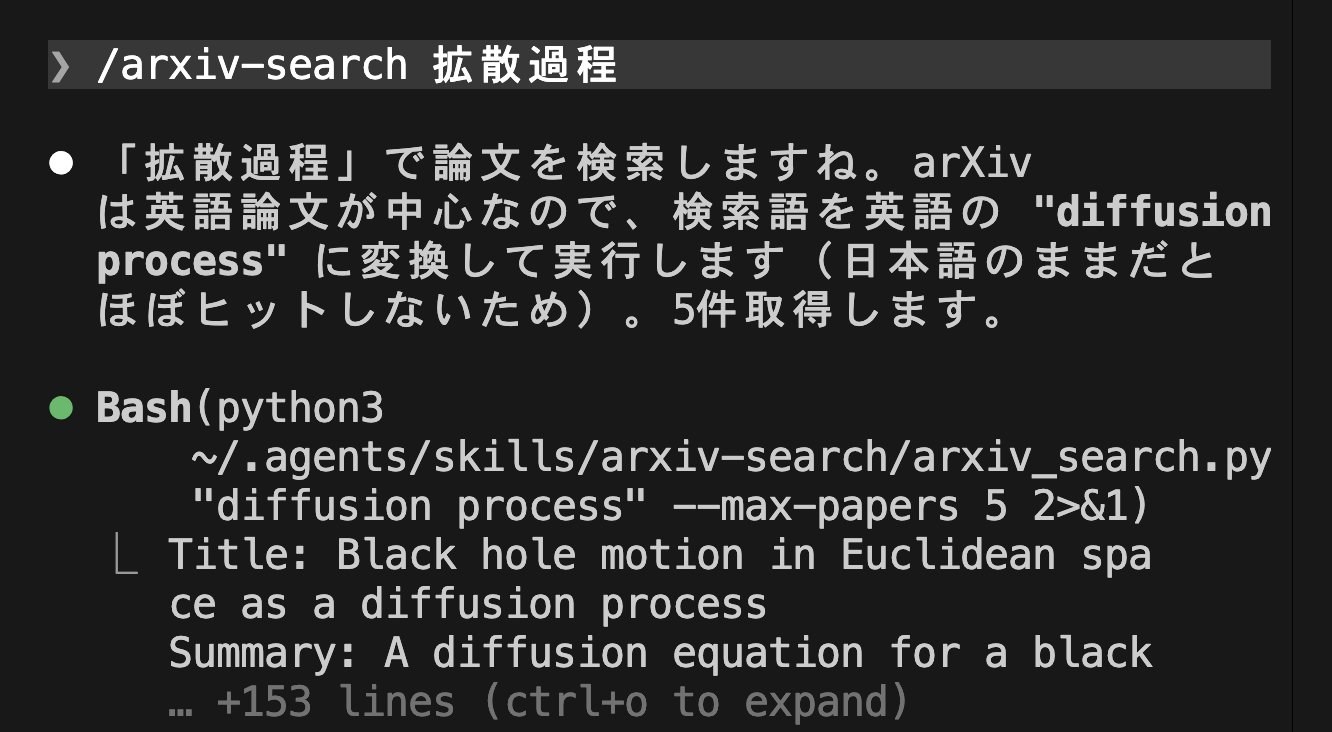
Claude Code terminal. Under the input '/arxiv-search 拡散過程' (diffusion process), a note that it will search in English as 'diffusion process', and the result 'Title: Black hole motion in Euclidean space as a diffusion process'
Finding papers on diffusion processes with the paper-search skill that find-skills found and installed. Source: Claude Code研究所 on X

The screen at the top shows Claude Code研究所 (Claude Code Lab), a Japanese account that runs Claude Code training, using a paper-search skill to look up papers on diffusion processes. find-skills had found and installed that skill from a single line: “論文を検索するskillが欲しい” (I want a skill that searches papers). The AI switched the search term to the English “diffusion process” and came back with five papers.

find-skills is a skill Vercel released on January 26. On the skills leaderboard skills.sh it has 3.71 million total installs, first overall. The first time you install another skill from the terminal, the installer asks whether to add find-skills too, and the default answer is yes.

find-skills tells the AI how to look for skills and how to choose among them. It first checks whether a well-known skill is already on the skills.sh leaderboard, then runs the search command npx skills find. Before recommending one, it checks whether the skill has more than 1,000 installs, comes from an official source, and has more than 100 stars on its repo. If you want, it runs the install command itself. If nothing fits, it offers to help with the job without a skill.
Reference 01Claude Code研究所 (Claude Code Lab), a Japanese account that runs Claude Code training · X

From one line asking for a paper-search skill, it compared two candidates, installed one, fixed its broken output, and found papers

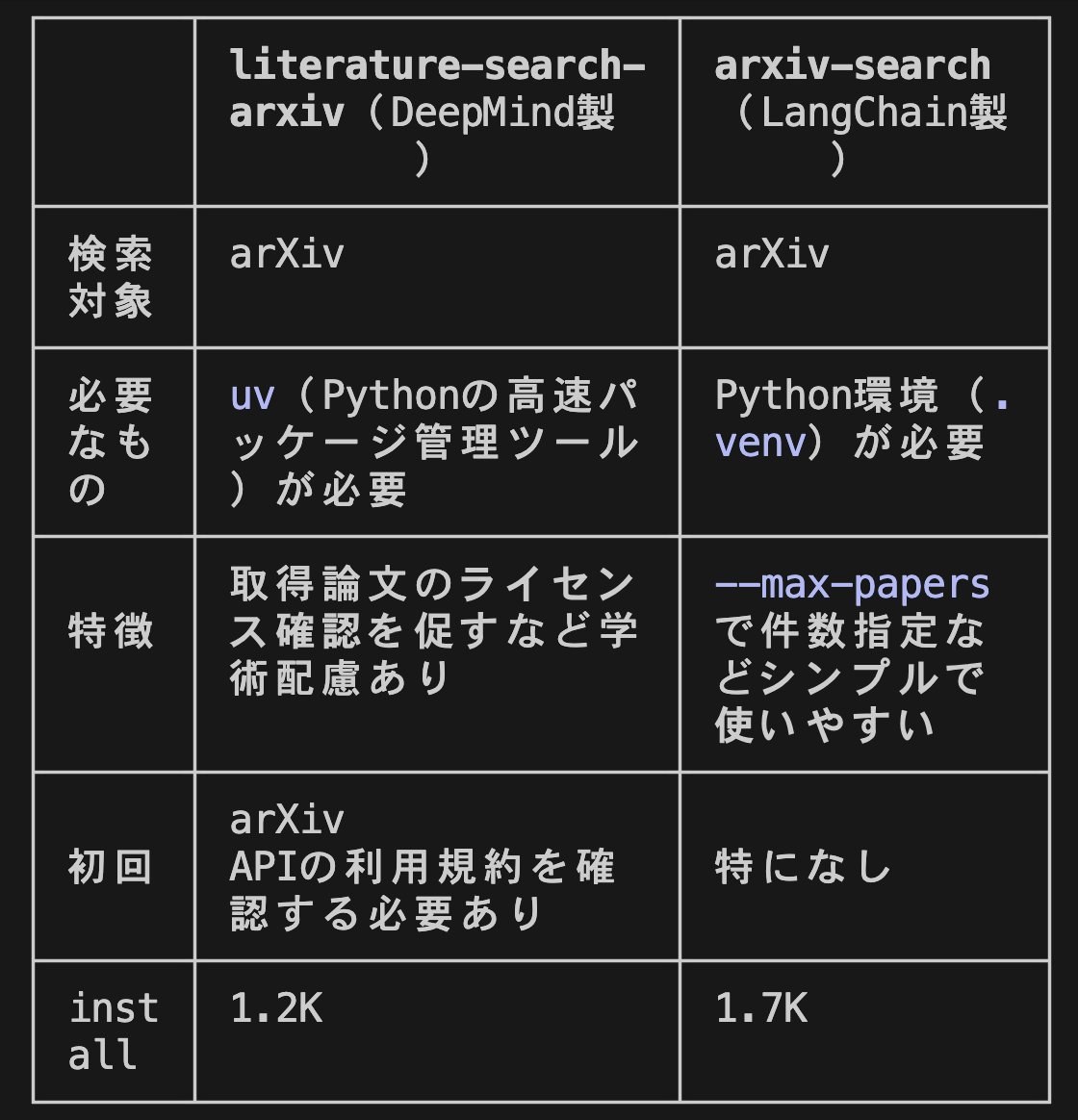
The AI ran three separate searches with terms it came up with for “papers” (research paper, arxiv, academic scholar). Then it compared two skills in a table, DeepMind's literature-search-arxiv and LangChain's arxiv-search, which had 1.2K and 1.7K installs at the time. Claude Code Lab picked LangChain's, which had slightly more installs and made it easier to set how many papers to fetch.

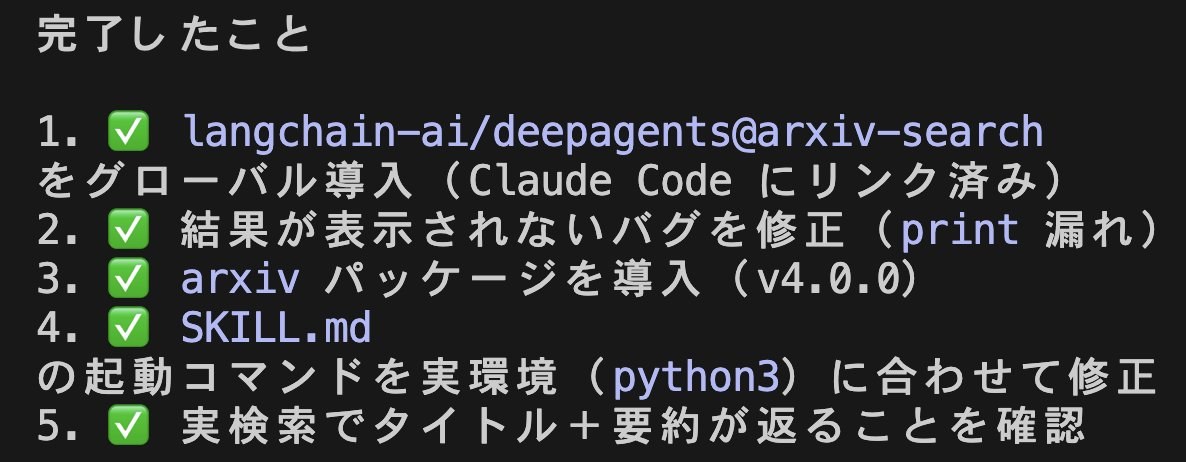
The installed skill didn't work out of the box. A bug kept results from showing on screen, so Claude read the file, fixed it on the spot, and adjusted the run command to fit that computer. The author singled out as a strength that “他人が作った道具を、その場で調整して使える” (you can adjust a tool someone else made right there and use it).

Claude Code Lab's request

論文を検索するskillが欲しい

Swap in the job you need in place of paper search.

A table comparing two skills, literature-search-arxiv (made by DeepMind) and arxiv-search (made by LangChain): what they search, what they need, features, first-use requirements, and installs of 1.2K and 1.7K
The comparison table the AI made. The bottom row shows install counts at the time (by October 6 the order had flipped: DeepMind 3,071, LangChain 2,316).
Claude's completion report: five checked lines covering installing arxiv-search, fixing a bug that kept results from showing (a missing print), installing the arxiv package, fixing the run command in SKILL.md, and confirming a real search
What Claude did after the install: fixed the skill's output bug and adapted the run command to the environment.

Reference 02Guillermo Casaus, cofounder of an AI automation agency · X

Asked to find web design skills, it brought back five candidates in a table with installs and makers, then installed the official one

After installing find-skills, Guillermo asked in Spanish for the best skills for web design. The AI showed five candidates in a table with their install counts, makers, and what each one does. The most installed, Vercel's web-design-guidelines, had 616K, and the least had 13K. Then it recommended: “instala la de Vercel — es oficial, con mucho margen la más usada” (install the Vercel one: it's official, and by far the most used). Guillermo looked at the table and asked it to install Vercel's official skill.

While installing find-skills, Claude first passed along a warning. One security audit (Snyk) had flagged it as medium risk, and since skills run with full permissions, he should look it over before using it. The video ends at the install request, so it doesn't show any design made with the skill.

Guillermo's request

Usa find-skills para darme las mejores opciones para diseño web

Swap 'web design' for what you're working on.

Reference 03YouTuber Vaibhav Sisinty · 867K subscribers (runs his own AI community)

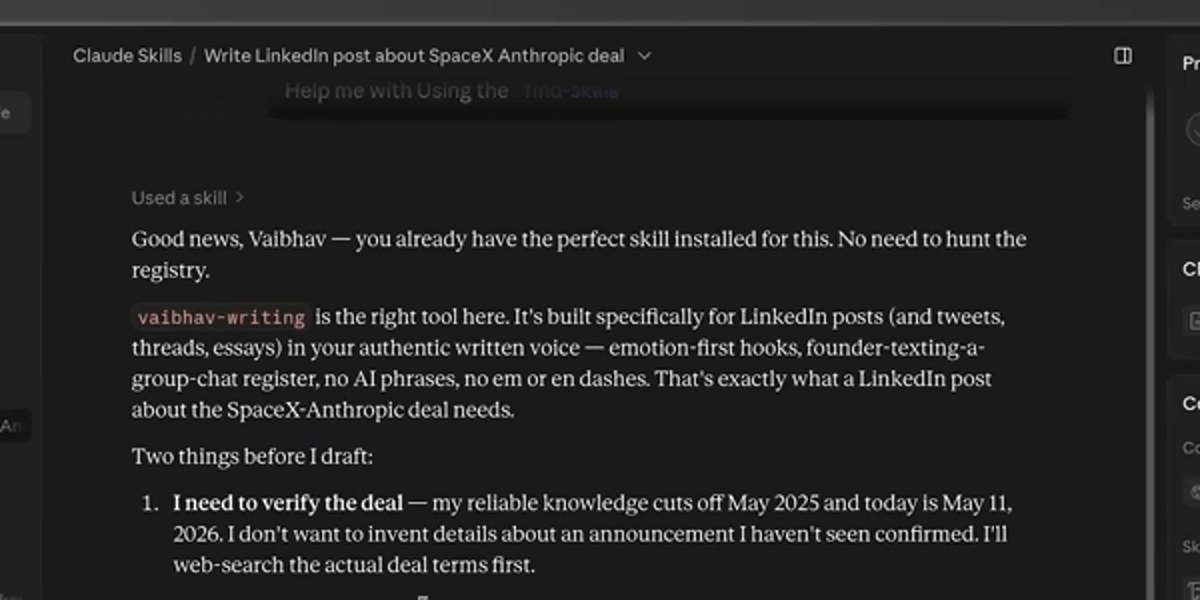
Called up to help with a LinkedIn post, find-skills skipped the search and picked the writing-style skill he already had installed

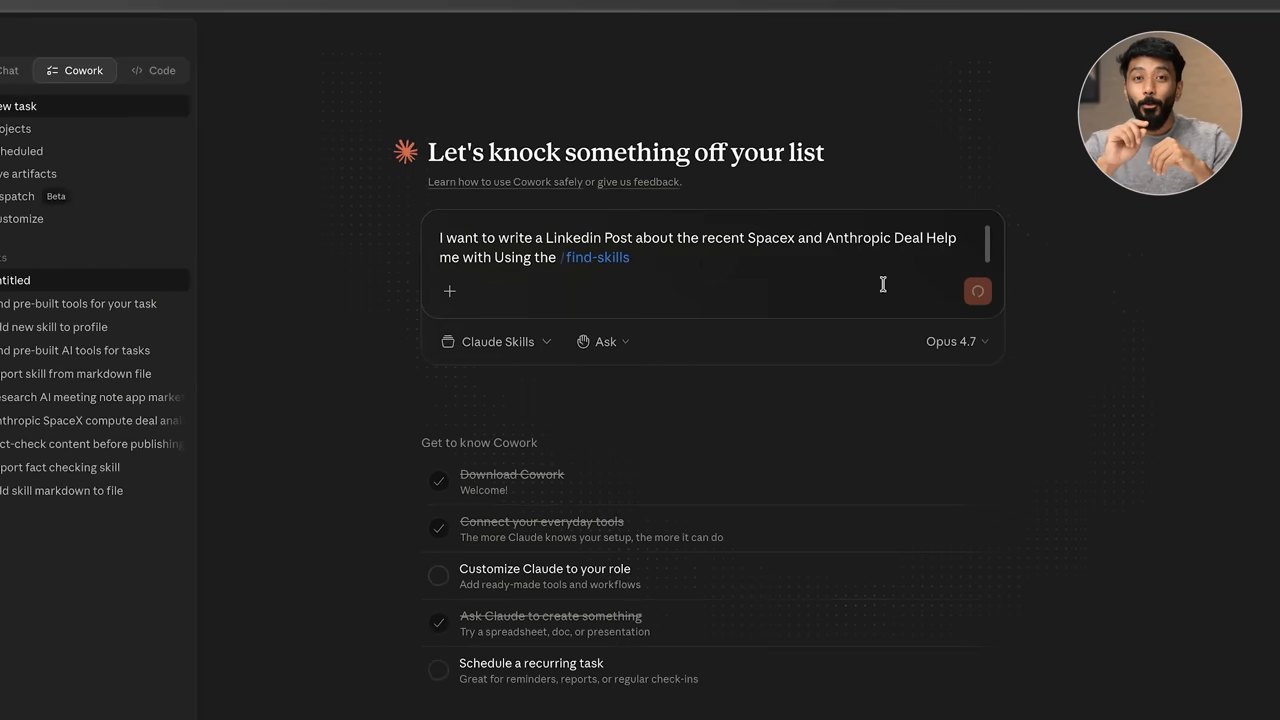
In Claude Cowork, Vaibhav called find-skills to write a LinkedIn post about the deal between SpaceX and Anthropic. The AI didn't search the leaderboard. Instead it said “you already have the perfect skill installed for this. No need to hunt the registry.” and picked the skill he had set up to write LinkedIn posts in his own voice. It then checked the facts of the deal on the web, asked about the angle and length, and finished the post.

Vaibhav's request

I want to write a Linkedin Post about the recent Spacex and Anthropic Deal Help me with Using the /find-skills

The Claude Cowork screen. 'Good news, Vaibhav — you already have the perfect skill installed for this. No need to hunt the registry.' followed by a description of the vaibhav-writing skill
find-skills' answer: instead of a new skill, it picked the writing-style skill already installed.
Claude Cowork showing find-skills' answer

Reference 04Korean YouTuber Data Popcorn

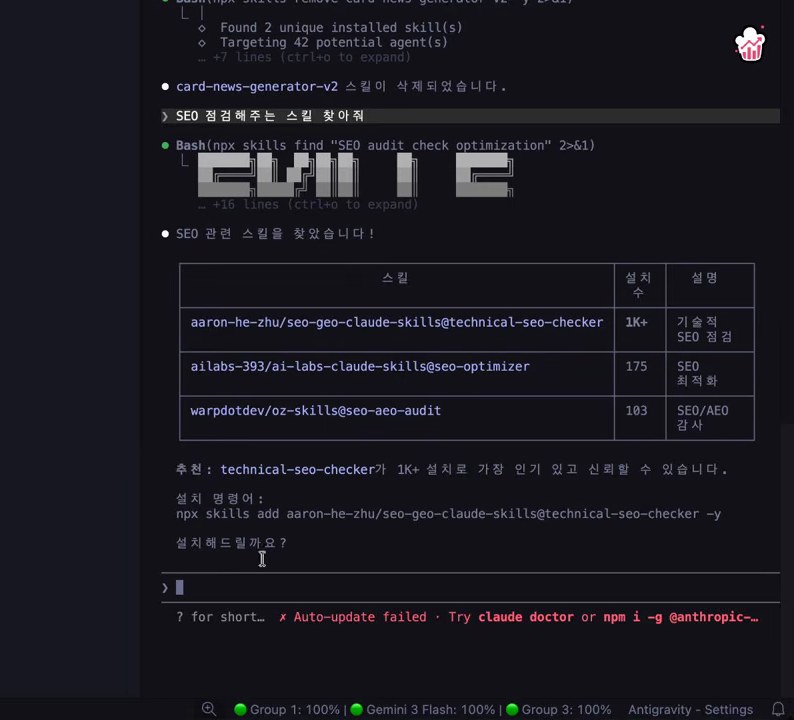
Without naming any skill, a plain 'find me a skill that checks SEO' brought back an SEO checker with 1K+ installs, install command included

After installing find-skills, Data Popcorn didn't tell Claude to use it, and just asked in Korean for what was needed. Claude reached for find-skills on its own, searched for 'SEO audit check optimization,' and showed three candidates in a table with install counts and descriptions. It then recommended technical-seo-checker, the one past 1,000 installs, as "가장 인기 있고 신뢰할 수 있습니다" (the most popular and trustworthy), gave the install command, and asked whether to install it.

Data Popcorn's request

SEO 점검해주는 스킬 찾아줘

Swap 'checks SEO' for the job you need. You don't need to know any skill names.

Claude Code terminal. Under the Korean request, a table of three SEO skills (1K+, 175, 103 installs), a recommendation of technical-seo-checker as the most popular and trustworthy, and the install command
Three candidates, a recommendation, and the install command, all on one screen.

What people who used it say

What worked

  • “Every new skill added to skills.sh makes manual browsing a little harder. `find-skills` is the one skill that keeps the rest of the catalog usable as it grows.”

    From a post where he had GitHub Copilot find skills for a React app.

    Rajeev Pentyala · Tech blograjeevpentyala.com
  • “I run find-skills at the start of a repo now. The agent stops guessing which Skill to paste.”

    Alvaro Cintas · Xx.com
  • “安装这个 find-skills,就可以让 ai 自己寻找合适的 skill 来安装,不用自己满处找了”

    Install find-skills and the AI finds and installs the right skill by itself, so you don't have to hunt all over for one.

    Justin(@interjc) · Xx.com
  • “it checks how many people use it and who made it first. so you're not adding junk to your setup..”

    Axel Bitblaze · Xx.com

What fell short

  • “If you run npx skills add (which you shouldn't), Vercel prompts you to install the "find skills" skill, then installs it globally for all AI agents. Might as well make a find-malware skill to recommend malware to install.”

    From someone who works in security. He is criticizing a tool that recommends skills other people upload, and an installer whose default answer is yes.

    Zack Korman · Xx.com
  • “An agent searching for frontend skills recommended a skill with 115 installs and 42 GitHub stars, while Vercel's `react-best-practices` (185K installs) and Anthropic's `frontend-design` (132K installs) were never mentioned.”

    An early-March problem, when it recommended straight from search results. This report is what added the check on installs, source, and stars.

    elliotllliu · GitHubgithub.com
  • “Current models follow routing text literally, so nearly any "how do I…" or "can you…" question matches. The skill then runs `npx skills find` and suggests installing third-party skills instead of just answering.”

    Reported on October 6.

    dinuka-rp · GitHubgithub.com
  • “The affected skill family amassed more than 1.7 million aggregate installs, not unique users.”

    Security firm Zenity on a family of malicious skills it found. Installs aren't people, so a high install count alone is no reason to trust a skill.

    Zenity Labs · Security companybusinesswire.com

How to start

find-skills doesn't show you a skill's contents before installing it. A skill someone else uploaded runs on your computer with the same permissions as your agent, and one security audit (Snyk) warned that the AI reads content uploaded by others as is. Even when the install count is high, read the skill's SKILL.md once before you install it.

  1. 1

    Install find-skills in the coding agent you use

    It works in agents that support the skills command, such as Claude Code, Codex, Cursor, and GitHub Copilot.

    Install command

    npx skills add https://github.com/vercel-labs/skills --skill find-skills

  2. 2

    Describe the job and ask it to find a skill

    The AI shows candidates with their install counts, makers, and install commands. If a skill you already have fits, it tells you so.

    Rajeev Pentyala's request in GitHub Copilot

    /find-skills I am building a React app and looking for best coding and security practices

    Swap in what you're working on for the React app.

  3. 3

    Look over the candidates, pick one, and ask it to install

    Sometimes a candidate with fewer than 100 installs shows up as 'the most popular'. If an installed skill doesn't run properly, you can ask it to fix the skill on the spot.

What you need

  • A coding agent like Claude Code, Codex, Cursor, or GitHub Copilot
  • Node.js (to run the npx install command)

Share this reference

Did you find this reference helpful?

Get curated references delivered to your inbox weekly