At this very moment, do you know what's actually happening when an AI agent uses your website?
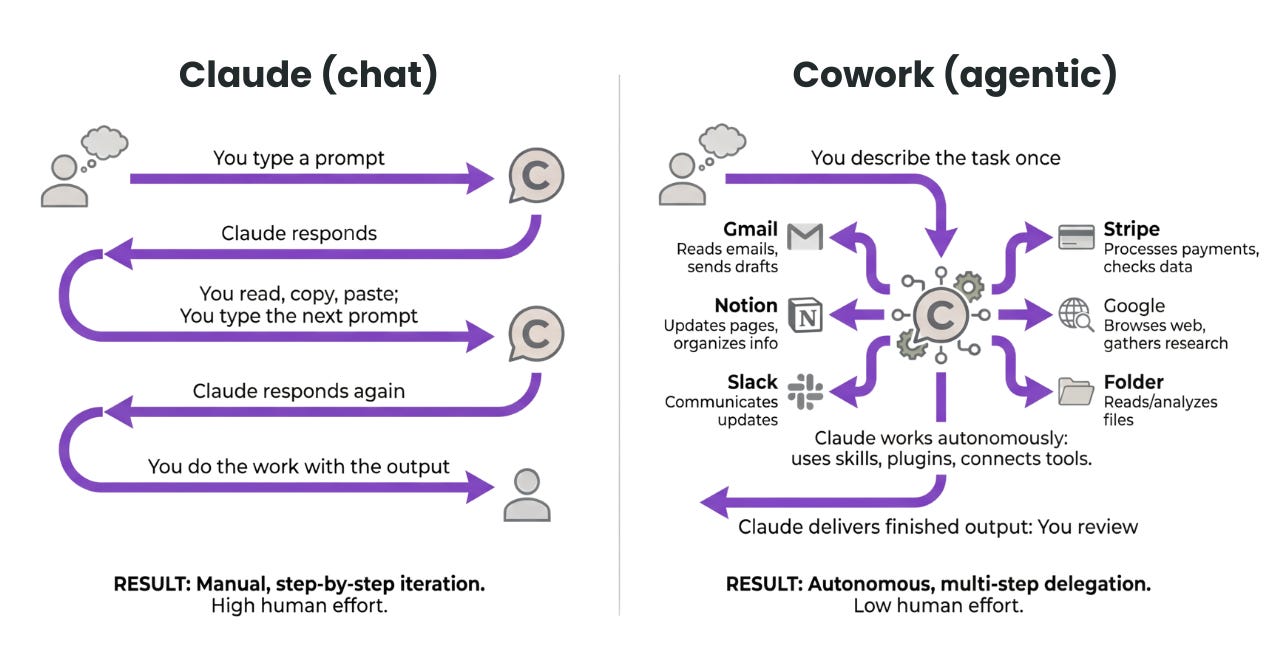
It takes a screenshot, analyzes pixels, and guesses where the button might be. One layout change and it fails completely. The industry calls this "vision-based automation," but honestly, it's closer to an AI feeling around your site with its eyes closed.
Google flipped this entire structure at Google I/O 2026. Chrome declared the age of the agentic web, and three announcements rewrote how AI agents and websites relate to each other.
So how do AI agents actually use websites right now?
Most AI agents doing web automation work like this: download the entire DOM and parse it, or take screenshots and guess coordinates. They burn through tokens repeating "the booking button is probably that blue one in the bottom right".
The problem is this approach is nondeterministic. Change the site design slightly and it breaks. Different agents handle the same task differently. And most tokens get consumed just trying to guess what things are for.
What Chrome flipped — "guessing" replaced by "declaring"
WebMCP (Web Model Context Protocol) is an open web standard jointly proposed by Google and Microsoft. The core idea is simple: instead of making agents guess the purpose of a button, what if the website just declared it upfront?
Take a flight booking site. Where before an agent would scan the page thinking "the origin field is probably here, the date picker is probably there," WebMCP lets the site declare this instead:
WebMCP approach: agent calls the function directly
book_flight({ origin: "ICN", destination: "JFK", date: "2026-08-01" }) — once the site declares this function, the agent calls it directly without looking at the screen.
It became an official W3C Web Machine Learning Community Group deliverable in September 2025, with Chrome 146 Canary (February 2026) shipping the first browser implementation. Chrome 149 Origin Trial opened it to anyone testing on real production sites.
Expedia, Booking.com, Shopify, TurboTax, and Target are already running experiments. Early reports show agent task completion 8–12× faster than vision-based alternatives, with roughly 90% fewer tokens consumed.
There are two implementation paths:
| Declarative API | Imperative API | |
|---|---|---|
| How | Add data-mcp-tool attributes to HTML forms | Register via JS: document.modelContext.registerTool() |
| Best for | Quickly making existing forms agent-ready | Custom logic and complex input/output schemas |
| Flexibility | Basic | Full control via JSON Schema |
Heads up: the API name changed in Chrome 150
navigator.modelContext is now deprecated. Use document.modelContext instead.
Two more things that came with it — DevTools and a coding guide
WebMCP wasn't the only announcement at Google I/O 2026. Two more developer tools for the agentic era shipped alongside it.
Chrome DevTools for Agents 1.0 launched stable. AI coding agents can now run real code in an actual browser while directly accessing console logs, network traffic, and the accessibility tree. LY Corporation used this to automate 96–98% of their manual performance auditing work. Available now via the Claude Code marketplace, Gemini CLI, and Antigravity 2.0.
Modern Web Guidance is a blueprint for guiding AI coding agents to write code that follows modern web standards. One line install — npx modern-web-guidance install — and AI tools reference 100+ validated patterns. Integrated with Baseline, so accessibility, performance, and security are automatically considered.
The paradigm didn't shift because agents changed how they automate the web — it shifted because the web started declaring itself for agents.
How to start right now
- Register for Chrome 149 Origin Trial
On Chrome 149+, register your domain at the Chrome Origin Trial registration page. For local testing, enablechrome://flags/#enable-webmcp-testing. - Mark existing forms with the Declarative API
Addingdata-mcp-tool="book-flight"to your existing HTML forms is enough for agents to recognize them as tools. Lowest code change, fastest way to start. - Register custom tools with the Imperative API
Usedocument.modelContext.registerTool()with a name, description (under 500 chars), JSON Schema for inputs/outputs, and an execute callback. Agents read this and call it precisely. - Don't skip security
requiresUserApproval: trueis required for financial or destructive actions. AdduntrustedContentHintfor external data,readOnlyHintfor non-mutating operations. Cross-origin iframe access requiresallow="tools". - Debug with Chrome DevTools for Agents
Install the Chrome DevTools plugin from the Claude Code marketplace to see in real time how agents are calling your tools.