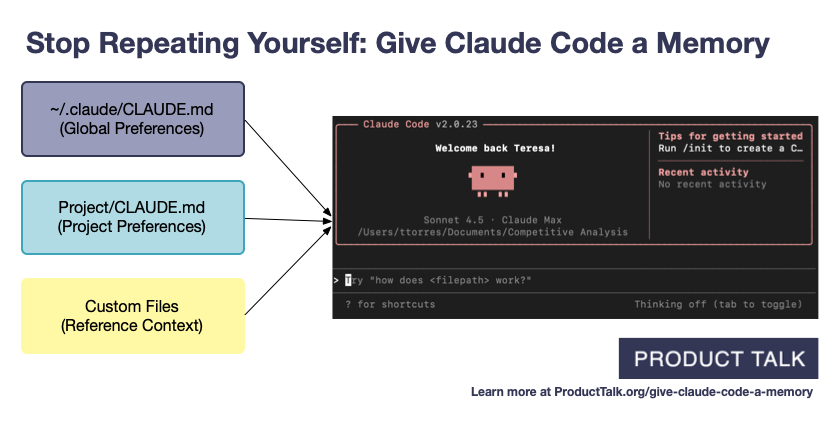
Every time you start Claude Code, do you find yourself repeating "We use pnpm" or "The test command is make test-integration"? Now you tell it once and it remembers forever. Even after the session ends. Even the next day.
What Is It?
Claude Code has two memory systems that persist across sessions.
The first is CLAUDE.md. It's a rulebook you write yourself. Things like "Our project uses TypeScript strict mode" or "Run tests with pnpm test:integration" — write them down and Claude automatically reads it at the start of every session. Think of it as an onboarding document for your AI.
The second — and today's star — is Auto Memory. This is a feature where Claude writes its own notes as it works. It automatically records project patterns, debugging insights, and user preferences, then references them in future sessions. If CLAUDE.md is the team wiki you write, Auto Memory is the work journal Claude keeps on its own.
The Key Analogy
CLAUDE.md = "Do it this way" (rulebook you write)
Auto Memory = "Last time this failed because of X" (work journal Claude writes)
Technically, Auto Memory is stored as markdown files at ~/.claude/projects/<project>/memory/. It's not some magic database — just text files. MEMORY.md serves as the index, with additional topic-specific files like debugging.md or api-conventions.md.
The important detail: only the first 200 lines of MEMORY.md auto-load at the start of each session. Claude reads additional topic files on demand as needed. That's why you should keep MEMORY.md as a concise index and split detailed content into separate files.
What's Different?
Let's be honest — an AI coding assistant without memory is like a new hire who shows up every day and asks "What does this company do?" Every session you're re-explaining project structure, coding conventions, and build commands. That repetition eats into your conversation tokens.
| Without Memory | With Auto Memory | |
|---|---|---|
| Session Start | Repeat project context every time | Context auto-loads |
| Repeated Mistakes | Makes the same bug pattern you fixed yesterday | References previous debugging insights |
| Coding Conventions | "Don't use default exports" — every single time | Tell it once, remembered permanently |
| Build/Test Commands | "It's pnpm, not npm" — constant corrections | Uses correct commands automatically |
| Token Usage | Tokens wasted on context repetition | Tokens focused on actual work |
The real-world results are impressive. One developer ran Auto Memory across 13 projects over several months, and Claude only recorded 12 lines. Disappointing? Not at all. Those 12 lines captured a critical pattern for catching context filename collisions in parallel sessions. It's about quality, not quantity. Those 12 lines auto-loading at every session start meant the same mistake simply stopped happening.
Teresa Torres at Product Talk demonstrated the non-technical use case. For marketing copy, SEO optimization, and competitive research — with Claude remembering target customers, product value props, and brand tone, there was no more uploading files or writing long prompts every time.
"CLAUDE.md is a config file I write, and Auto Memory is a config file the system writes automatically. Neither is 'learning' — both are 'training.'"
— Brent W. Peterson, "Automatic Memory Is Not Learning"
Quick Start Guide
- Bootstrap CLAUDE.md with /init
Run/initin your project directory and Claude will analyze your project structure to generate a starter CLAUDE.md. The crucial part — aggressively delete the unnecessary stuff from what it generates. Remove obvious things like "This project uses JavaScript" and keep only what Claude would get wrong. Focus on build commands, coding conventions, and architecture decisions. - Verify Auto Memory Is Enabled
Run the/memorycommand to see your current memory files and the Auto Memory toggle. Turn it on here if it's off. You can also force-enable it with the environment variableCLAUDE_CODE_DISABLE_AUTO_MEMORY=0. - Just Work — Claude Records Automatically
No special action needed. As you work, Claude automatically logs project patterns, debugging insights, and code style preferences to MEMORY.md. You'll see aWrote X memoriesmessage during the session when it does. - Teach It Directly
Want to make sure something sticks? Just say it. "Remember that we use pnpm" or "Note that API tests need local Redis running." Claude writes it to Auto Memory. - Review Periodically
Use/memoryto open MEMORY.md and check what Claude has recorded. Fix anything wrong, and promote recurring patterns to CLAUDE.md rules. It's a markdown file, so edit it in any editor you like.
Heads Up
Auto Memory is isolated per project (git repository). What it learns in Project A doesn't carry over to Project B. For personal preferences that apply to all projects, put them in ~/.claude/CLAUDE.md (global memory).