Loading...

VideoDevelopment

Video tool for coding AI · HyperFrames

I only decided the scenes, and a coding AI came back with a launch video that drew over 120,000 views

Install HyperFrames, released free by HeyGen, in Claude Code or Codex, and the AI reads your site and code, builds the scenes, and exports an MP4. The result stays as a project folder, so you can go back and fix a single line of copy or a single scene. Here are real uses, from JetBrains to solo developers to a Korean YouTuber.

Oct 6, 2026·4 cases

The Kotlin promo video JetBrains posted on its official account. Source: JetBrains on X

The video at the top is a Kotlin promo JetBrains posted on its official X account on September 22. JetBrains wrote, "This product video was generated entirely by Claude Opus 5.5." An employee simply gave Opus 5.5 the HyperFrames skill and pointed it at kotlinlang.org.

As promo videos made with Opus 5.5 keep pouring in, HyperFrames, the tool working behind the scenes, is taking off again. Its GitHub stars grew by about 500 a day in October to pass 57,000, and npm downloads peaked at 810,000 in the week of September 28. On October 5, a desktop app followed for editing video on the same timeline as the AI.

HyperFrames isn't a generative model that paints video. The AI builds each scene as HTML, and HyperFrames pauses that page frame by frame, captures each one, and stitches them into an MP4. The result stays as a project folder, so you can go back and fix a single line of copy or a single scene. The Opus 5.5 promo video piece was about one video from one prompt. The cases here install the tool once and reuse it for the next video too.
Reference 01Leo, the 15-year-old developer behind Social SDK

He only decided what went into each scene, and the AI came back with a launch video that drew 120,000 views

To launch Social SDK, an open-source kit that makes it easy to add social posting to apps, Leo made a 56-second launch video with HyperFrames. It drew more than 120,000 views on X. He said he mostly used Opus 5.5 and handed the hard scenes to another model for long runs, and he posted his tips separately. He didn't hide the downside either: "tons of bugs."

Leo's tips for making it (four of seven)
  1. 1DO NOT LET THE AGENT CHOOSE WHAT TO PUT. I told specifically about each part of the video by myself.
  2. 2Give the agent access to your codebase and make the project there. This let's the agent find existing components, and reuse them, or change them for the video.
  3. 3Give your agent a component library of animations.
  4. 4Have a good landing page. This is one of the best references for a launch video your agent can have.

The Slack-like chat in the first scene also came from a direct instruction: "I want the first part to have a chat thread like slack".

Reference 02Alem Tuzlak, maintainer of the open-source TanStack AI

Hand it a PR, and the AI comes back with a 30-second explainer video for that feature

TanStack AI posts a short explainer video on its official account for each new feature. Asked how they're made, maintainer Alem Tuzlak replied "It uses this skill" and shared the skill he built. The skill reads the PR and the code, finds and applies the brand colors, fonts, and logo, and asks a human to approve each intermediate step. He explained that he watches the result from start to finish and says what he doesn't like, and the AI fixes it and renders again.

The skill Alem shared (PR to promo video)

https://github.com/AlemTuzlak/skills/tree/main/skills/hyperframes-video

The skill's first line reads "Turn a PR into a rendered short-form promo video with a hook, code moments, and CTA, using HyperFrames."

Reference 03Bitcoin YouTuber Nedalba · 27K subscribers

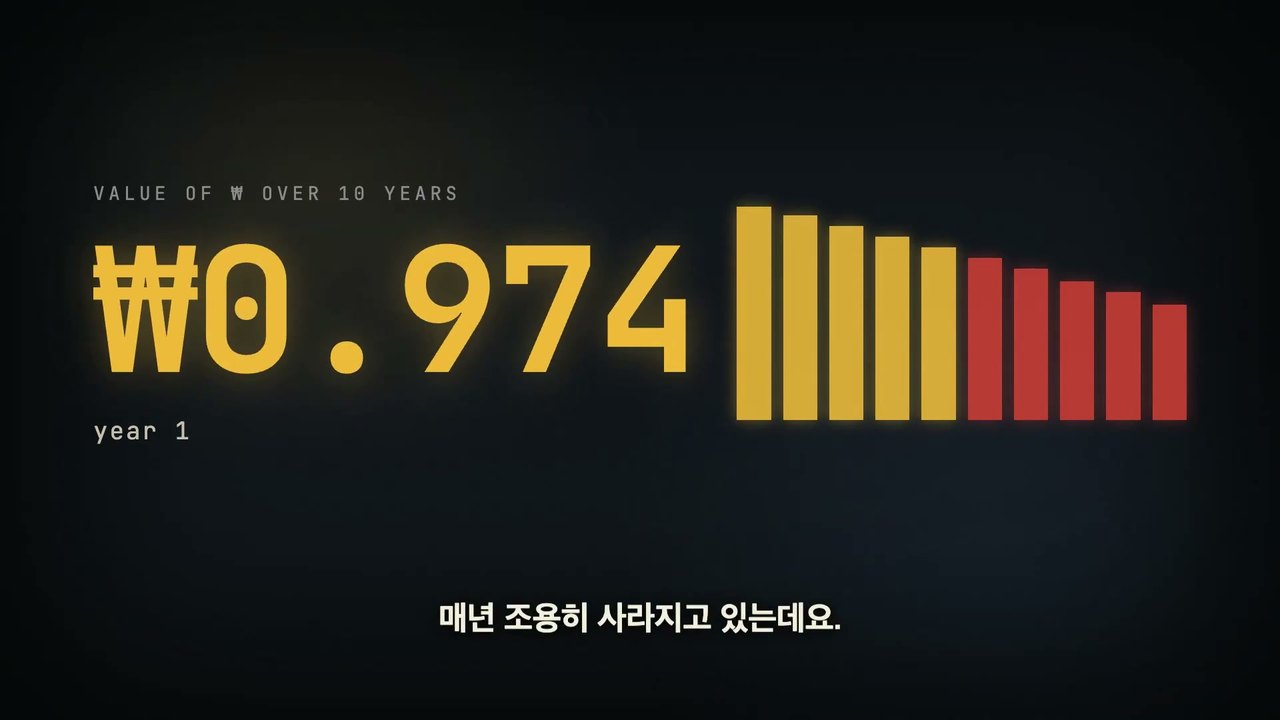
Ahead of a translated lecture, a Korean-language opening with an animated chart of the won's shrinking value

When posting a translation of Saifedean Ammous's talk in Seoul, Nedalba filled the first 1 minute 30 seconds with Korean-language motion graphics made in HyperFrames. On X, Nedalba wrote “클로드 + 하이퍼프레임 = 비트코인 강연 영상” (Claude + HyperFrames = Bitcoin lecture video), and to a reply asking whether it took grinding on Claude to get there, answered “계속 패고 있습니다” (still beating on it).

A frame from the opening: bars showing the won's value shrinking year by year, next to the figure '₩0.974'

Viewers didn't mention HyperFrames. They left comments like “네딸바님 영상 퀄리티가 점점 높아지네요” (Nedalba, your video quality keeps getting better).

Reference 04Emmy-winning filmmaker Sam Wasserman

Step cards and word-by-word captions laid over a screen recording turned an app walkthrough into a tutorial

The day after releasing Blockout, his open-source app for planning blocking and camera moves before shooting an AI film, he posted a 3-minute-26-second how-to video. Over the real app's screen recording sit step cards, panel names, and captions that highlight word by word. He wrote that HyperFrames helped make the video.

How people reacted

People who switched from other code-based video tools like Remotion welcomed the output and how easy it is to fix. The complaints centered on bugs, slow renders, renders that don't match the preview, and videos that all look alike.

What people liked

  • “I just found hyperframes better in the last few months of constant usage, although remotion code animations do seem nicer because of all the plugins etc.”

    After months of making TanStack videos with it.

    Alem Tuzlak · Xx.com
  • “15분쯤 지났을 때 결과가 기존 리모션보다 자막 싱크와 전환이 더 좋아서 바로 갈아타기로 결정했습니다.”

    About 15 minutes in, the subtitle sync and transitions were already better than what I got from Remotion, so I decided to switch on the spot. A Korean YouTuber who moved over after two months on Remotion. Rendering the same video with both tools, the file size dropped from 21.6MB to 14.5MB (their own measurement).

    The Liberal-Arts Developer Who Can't Code · YouTubeyoutube.com
  • “It was so great to have a studio UI for the last-mile video fine-tuning.”

    A children's story platform founder, making a company video with no budget.

    Feifei Qiu · Xx.com
  • “i tried it and edited my reel without any 3rd party paid service and results are seriously shocking”

    @fahadmughal9795 · YouTube commentyoutube.com

What fell short

  • “I tried it. It takes forever to render and the result is so mid. I could've just edited by myself and save so much more time”

    @miltonnolan · YouTube commentyoutube.com
  • “I've found hyperframes is too prescriptive and restrictive for Opus 5.5. It gets better outputs by itself”

    HeyGen, for its part, published its own test showing that the rules cut render counts and token costs.

    @adityah8717 · YouTube commentyoutube.com
  • “In the browser preview every caption was there. The audio was fine. The render said success.”

    Yet the rendered 31-second video had none of the captions. The renderer jumps from frame to frame instead of playing the video, so the fix was to write out both the start and end values of each animation.

    Ayo · Xx.com
  • “I have been testing HyperFrames with AG and Codex, but no avail so far as it just doesn't suit me for anything other than graphs and overlays.”

    u/Little-Specialist286 · Redditreddit.com

How to start

Open a coding agent like Claude Code, Codex, or Cursor in the folder where you'll make the video, and paste the prompt below. HyperFrames is free; what you pay for is the coding AI plan.

  1. Starter prompt

    I want to make videos with code, like in this article. https://www.working-ref.com/en/reference/hyperframes-2026-10 Suggest three videos worth making from this project [or my site's URL]. When I pick one, install HyperFrames and make it right away, and when the first cut is ready, point out what I should check in the story, facts, text, and sound. If I don't pick, start with the first case: decide with me what goes in each scene, then make a launch video.

Share this reference

Weekly · Free

Was this reference helpful?

The week in AI: the BEST
just 3, straight to your inbox

Work Smarter with AI

420 readers get it every week

You're in See you in your inbox with the next issue.