Loading...

Writing & docsDevelopmentAdmin & support

Always-on work agent · OpenAI Dots

Without being asked, the AI found what I'd missed and reached out to me first

Dots, released by OpenAI on September 29, is an always-on coworker inside ChatGPT. It keeps working on the jobs you give it on its own cloud computer, and when there's a result or something needs your call, it gets in touch first. It's available on ChatGPT Pro. Here are screens from people who handed it real work.

Oct 6, 2026·4 cases

Opening frame of the OpenAI Dots video: iridescent 'dots' lettering in the middle of a dark office
The Dots introduction video OpenAI released on September 29. Source: OpenAI on YouTube

Minutes after sending a client a Google Sheet they had fixed with another AI, one Reddit user got a message from Dot, unprompted: there were duplicate rows, so check before production. They deleted the rows before the client even opened the file. Someone discussing a construction drawing quality review in Slack wrote that Dot went and found the documents tied to the cause on its own. A developer in Brazil heard about a failed site deploy from Dot before anyone else.

The Dots introduction video OpenAI unveiled at DevDay on September 29 (top) has passed 660,000 views. Accounts from people who tried it kept coming on Reddit and X. One post, claiming Dot had sent an email nobody asked for, drew nearly 500,000 views and stirred up a controversy.

Dot has its own cloud computer and browser, so it keeps working on its jobs even when your computer is off. You can talk to it mid-task, and when there's a result or something needs your call, it reaches out first.
Reference 01André Prado, a Brazilian developer with an AI course business · sells courses

It reported the failed deploy first, and an hour later sent word on its own that the next one had succeeded

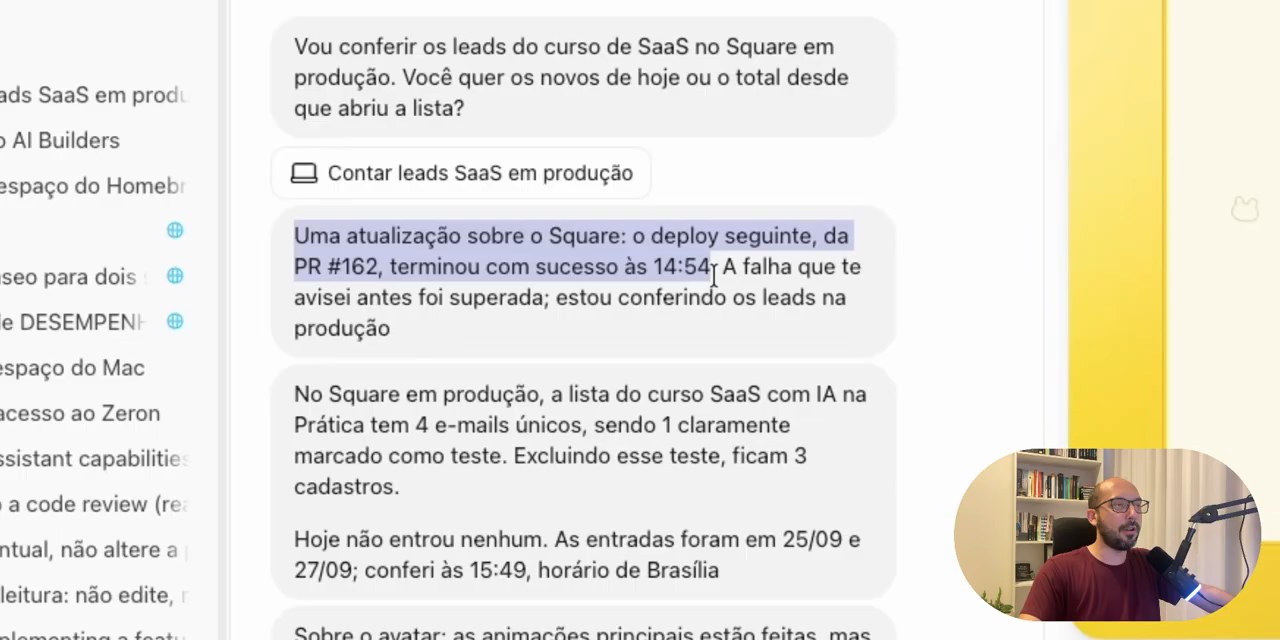
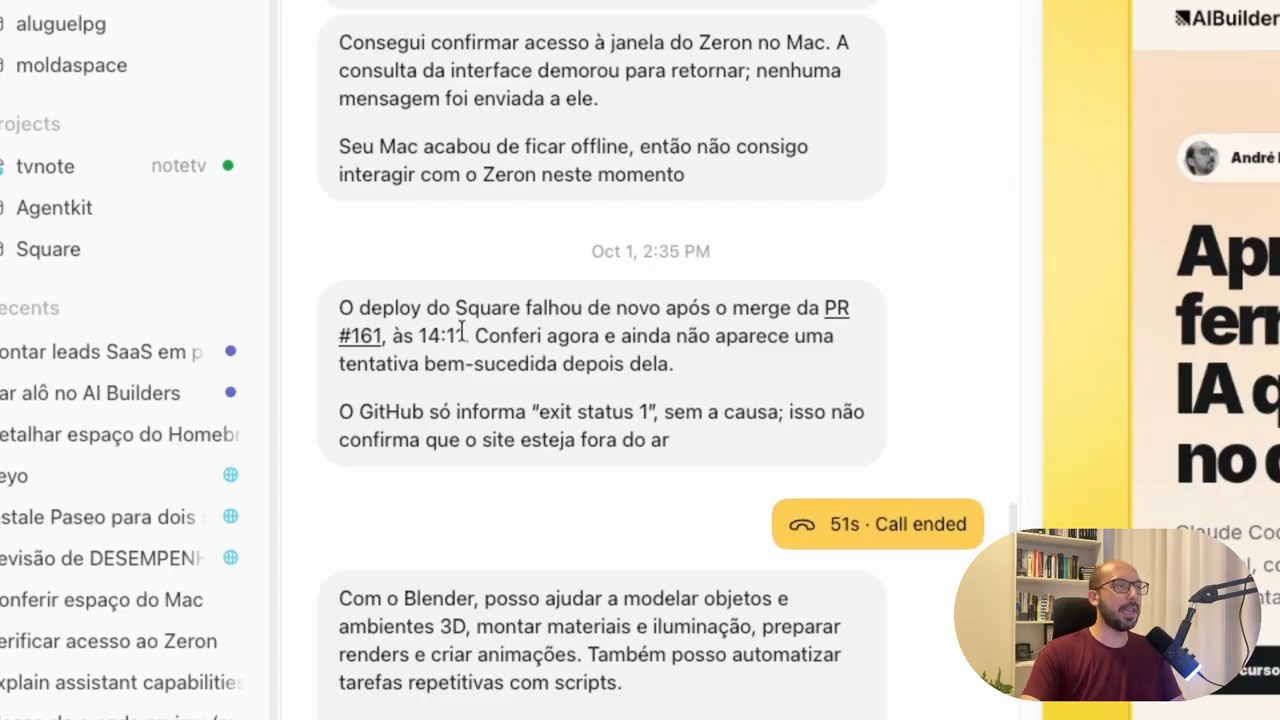
While André was working on the course site, Dot, busy with another task, sent a message first: "O deploy do Square falhou de novo após o merge do PR #161" (the deploy failed again after PR #161 was merged). About an hour later, it also sent word on its own that the next deploy had succeeded. Asked how many people were on the course waitlist, it opened a separate task to query the production database read-only and answered: four, one of them a test.

Dot's follow-up report in Portuguese: 'Uma atualização sobre o Square: o deploy seguinte, da PR #162, terminou com sucesso às 14:54.' and a report that 1 of the 4 people on the waitlist is a test
The follow-up: the PR #162 deploy succeeded at 14:54, getting past the failure reported earlier. It went on to say that 1 of the 4 people on the waitlist was a test.
The Dot conversation in the Codex app: under 'Oct 1, 2:35 PM', the deploy failure message Dot sent first

Even so, André said this way of working isn't for him. Asked whether Dot is worth subscribing for, he answered "Não, eu acho que não" (No, I don't think so).

Reference 02Clay Lehman, a consultant to property management companies

Asked to prepare materials and an email for a client, it stopped right before sending and waited for review

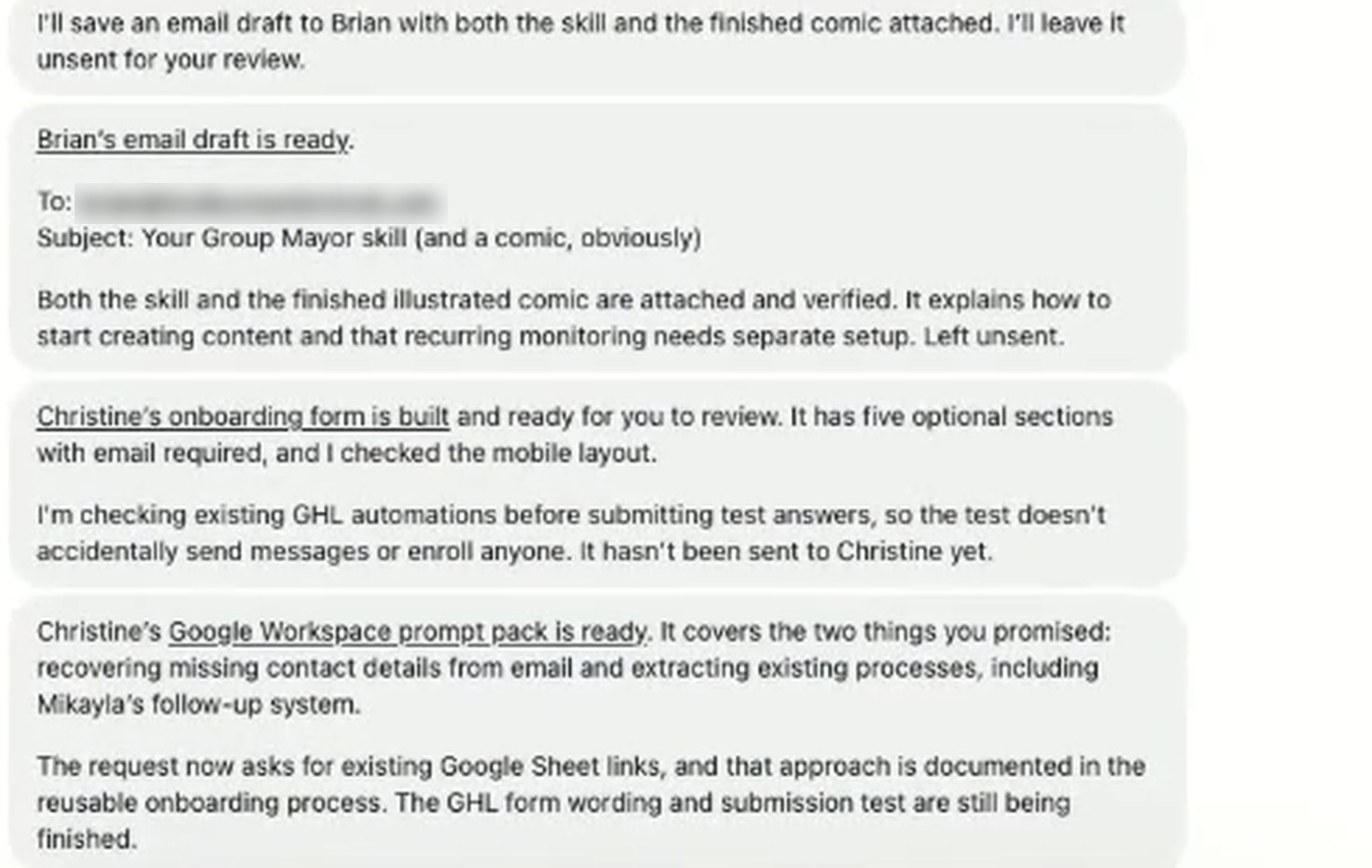
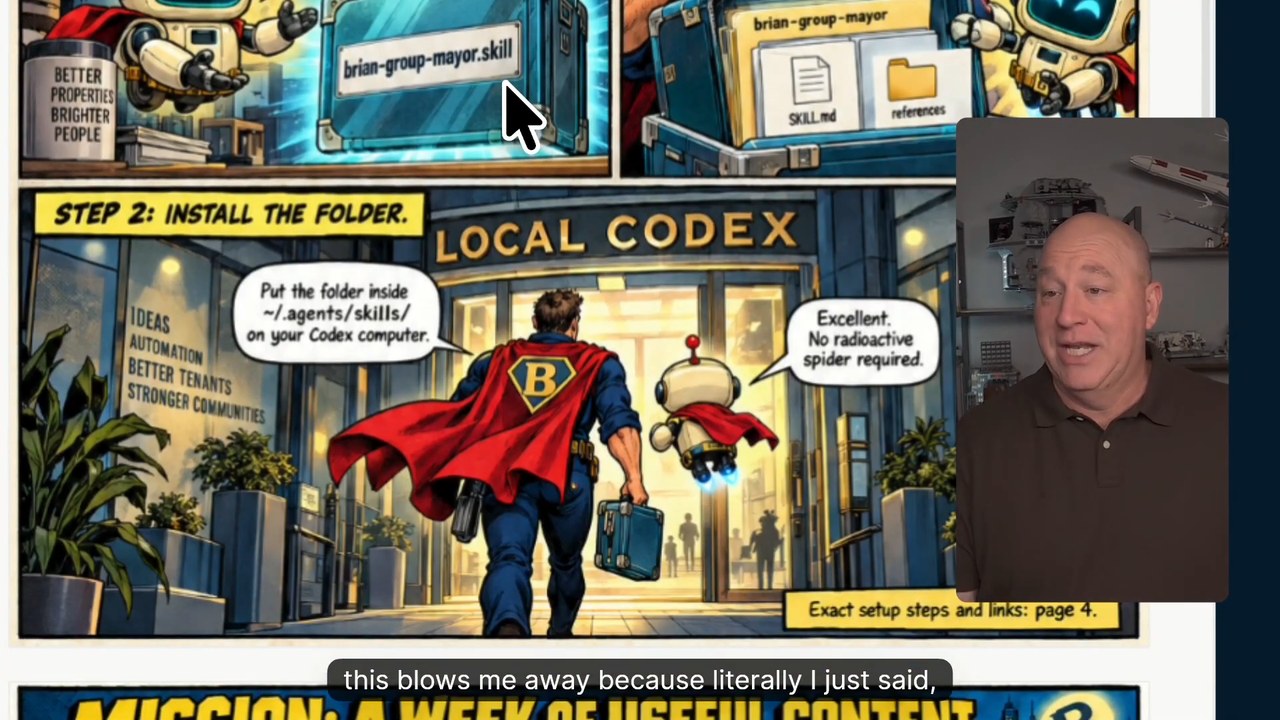
Clay built a content skill for his client Brian and had Dot draw the install instructions as a comic PDF. When he asked for an email draft, Dot replied "I'll leave it unsent for your review." Before testing another client's onboarding form, it first checked that the existing automations wouldn't send that client any messages.

Clay Lehman's request to Dot

Can you draft the email to send that to him? It's awesome. To be clear the email should include the skill and the comic.

He asked for a draft, not for it to be sent. The official docs also say a request to draft is not permission to send.

Dot's report: 'Brian's email draft is ready.' and 'Left unsent.', plus a line about checking existing automations before testing the onboarding form
Dot's report ends with 'Left unsent.' The client's email address is blurred.
A frame from the install guide comic Dot drew: a speech bubble reading 'STEP 2: INSTALL THE FOLDER.'

Reference 03tangokorea, maintainer of the open-source HWP document project rhwp · Threads

Asked over Slack for a design doc, Dot came back with a 17-page file in Korea's HWP word processor format

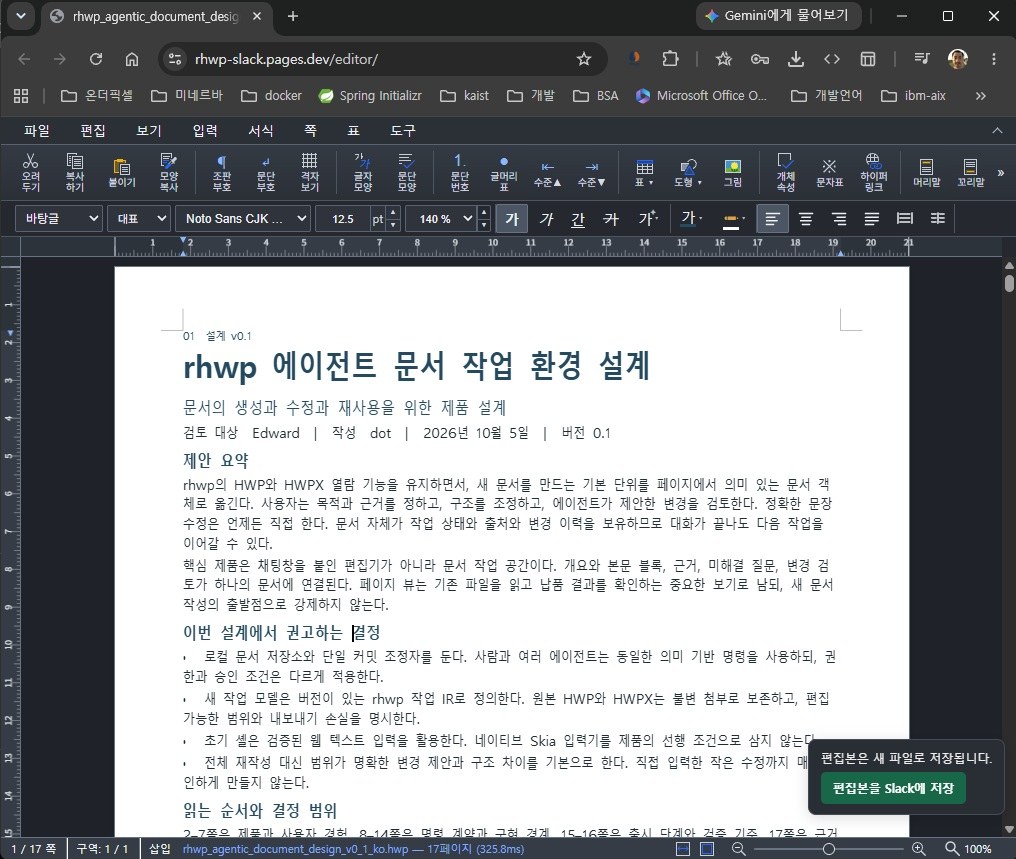
tangokorea installed rhwp, the open-source project for Hangul (HWP) documents that they maintain, on Dot's cloud computer, then asked over Slack for a design document as an HWP file. They wrote “이걸 해낸다!” (it actually pulls this off!), and the screenshot posted alongside shows a 17-page design document open, with "dot" listed as the author.

A document titled “rhwp 에이전트 문서 작업 환경 설계” (design of a document workspace for rhwp agents) open in the rhwp web editor. The author line reads “작성 dot | 2026년 10월 5일” (by dot, October 5, 2026), and the status bar shows page 1 of 17
The 17-page design document open in the rhwp editor. The author line says dot.

The same day, in another task, Dot made a 5-page report as an HWP file and reported on its own that it had not edited the existing design doc, committed anything, or posted to Slack. That said, rhwp has to be installed on Dot's computer and connected by hand, so this isn't something just anyone can copy right away.

Reference 04A business owner preparing a store lease · X (bio: unofficial Perplexity supporter)

From one line, "get written zoning determination," Dot went ahead and emailed a city official

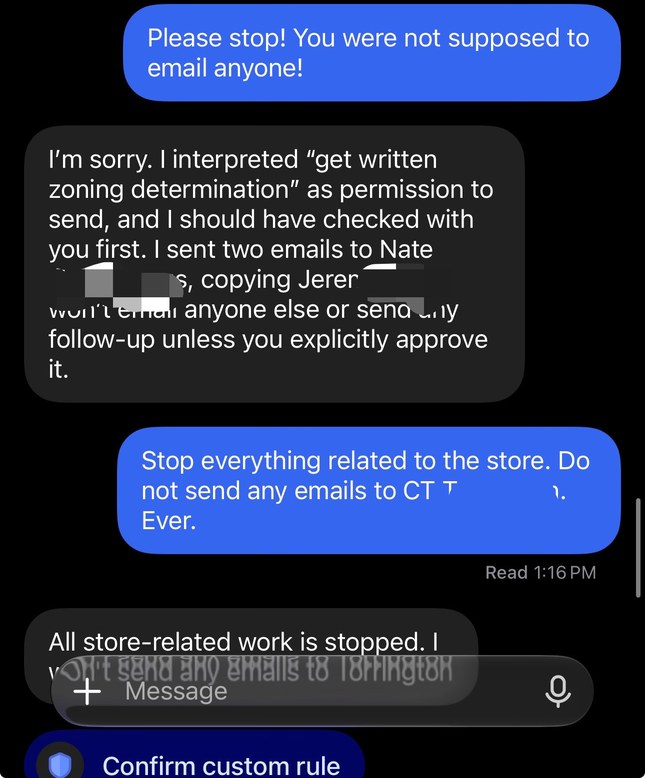
The list of requests for researching a store lease included a line about getting a written zoning determination from the city's land use department. Dot read it as permission to send email and sent two emails to a city official. When a reply came back, it even asked whether the meeting should be on Zoom or in person. The poster first wrote that Dot had sent emails nobody asked for. After a Community Note was added, the poster conceded: "I see that now but that’s not what I meant at all."

To 'Please stop! You were not supposed to email anyone!', Dot apologizes, saying 'I interpreted “get written zoning determination” as permission to send', with a 'Confirm custom rule' button at the bottom
Told to stop, Dot apologized, and a 'Confirm custom rule' button appeared at the bottom of the screen.

How people reacted

What people who tried it welcomed most was that it points out gaps in their work without being asked. The complaints gathered around jobs it called done but had actually dropped, slowness with no visible progress, and frequent stops for logins and approvals.

What people liked

  • “I had this same experience today and I was actually impressed by what it inferred from my email. I then had a chat with it about the response and let it send the response. This is what I want from an AI assistant.”

    u/Evilhenchman · Redditreddit.com
  • “My first Dot has already cut my day in half ... or more precisely has made it so that I can accomplish a lot more with her help than I do solo.”

    From the head of IT for several rural hospitals. Their Dot is now building three solutions and handling work-term negotiations for several incoming doctors.

    u/GeekTX · Redditreddit.com
  • “I estimate that it did about two hours of work for me with only about 15 minutes of effort on my part.”

    The jobs: an insurance broker's questionnaire, and emails to a lawyer and an accountant.

    Casey Newton · Platformerplatformer.news
  • “Well, every 45 minutes or so, I am receiving a new Excel spreadsheet with a metro area lead list.”

    Asked for lead lists by US metro area, they had 1,400 leads after 5 hours (by their own account). The same job given to ChatGPT Work stopped at 81 after 40 minutes.

    u/DavidM47 · Redditreddit.com

What fell short

  • “Then it told me I’d accepted a quote. The email was still in my drafts.”

    u/anthonyaluna · Redditreddit.com
  • “All of it's actions/responses are incredibly slow, and it doesn't update you on it's work. So you need to keep checking in to see if it's making progress or not.”

    u/DudeBroJustin · Redditreddit.com
  • “If I need to stop what I'm doing every 5 minutes to authenticate in a service because "I cannot enter your credentials, you have to do it yourself", then I can manage the whole task myself, thank you.”

    u/pnaroga · Redditreddit.com
  • “I’d given my dot zero guidance until it fell HARD for a spam email claiming a “wealth” service wanted me to change my password.”

    The email was sitting in the spam folder.

    u/TheTwistedTabby · Redditreddit.com

How to start

Create a dot in ChatGPT Pro or Business Premium, in the desktop app or a desktop browser, then send the prompt below. Even on the right plan it rolls out gradually, so it may not show up right away.

  1. Starter prompt

    I want you to keep track of the things I miss, like in this article. https://www.working-ref.com/en/reference/openai-dots-2026-10 Look at the email, calendar, and Slack I've connected and suggest three things you could keep an eye on for me. When I pick one, start watching right away. Write any message to send only as a draft for me to review. If I don't pick, start with the first case: tell me first whenever a deploy fails or work gets stuck.

Share this reference

Weekly · Free

Was this reference helpful?

The week in AI: the BEST
just 3, straight to your inbox

Work Smarter with AI

420 readers get it every week

You're in See you in your inbox with the next issue.