You tell Claude Code "build me an auth system" and boom — code appears. But how do you actually review it? Are you scrolling back through the terminal, eyeballing the output, and typing something like "use argon2id instead of bcrypt in that third function"?
Laura Summers from the Pydantic team has a name for this: "supervision fatigue". It's that new kind of exhaustion from manually validating mountains of "almost correct" AI-generated code. The Martin Fowler team proposed a frame for this called "human on the loop" — the idea being that a developer's new role isn't to inspect code line by line, but to design the harness that keeps the agent working well.
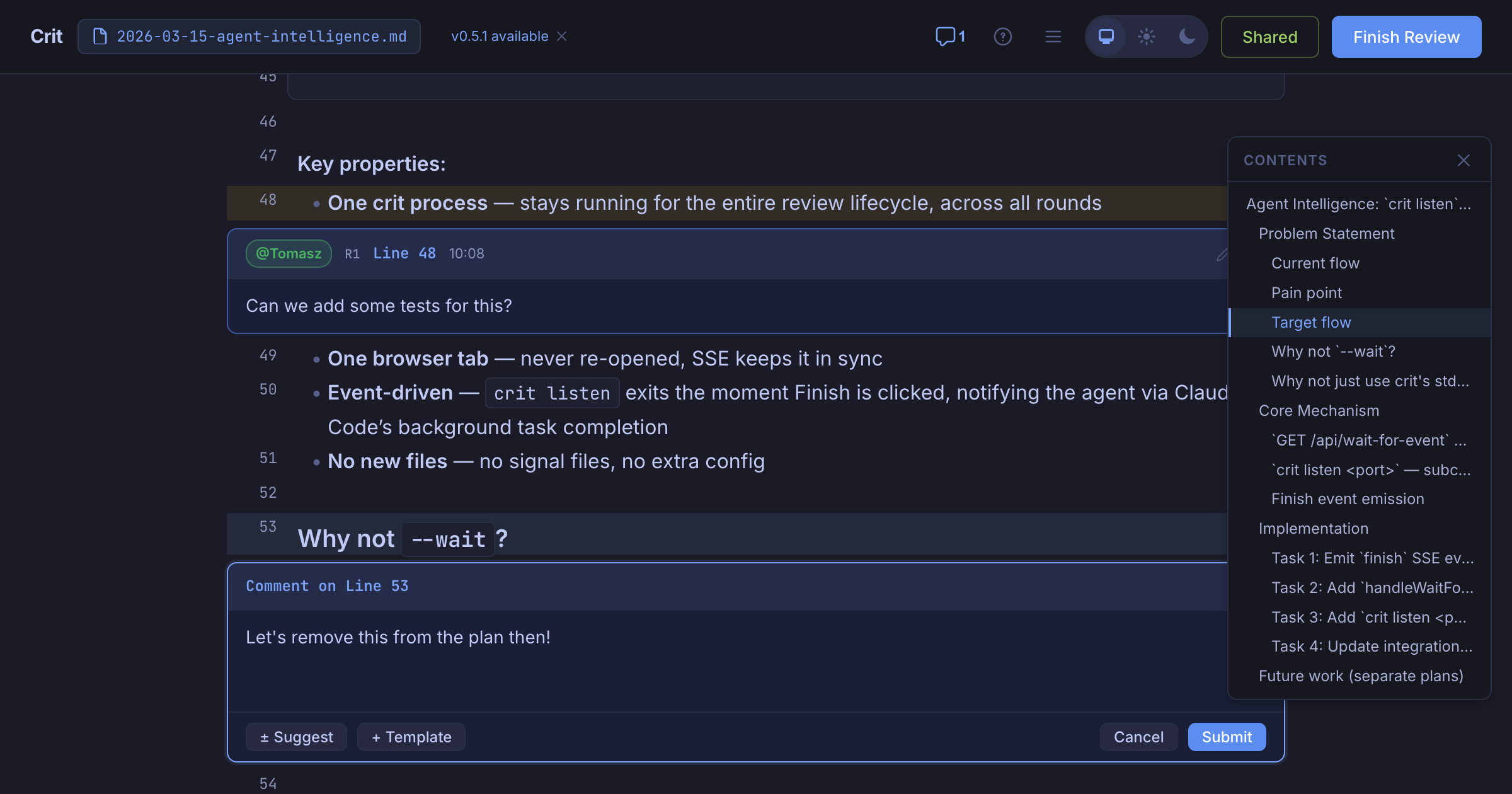
Crit is a CLI tool that tackles this problem head-on. Whether the AI produced a plan or actual code changes, you can leave inline comments in the browser — just like a GitHub PR — and automatically pass that feedback back to the agent.
What Is It?
Crit is an open-source CLI tool built by Polish developer Tomasz Tomczyk. While working with Claude Code and Cursor, he kept running into the same wall: plausible-but-wrong code with no structured way to give feedback without spinning up a full PR. So he built it himself.
The key is the review loop. Leave your comments, hit Finish Review, and the agent automatically picks up the feedback, revises the code, and Crit shows you the updated diff. Comments from previous rounds stay visible so you can check that nothing slipped through. It works with Claude Code, Cursor, GitHub Copilot, Aider, Cline, Windsurf — any agent that can read files.
What Changes?
There's no shortage of AI code review tools — CodeRabbit, Qodo, GitHub Copilot PR reviews, and more. But here's the thing — those are all AI reviewing AI. Crit flips that around. It's for humans reviewing AI.
| Approach | Direction | What It Does |
|---|---|---|
| GitHub PR Review | Human → Human | Works great, but creating a PR mid-agent-session is way too heavy |
| CodeRabbit, Qodo, etc. | AI → AI (human oversight) | Auto-reviews after a PR is opened. Can't intervene mid-session |
| Crit | Human → AI | Inline feedback while the agent is coding. Runs locally, zero dependencies |
Addy Osmani from the Google Chrome team wrote in his 2026 coding workflow post: treat AI-generated code like code from a junior developer — read it, run it, test it. The problem is that "read it" step has no structure. That's exactly the gap Crit fills.
Ullrich Schäfer, Engineering Manager at Pitch, said: "I use Crit daily to keep my agent feedback loop tight. Being able to review specific sections of a plan means AI coding is fast and still under control." Vincent, a senior engineer, put it this way: "It's like doing a PR review on a plan. I used to have to say 'fix point 3 like this and drop point 7' for a long plan — now it's just a comment."
Using the Martin Fowler team's "human on the loop" frame, Crit is a practical implementation of harness engineering. You're not "in the loop" directly fixing the agent's output, and you're not "outside the loop" just letting it run. You're "on the loop" — tuning the system so the agent works better. Crit's review loop is exactly that pattern in practice.
Getting Started
You can try it right now. It's a single binary — no dependencies.
- Install (10 seconds)
Homebrew:brew install tomasz-tomczyk/tap/crit
Go:go install github.com/tomasz-tomczyk/crit@latest
Nix:nix profile install github:tomasz-tomczyk/crit
Or download the binary directly from GitHub Releases - Start a Plan Review
Runcrit plan.mdor justcrit(auto-detects changes) and the browser opens. Click or drag line numbers to leave inline comments. Vim keybindings are supported too: j/k to navigate, c to comment, Shift+F to finish the review - Connect Your Agent
Claude Code, Cursor, OpenCode, and GitHub Copilot support the/critslash command. Run it and Crit opens automatically — finish your review and the agent picks up your feedback and revises. Any other agent that can read files works too. - Review Code Changes (git diff)
You're not limited to plans — actual code changes work too. Runcriton its own and it detects your git changes, showing them in split or unified diff view. Round-by-round diff comparison makes it easy to verify: "Did my last batch of feedback actually land?"
Crit runs locally by default, but the Share Review feature lets you generate a public link — great for sending a teammate a "what do you think of this plan?" Comments are color-coded by author and you can unpublish anytime. If you need full self-hosting, spin up crit-web with Docker Compose.
Deep Dive Resources
Why Quality Control for AI Code Is So Hard
Qodo's 2026 code review analysis found that AI coding agents boosted developer productivity by 25–35%, but the amount a reviewer can actually verify stayed flat. PRs got bigger, architectural drift worsened, and senior engineers found themselves buried in validation work instead of system design.
As Berkeley Haas research showed, AI doesn't reduce workload — it intensifies it. Pydantic's Douwe described reviewing 30 AI-generated PRs every morning and asking himself: "If I hand this off to AI too, what am I actually doing here?" Tools like Crit get attention because they bring structure to that supervision fatigue. Instead of eyeballing things, you get a systematic loop — review and feedback, like a real PR.
In Addy Osmani's workflow, the core cycle is: write spec → break into chunks → run agent → test → review. The review step is the biggest bottleneck, and Crit targets exactly that — streamlining it with a browser-based UI. It's a fundamentally different experience from citing line numbers back in the terminal.



