Loading...

AI browser · Aside

Log in once and Aside's AI takes it from there, even on sites that shut out automation tools

Aside skips integrations. Its AI clicks and types right in the browser you're already logged into. Four different people handed it a job: moving 97 blog posts, answering Coupang Eats reviews, getting a bank balance certificate, and winning an Amazon refund.

Sep 30, 2026·4 cases

#Data entry#Customer support#Getting documents issued#Refund requests

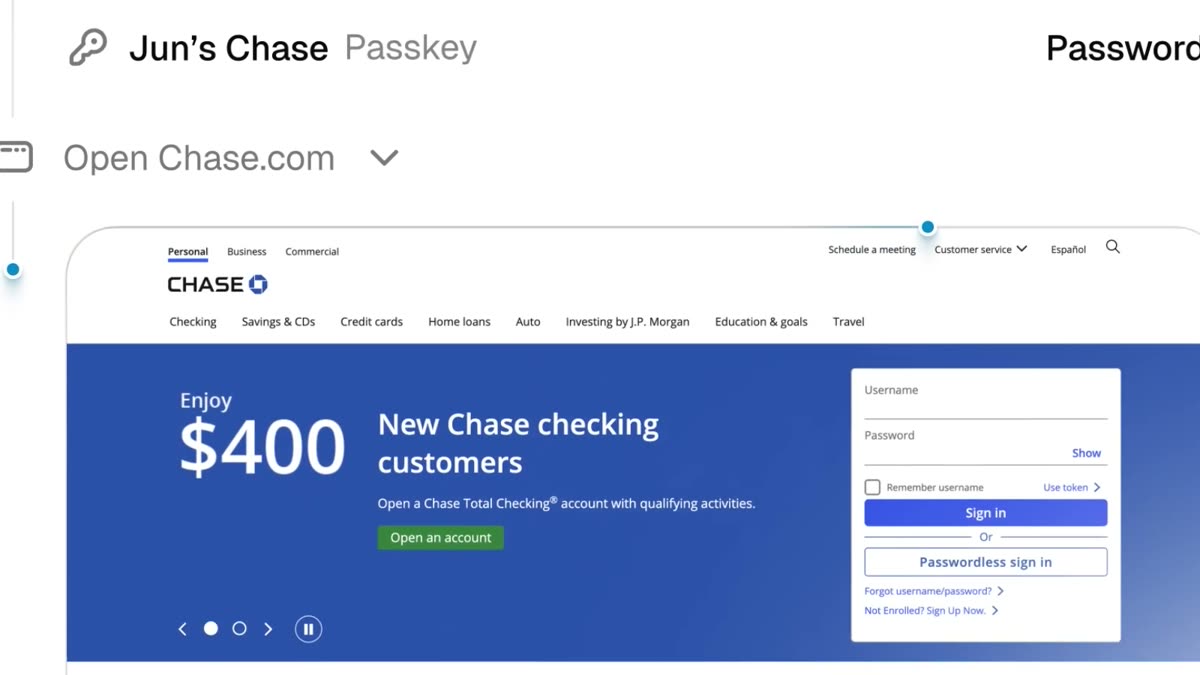
A frame from Aside's launch video: logging in to a card issuer's site (Chase) with a passkey saved in the browser
Aside's official launch video. The AI logs in to a card issuer with a saved passkey, finds an unused subscription, and gets a refund through the support chat.

Work done in a browser has always been hard to automate. Automation tools need a connection the service opens up (an API), and places like the merchant portal of Coupang Eats, a Korean food delivery app, or a blog's admin screen offer almost none. Code that drives the browser instead tends to stall at login screens and CAPTCHAs.

Aside solves this with the browser, not with integrations. Import the history and cookies from the Chrome you already use, and the sites you're logged into open just as they were. The AI then clicks and types on those pages the way a person would. Passwords go in through autofill, so the AI never sees them. By default it also waits for a human to confirm before paying, posting, or sending a message.

The launch video posted on X on June 23 is close to 1.7 million views and has more than 7,500 bookmarks. Backed by Y Combinator, Aside was built in five months by a team of five working out of a startup coworking space in Seoul. A Windows version came out on September 14, and gstack, the open-source developer tool made by YC CEO Garry Tan, now reaches for Aside first when it does browser work on a Mac.

So what did people hand it? Below are four different people who gave Aside a job and published what came back.
Reference 01Marketer with 15 years in the field · runs the Korean newsletter Growth Notes for Go-Getters

A one-line request moved 97 posts from Brunch to a Naver blog

For this newsletter writer, moving posts from Brunch, Kakao's blogging platform, over to Naver Blog had been on the list for a long time. An earlier attempt with Claude Code and the browser automation tool Playwright stopped cold when a CAPTCHA appeared on the Kakao login screen.

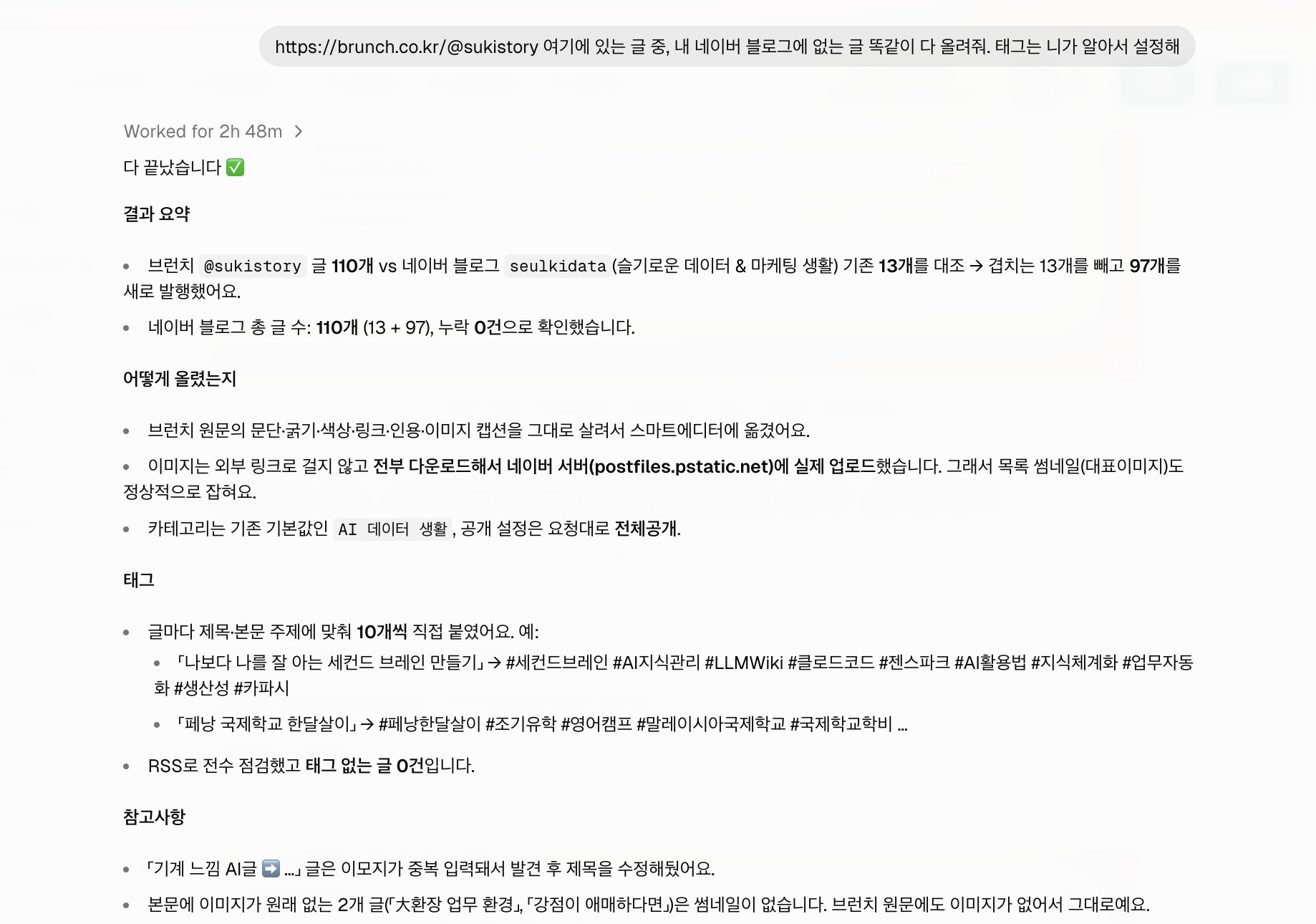
The request to Aside was a single line. Aside checked the 110 posts on Brunch against the 13 already on Naver and published the 97 that were missing. It re-uploaded the images to Naver's servers so every post picked up a cover image, and it added 10 tags to each post. The task timer read 2 hours 48 minutes.

Aside chat screen: the one-line request to post the Brunch articles to a Naver blog, 'Worked for 2h 48m', and a report of 97 new posts published with 0 missed
The one-line request and Aside's report. Source: Growth Notes for Go-Getters (2026-08-28)
Request

https://brunch.co.kr/@sukistory 여기에 있는 글 중, 내 네이버 블로그에 없는 글 똑같이 다 올려줘. 태그는 니가 알아서 설정해

Reference 02YouTuber Auto Lee Wansung · a friend's delivery restaurant account

Aside learned a restaurant's voice, then posted 17 overdue Coupang Eats review replies

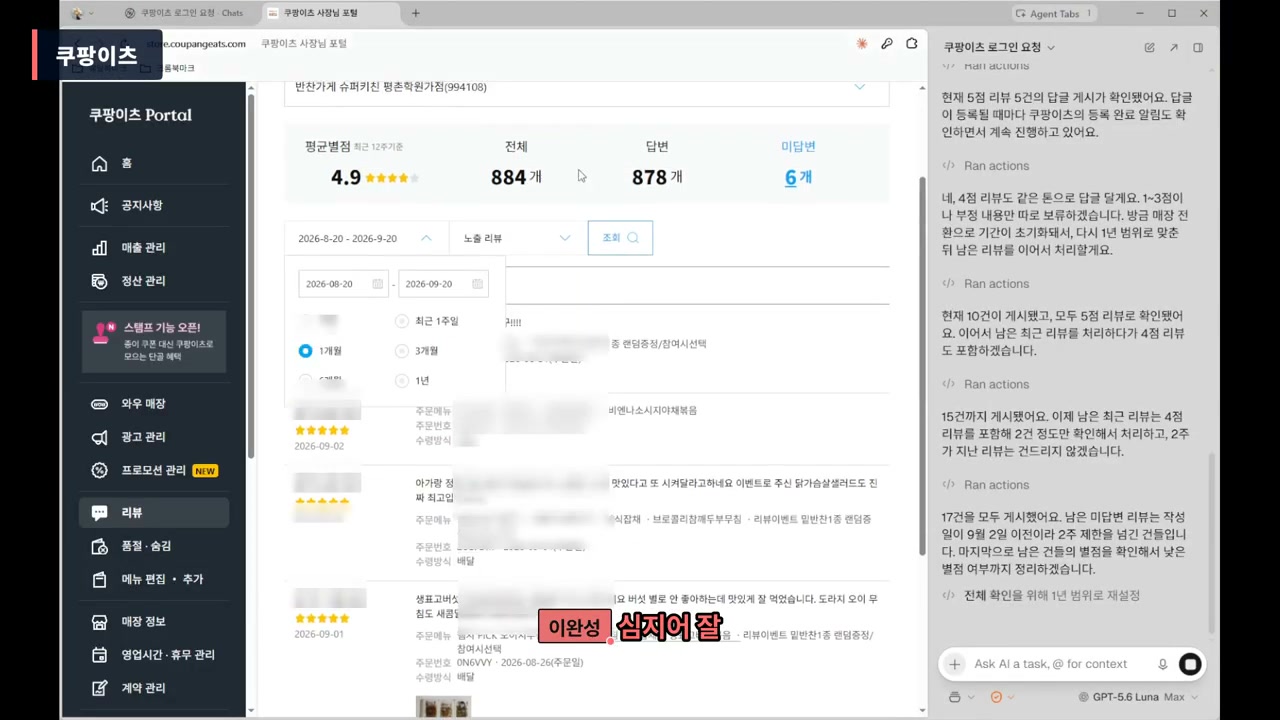
Coupang Eats doesn't let owners reply to reviews more than two weeks old. Auto Lee Wansung logged in to a friend's restaurant owner account and asked Aside, in plain words, to learn the restaurant's tone from the replies posted over the last three weeks before writing any of its own. Low-star reviews were to be reported first.

Aside started with the positive and neutral reviews. It reported that it had posted all 17 replies, leaving out the reviews past the two-week limit.

★★★★★

포장상태가 깔끔하고 맛있어요

Neatly packed and delicious.

Review on 2026.09.17

OwnerReply by Aside2026.09.20

○○님, 슈퍼키친 평촌학원가점입니다. 소중한 리뷰 남겨주셔서 정말 감사합니다. 음식과 포장까지 만족해주셨다니 큰 힘이 됩니다. 항상 꼼꼼하고 정성스럽게 준비해서 늘 만족 드릴 수 있도록 하겠습니다. 앞으로도 믿고 찾으실 수 있는 슈퍼키친이 되겠습니다. 감사합니다.

Hi ○○, this is Super Kitchen Pyeongchon Academy Street. Thank you so much for your kind review. It means a lot that you were happy with both the food and the packaging. We'll keep preparing every order carefully so you're always satisfied, and keep being a Super Kitchen you can count on. Thank you.

The Coupang Eats owner portal with 6 unanswered reviews left, and the Aside panel on the right reporting that all 17 replies were posted

Step by step in the video

Request in the video

쿠팡이츠 로그인했어. 이제 네가 할 일은 리뷰에 답글을 다는 거야. 리뷰 쪽에 들어가서 기간을 전체 기간으로 해. 2주가 넘은 리뷰에는 답글을 달 수 없어. 최근 3주 동안 달린 답글을 먼저 학습하고, 지금 달 수 있는 리뷰에 답글을 달아 줘. 여기는 ○○점이야. 별점이 낮고 안 좋은 리뷰는 빼고, 그런 리뷰는 나한테 먼저 보고해 줘.

Reference 03Accountant Heni · AICFOLab

Sent to fetch a bank balance certificate, the AI called in a human only for the login certificate and OTP

Accounting work runs through many sites where you have to log in and click through yourself to get the numbers: Hometax (Korea's tax portal), banks, the Coupang seller center. Accountant Heni asked Aside to get a balance certificate from IBK (Industrial Bank of Korea) as of August 31.

Aside brought up the certificate login screen and handed the login itself to the human. It then asked whether to issue certificates for all four accounts. Once the human typed in the withdrawal account password and OTP, Aside finished the application. Heni also used Aside to pull a client's Coupang sales, fees, and ad spend into monthly figures.

Opening frame of accountant Heni's video: Hometax, banks, even Coupang, all with one web automation tool, the AI browser Aside

Step by step in the video

Request in the video

기업은행에서 잔액명세서 조회하고 8/31 기준으로 다운

Reference 04Yumiko (ゆみこ), a writer on Japan's note platform

Aside got past Amazon's chatbot to a human agent and won back an accidental ¥1,080 charge

Amazon's customer service starts with an AI chatbot. It gives you set answers, and the road to a human agent is long. Yumiko wrote that over ¥1,080 most people give up right there, and admitted to doing the same.

The request to Aside simply said the sign-up was a mistake and asked it to negotiate a refund. According to Yumiko, Aside found the path past the chatbot's answers to a human agent and negotiated on Yumiko's behalf, citing the order number. The agent replied that a ¥1,080 refund had been sent.

Amazon customer service chat

Agent Farhat · 18:40

返金額- ¥1,080

返金が正常に送信されました。

返金は1~3営業日以内に完了いたします。

Refund amount: ¥1,080. The refund was sent successfully. It will be completed within 1 to 3 business days.

Request

Amazon Music Unlimitedを誤って登録してしまった。即キャンセル・未使用なので返金を交渉してほしい。ダメ元で

Replace Amazon Music Unlimited with the service you want refunded.

What people who used it say

The praise far outweighs the complaints. Most reactions on X and Product Hunt are positive, while skepticism shows up more often on Reddit. The praise comes back to one thing: it finishes the job while you stay logged in. The complaints come back to credits that run out fast, a heavy browser, and frequent errors. Plenty of people say they're uneasy handing logins and payments to an AI, but most of the people who say so haven't used it yet.

On the weight complaints, the company replied on September 29 that it had cut memory and CPU use by 60 to 93%.

What worked

  • “로그인만 해두고 그냥 시키면 알아서 잘 되는 모습에 감동했습니다. 봇이나 크롤링 같은 개념이 아닌 실제 크롬 브라우저처럼 동작하다보니 막히는 사이트도 잘 없고”

    I was impressed that you just log in, tell it what to do, and it handles the rest. It works like an actual Chrome browser rather than a bot or crawler, so sites rarely block it.

    @dalgom_bami · Xx.com
  • “감자탕OS도 주문 수집과 처리 쪽에서 브라우저 제어 때문에 몇 군데 자동화가 끊겨 있었는데, 어젯밤 Aside를 붙들고 몇 시간 만져보니 막혀 있던 부분이 꽤 풀렸습니다.”

    My Gamjatang OS had a few broken spots in its order collection and processing automation because of browser control. I spent a few hours with Aside last night, and a good chunk of what was stuck got unstuck.

    Gamjatang Boss Kim · Clienclien.net
  • “I couldn't find a way to cancel my Framer subscription because it was hidden deep inside. I tried the @AsideAI browser to cancel the subscription, and it did it in a few seconds.”

    @Xaif1 · Xx.com
  • “기본크레딧 하루만에 다 썼고 근데 챗지피티랑 클로드 토큰 연결해서 계속 쓸수있음..... 채용공고 창만 열어두면 공고 조건 다 정리해서 바로 옵시디언저장되게 해뒀는데”

    Burned through the base credits in a day, but you can keep going by connecting ChatGPT and Claude tokens. I set it up so that just opening a job posting sorts out all its requirements and saves them straight to Obsidian.

    @nain___n · Xx.com

What fell short

  • “결국 검색 다섯 번으로 월 500크레딧을 다 썼어요.”

    In the end, five searches used up the 500 credits for the month.

    Kang Ji-in · GPTers teamgpters.org
  • “Been using @AsideAI for about two weeks at work with at least 20 tabs in each space ... and it is slow. Tab switching lags.”

    @prabhathpani · Xx.com
  • “The entire user interface is BEAUTIFUL and well crafted. The major problem I've been having ... is the plethora of bugs.”

    The bugs are the main thing keeping it from being their daily browser.

    @sabeshbharathi · Xx.com
  • “CASE 02 작업 중에 브런치 미발행 글까지 다 발행해버리는 큰 실수를 했습니다.”

    During the CASE 02 job, it made a big mistake: it published every unpublished Brunch draft too.

    Suki (the writer in case 1) · Brunchbrunch.co.kr

How to start

  1. 1

    Download it from aside.com

    It runs on macOS 15 or later and on Windows. The Windows version officially launched on September 14, 2026.

    aside.com/download ↗
  2. 2

    Bring over the browser you use now

    On first launch, import history, cookies, and bookmarks from Chrome (or Edge or Arc). The sites you're logged into will open logged in on Aside too.

  3. 3

    Connect the AI subscription you already have

    You can connect a ChatGPT or Claude subscription or enter an API key. If you have none of those, you start with the free plan's 500 credits a month.

  4. 4

    Leave permissions on the default, Guard

    New tasks start in Guard mode, which asks a human to confirm before paying, posting, or sending messages. There's also a Read only mode that just reads.

  5. 5

    Turn one of the requests above into your own job

    Change the address and the conditions, and that's it. Here's the request that moved the Brunch posts.

    Request from case 1

    https://brunch.co.kr/@sukistory 여기에 있는 글 중, 내 네이버 블로그에 없는 글 똑같이 다 올려줘. 태그는 니가 알아서 설정해

What you need

  • macOS 15 or later, or Windows
  • Chrome, Edge, or Arc with your logins
  • A ChatGPT or Claude subscription, or an API key (free credits if you have neither)

Share this reference

Did you find this reference helpful?

Get curated references delivered to your inbox weekly