Loading...

Computer-use agent · ChatGPT Computer Use

GPT-6 Astra took over the mouse and keyboard to fill in a grant application and edit a client's video in Premiere

Turn on computer use in the ChatGPT desktop app and hand GPT-6 Astra a job, and the AI watches the screen and runs the programs on your computer with the mouse and keyboard. No uploading files, no connecting apps. Here are real jobs people gave it: a form in Hangul, an edit in Premiere, customer inquiries across online stores.

Oct 6, 2026·3 cases

#Data entry#Video editing#Customer support

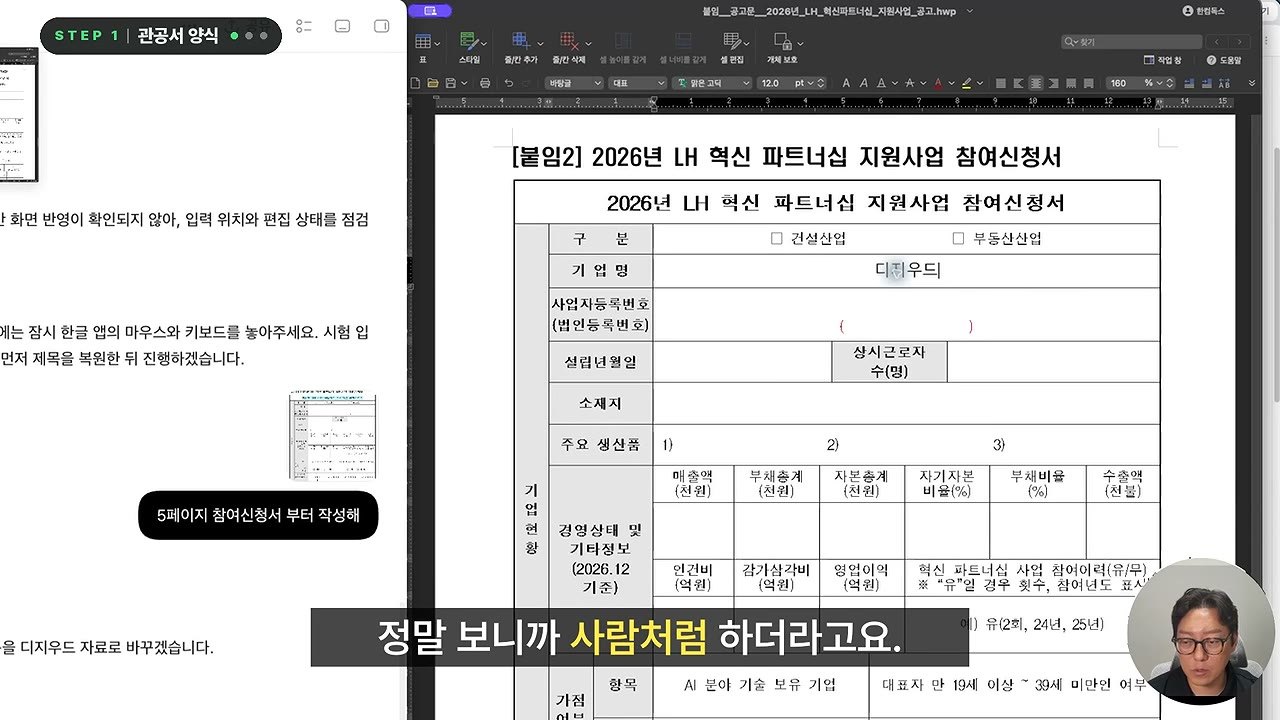
Left, the Codex chat window with the AI reporting progress. Right, a company name typed into the company-name field of a 2026 support program application in the Hancom word processor
GPT-6 Astra filling in a support program application in the Hancom word processor. Source: Autofrog on YouTube

The video at the top shows the owner of a manufacturing business handing this year's support program application to GPT-6 Astra. The AI read the blank form open in Hangul, the Hancom word processor, straight off the screen, then typed into each field itself while checking last year's application PDF. The owner said “마우스 움직이고 키보드 누르고 하는게 사람처럼 해서 깜짝깜짝 놀래기도 했거든요” (the way it moved the mouse and pressed keys like a person kept catching me off guard).

After OpenAI introduced GPT-6 Astra on September 3 as "The world's best computer use model," videos of people in Korea handing it real work followed one after another, each drawing 20,000 to 40,000 views. A user on the Korean forum Clien who had it build a math worksheet as a Hangul file wrote “한글프로그램을 열어서 직접하더라구요. 파일조작이아니라 컴퓨터조작입니다” (it opened the Hangul program and did it directly; it isn't manipulating files, it's operating the computer).

Instead of taking a file and editing it, the AI captures the screen, reads it, and moves the mouse and keyboard. That means it can take on work in programs that had no way to connect, like Hangul, Premiere, or a company's ERP.
Reference 01Manufacturing business owner · YouTube channel Autofrog (runs AI automation courses)

The AI filled in a support program application in Hangul, then keyed a supplier's invoice into the ERP

The owner's request for the application

오른쪽 한글독스에 hwp lh혁신 파트너십 지원사업 참여신청서가 열려 있어 6~8페이지의 빈양식을 채워줘 참고할 자료는 2025년도 작년에 신청했던 지원사업 신청자료가 5 6 7 pdf 파일을 확인하고 그 내용을 기준으로 양식을 작성하자, 열려 있는 한컴독스에 내가 볼수 잇게 입력해봐 지금 6페이지 7페이지에 채워진 내용은 예시자료고 실제 내용을 우리 자료에 맞도록 입력해야돼

At first the AI went looking for the document in a browser tab, and the owner had to tell it again: not a tab, the Hancom Docs app. Spell out from the start which program has what open, and you won't need to correct it like this.

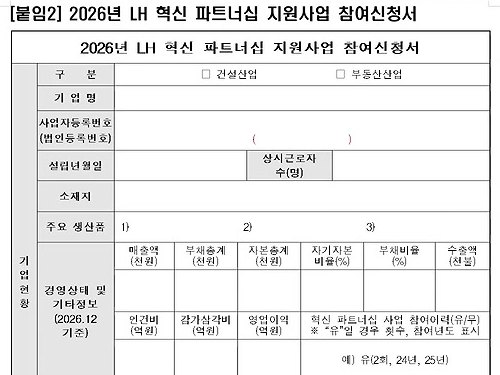
The blank 2026 LH Innovation Partnership support program application
Before: the blank 2026 application
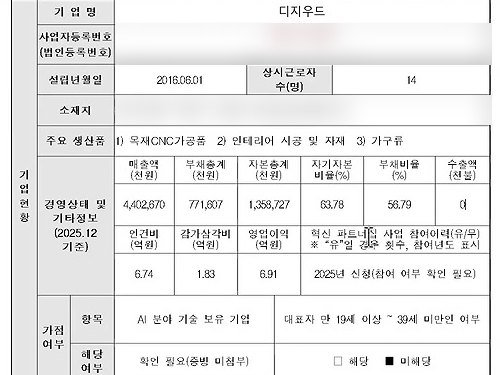
The application filled in with the company name, founding date, main products, and figures such as revenue and total liabilities
After: the application with company details and financial figures filled in

While reading the PDFs, the AI stopped to ask a question. A memo in the same folder said some figures had been doubled for filming, and the financial totals didn't add up either, so should it use these numbers as they were? The owner said it was for filming and to use the PDF numbers as is. Midway, when the company name went into the title field, the AI undid it on its own. Another time the screen moved and it kept typing at the old position, putting three contact entries in the wrong fields. It reverted those after the owner pointed them out.

The same owner's request for the ERP entry

거래명세표의 물품 내역을 확인하고 오른쪽 브라우저의 이카운트 ERP의 구매전표를 입력해줘 물품명을 품목코드에서 한글로 검색하면 동일 품목이 있어 품명이 완전히 똑같이 않고 자작, 코팅, 6t 이렇게 나무종류, 코팅유유, 두께로 구성되어 잇어 확인해서 입력을 해보자

ECOUNT is a web-based ERP, so the owner logged in ahead of time in the browser in the app's right sidebar before asking.

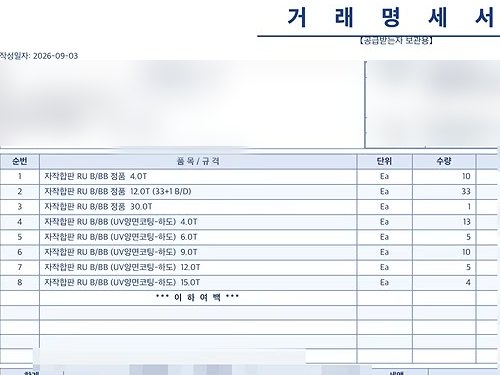
Transaction statement: 8 birch plywood items with quantities 10, 33, 1, 13, 5, 10, 5, 4
The supplier's transaction statement (dated September 3, 8 items)
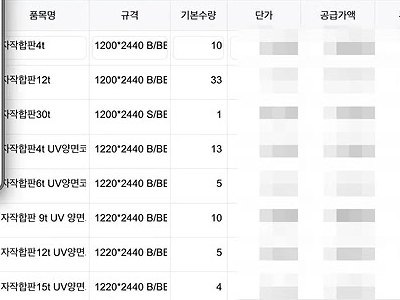
ECOUNT purchase slip: 8 birch plywood items with base quantities 10, 33, 1, 13, 5, 10, 5, 4
The ECOUNT purchase slip the AI entered

For a 30T plywood whose name differed slightly from the ERP item, the AI asked first. Could it enter the standard 30T birch plywood as ERP item 00018, “자작합판30t (S/BB 러시아)” (birch plywood 30t, S/BB, Russia), given that the statement said B/BB? All 8 quantities went in exactly as on the statement, and the AI also asked which receiving warehouse to use before saving the slip.

Reference 02Kang In-hwan, YouTube agency owner · runs a paid AI editing community

The AI ran Premiere itself to edit a YouTube video delivered to a paying client

Handing Codex the edit for a client's channel, an eyewear shop, Kang asked it to operate Premiere Pro directly and gave it the client channel's earlier videos as reference. The video edited this way went up on the client's channel on September 19.

Kang's requests to Codex (in the order sent)
  1. 1너가 직접 컴퓨터 유스로 해주면 좋겠어
  2. 2기존에 레퍼런스 유튜브 영상을 주면 좀 학습먼저 해볼수 있겟니
  3. 3내가 다음 편집 맡기면 한번에 여기 결과 까지 오게해줄수 있어?

The second request came with the URL of an earlier video from the client's channel. To the third, the AI replied that it had created and saved a skill called “스탠다드 안경 영상 편집” (Standard eyewear video editing). The idea was to have every future video edited to the same standard.

Codex screen: under 'Worked for 1h 19m 56s', a report that the second rimless-glasses video was saved, plus four glasses illustrations the AI made
Codex screen: the AI's report that the second video was saved, and the four illustrations it made
A frame from the client channel's video: next to the optician, an illustration of rimless glasses with burgundy temples and the caption 'Where they sit also changes your look'
The same illustration in the video posted on the client's channel

After Kang said “지금 준비됐어 한번 시작해볼래” (I'm ready now, want to give it a go?), the AI worked on its own for 1 hour 19 minutes 56 seconds. It reported adding cuts, spoken subtitles and burgundy accent captions, illustrations in 10 places, 5 chapters, plus motion, sound effects, and color correction, then saving. Those illustrations and burgundy captions appear unchanged in the client channel's video.

A frame from the client channel's video: a glasses illustration over a ruler, with burgundy captions

It got stuck along the way, too. When clicks on the Premiere timeline, open on a secondary monitor, kept failing, the AI asked for the window to be moved to the center of the main monitor. Asked why it was slow, the AI explained that editing by clicking one step at a time with computer use is slow, because it has to check the screen, act, and then check the result again. For the spoken subtitles, the AI had the Vrew app transcribe the audio, and Kang approved the credits that used.

Reference 03Owner of a clothing store sold across several platforms · YouTube channel Onktree (runs store courses and a membership)

Every 10 minutes, the AI makes the rounds of 9 store channels, collects customer inquiries, and drafts the replies

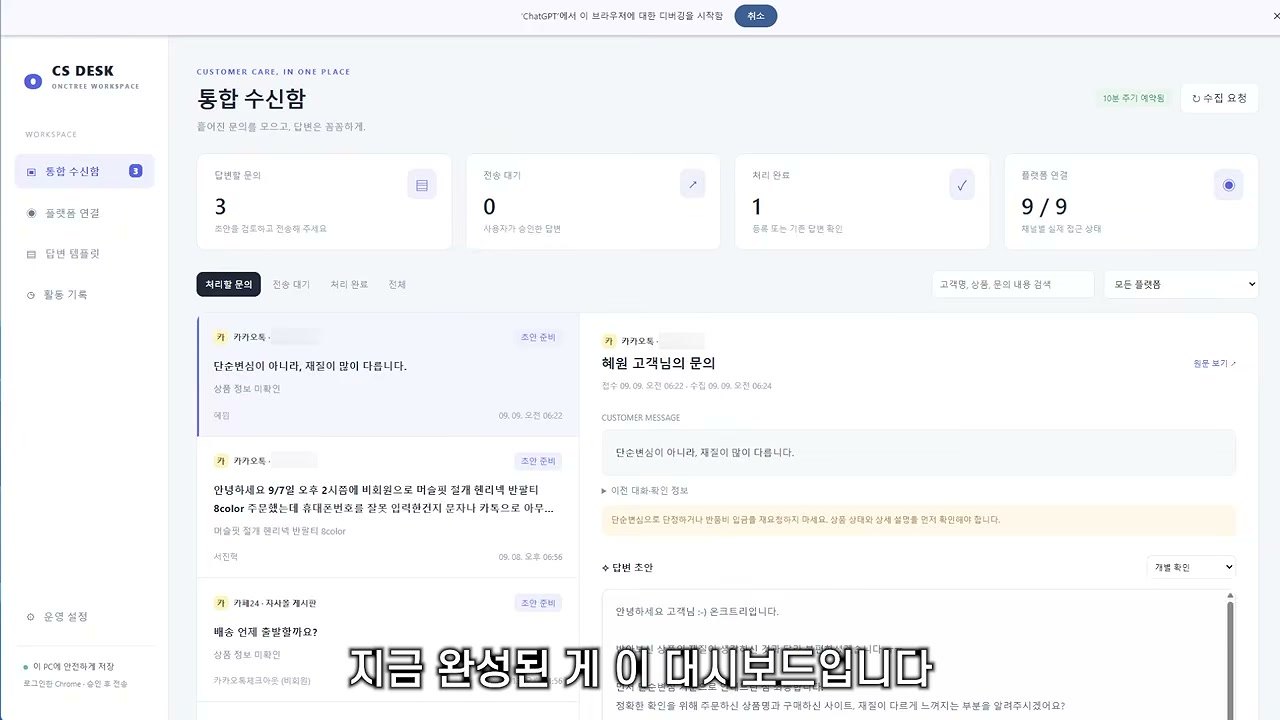
Rather than connecting an API for each channel, such as its own Cafe24 store, Naver Smart Store, the fashion app Ably, and a KakaoTalk channel, the AI operates a Chrome browser that's already logged in and gathers the inquiries itself. Codex built the dashboard too. A person reads each draft, fixes only what needs fixing, and presses send.

Onktree's request (the latter part, visible in the video)

각 플랫폼들 다 로그인 상태고 접속 링크임 지금부터 너가 만들어볼건 CS자동화 프로그램임 일단 대시보드를 하나 만들고 10분마다 CS들을 수집해오는 거임 각 링크에서

The first part pasted in the access link for each platform. Onktree said the next messages gave the action rules, such as sorting inquiry types, drafting replies, and posting the reply on that platform when the send button is pressed, along with the existing reply templates.

CS DESK unified inbox: 3 inquiries to answer, 9/9 platforms connected. A banner at the top says ChatGPT has started debugging this browser
A draft reply to a KakaoTalk channel customer's shipping question, with the restock date left as “[입고/출고 예정일 확인 필요]” (restock/ship date to be confirmed)
A draft that leaves the unknown restock date as a placeholder, “[입고/출고 예정일 확인 필요]” (restock/ship date to be confirmed). The person fills in just that part and sends.

Asked in the comments whether this approach breaks the channels' policies, Onktree replied “그 부분은 한번 알아봐주셔야 할 거 같아요” (you'll need to look into that part yourself).

What people who used it say

What people who tried it welcomed most was being able to hand over work in programs that had no way to connect. The complaints gathered around usage limits, speed, and Windows. Many posts in particular say that running computer use on the Plus plan filled the 5-hour limit within minutes.

What worked

  • “문구정도만 수정해서 30분이상걸리던걸 10분만에 해결했습니다.”

    I only had to fix some wording, and what used to take 30+ minutes was done in 10. They had it make a math worksheet covering a few textbook pages in the format of an existing HWP file, and it kept the format and filled in the equations too.

    Yuseonhui-ppalla · Clienclien.net
  • “Something that would have taken her +30 hours, done in 3h 30 minutes.”

    The work was their fiancée's: the same task for three clients, on a work platform that doesn't connect to Codex, so it ran through computer use.

    u/Lonely-Brief-3798 · Redditreddit.com
  • “it's still wanky but Astra is the first model that feels like it actually does what you want some what reliably”

    u/OWazabi · Redditreddit.com
  • “In Computer Use Codex is just so much better overall especially in Astra model so far”

    From someone 18 months into Claude's 20x plan.

    u/Creative-Ganache1086 · Redditreddit.com

What fell short

  • “I'm on plus and I blew through my entire quota in FIVE MINUTES of computer use.”

    u/Siciliano777 · Redditreddit.com
  • “Astra의 컴퓨터 유즈 능력은 맥에서 차원이 다르네요.”

    Astra's computer use is on another level on Mac. After trying it on Windows, the writer's first take was that it wasn't as good as expected. Mostly Excel work, and much faster and more accurate on Mac.

    71_102 · Threadsthreads.com
  • “근데 아스트라 너무 느리지않나요? 뭐 일시켜놓으면 기본 5분~10분에 좀 어려운거 오더넣으면 30분씪쓰던데”

    Isn't Astra way too slow, though? Any task takes 5 to 10 minutes by default, and anything a bit harder takes 30 minutes each.

    @junestudio · YouTube commentyoutube.com
  • “I asked Astra to find the lost session, and next thing I know it's prompting for full computer control to drive Finder.”

    The job only needed reading files on disk.

    wilj · Hacker Newsnews.ycombinator.com

How to start

  1. 1

    Install the ChatGPT desktop app and sign in with Plus ($20 a month) or higher

    It works in the macOS and Windows apps. GPT-6 Astra is available from Plus, but Plus allows only about 5 to 45 Astra messages per 5 hours, so it gets tight fast. From Pro ($100 a month), there's no 5-hour limit.

    Download the ChatGPT desktop app ↗
  2. 2

    Turn on the Computer Use plugin in Work or Codex

    In the top left of the app, pick ChatGPT and switch to Work, or pick Codex. Install the plugin under Plugins > Computer Use and turn on the server and skill toggles. On macOS, allow Screen Recording and Accessibility permissions so the AI can see and control the screen.

    OpenAI Computer Use docs ↗
  3. 3

    Use GPT-6 Astra for hard jobs and GPT-6.1 Sol for simple repetition

    OpenAI recommends Astra for hard jobs that require judging what's on screen. It introduced GPT-6.1 Sol, released September 29, as nearly as good at computer use for a fifth of Astra's token price. If you hit the limit quickly, try Sol first.

  4. 4

    Name the program, the window, and the task

    Put @Computer or @AppName in your request, and spell out what's open in which window, which material to work from, and how far to go. A permission prompt appears the first time it uses each program. OpenAI advises handing over steps that involve passwords, certificates, or payments only while a person is watching the screen. On Windows, the AI uses the mouse and keyboard while it works, so you can't use that PC for anything else in the meantime.

What you need

  • ChatGPT Plus ($20 a month) or higher
  • The ChatGPT desktop app (macOS, Windows)
  • A computer with the program you want to hand over open

Share this reference

Did you find this reference helpful?

Get curated references delivered to your inbox weekly