Loading...

AI coding tool feature · Claude Code Mods

Tell Claude Code what bugs you, and Claude builds the fix into its own screen, from usage bars to right-to-left Hebrew

With Claude Code Mods, released October 1, you just tell Claude Code "I want this always visible" or "let me know this way," and Claude builds the feature itself and attaches it to the Claude Code screen. Mods other people made install in one line. Here are the screens of people who fixed their own annoyances this way.

Oct 6, 2026·4 cases

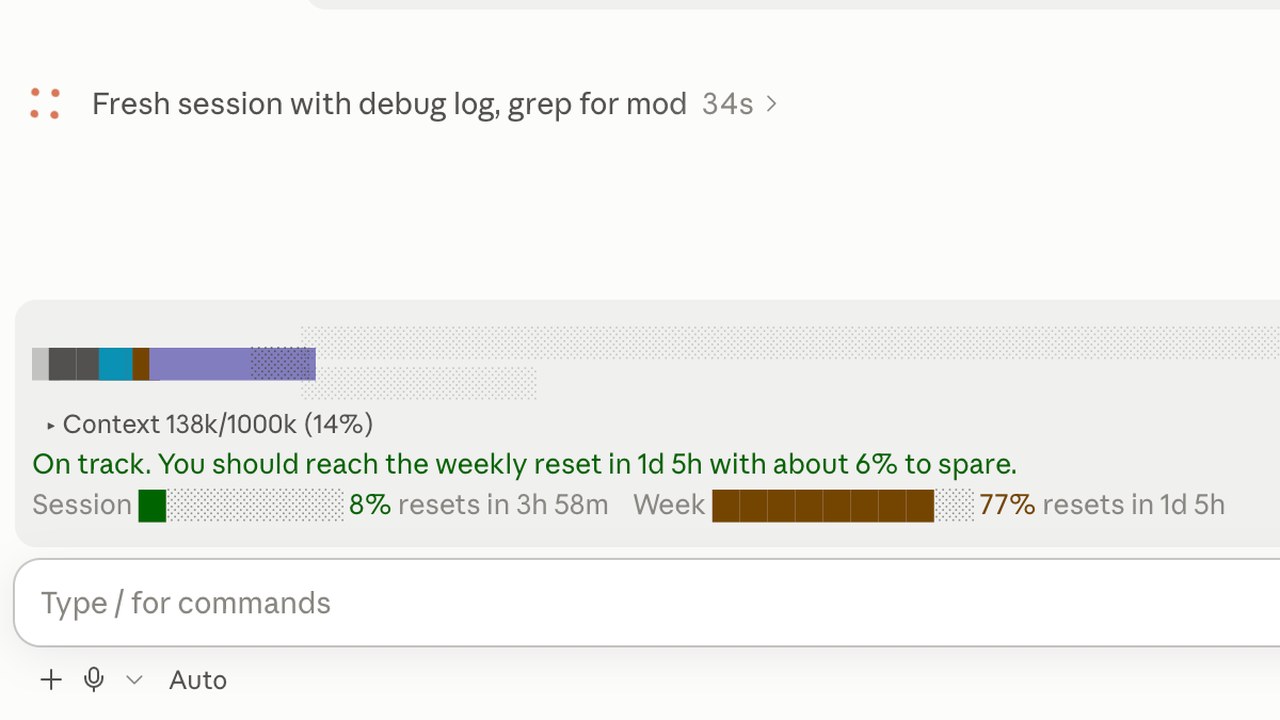
Right above the input box in the Claude Code desktop app: a colored context bar, the line 'On track. You should reach the weekly reset in 1d 5h with about 6% to spare.', and session and weekly usage bars
The usage bar Reddit user Paker93 attached above the input box. Source: r/ClaudeCode

The screen at the top is a usage bar that Reddit user Paker93 attached to the Claude Code desktop app. It used to be one small circle, and you had to click it to see what was filling up and by how much. Now, right above the input box, context shows as a bar colored by category, and the weekly limit stays in view with a forecast of how much will be left at reset at the current pace, here about 6%. "Took two prompts," Paker93 wrote.

Anthropic's October 1 post announcing the feature drew 4.36 million views on X. During launch week, Reddit's Claude Code board filled up with mods that fixed people's own annoyances: usage bars, notifications, language display.

A mod is a small program that steps in whenever Claude Code runs a tool or draws its screen. Describe what you want in words and Claude writes the mod and attaches it, and mods made by others install like plugins. Unlike the existing hooks, which you set up in config files, mods can draw new panels and buttons on the screen.

Reference 01Three Claude Code users · the same Reddit thread

One person's request, reworked by the next, became a mod anyone can install within a day

Paker93, who built the usage bar at the top, posted the requests sent to Claude in a comment.

Paker93's requests (in the order sent)
  1. 1Create a mod that draws my context window as a stacked bar above the prompt, one color per category like /context, toggled with /context-bar.
  2. 2The usage page in Claude settings also shows a very useful prediction of when I will run out of credits given the current usage; can you check what I'm talking about and add it to the usage in our mod? This is the page I'm talking about (check the screenshot).
  3. 3Excellent, now, enable this mod for all sessions and make it so next time I open claude code it will work and show out of the box

The second request came with a screenshot of the settings page. The third was needed because, by default, a mod Claude makes runs only in the session where it was made.

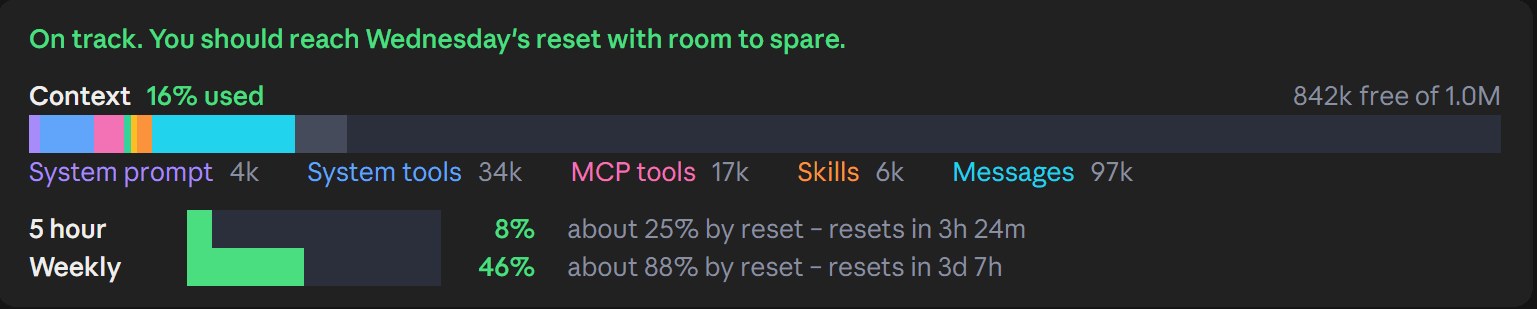
A dark strip reading 'On track. You should reach Wednesday's reset with room to spare.', a context bar colored by category, and 5-hour and weekly limit bars
The bar itsxzy, in the same thread, built by reworking Paker93's requests.
Red text 'At this pace you'll run out before the 12:30 AM reset.', 5-hour usage at 92%, an auto-compact switch, and a Compact button
The mod a third person released with a compact button and auto-compact added. Red text warns when the limit will run out at the current pace.
Install the third person's mod (terminal)

claude plugin marketplace add anantraghunath/claude-code-usage-quota-mod claude plugin install claude-code-usage-quota@claude-code-usage-quota-mod

The README says it needs the latest Claude Code and a login on a Pro or Max plan.

The second person, itsxzy, reworked Paker93's requests to suit their own taste. When Sonnet 5.5 hid the whole bar, switching to Opus 5.5 fixed it in a single request, they wrote. The third person started from those requests and within a day turned them into an installable mod, crediting the original post and requests in the README.

Reference 02A developer running five chat sessions at once · released under the account of observability company Fixter

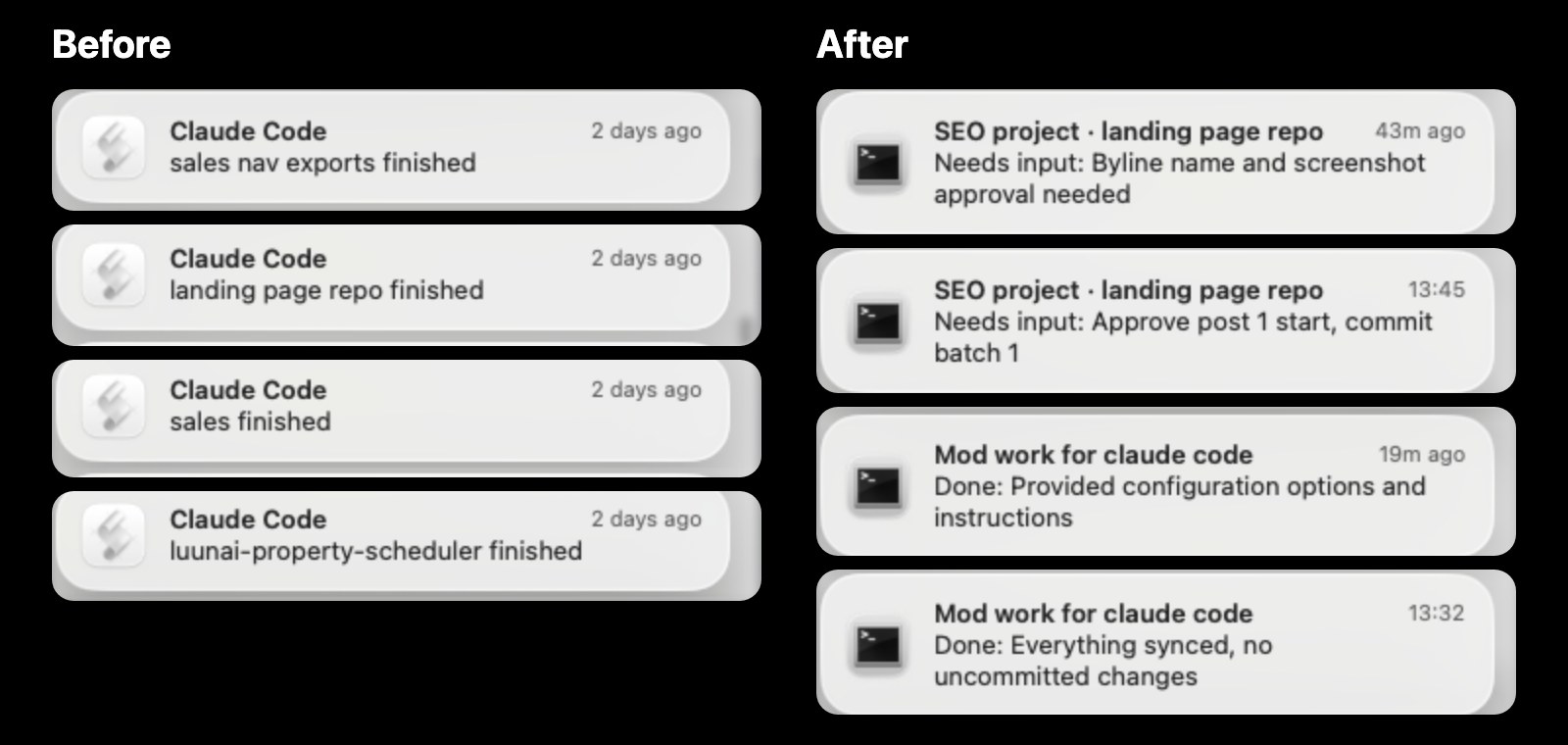
Notifications that only said a job had finished now say which session is waiting on what

This developer keeps about five chat sessions open on one repository, but the notification just said "landing page repo finished," so there was no telling which session wanted what. When mods came out, the developer rebuilt the notifications for personal use. Now each one carries the session title and what it's waiting on in a single line, pings again after 5 minutes without a reply, and opens that session when clicked.

Mac notifications before and after. Left, Before: a notification like 'landing page repo finished'. Right, After: a notification like 'SEO project · landing page repo / Needs input: Approve post 1 start, commit batch 1'
The same Mac notification before (left) and after (right).
Install session-pings (Mac, terminal)

claude plugin marketplace add fixter-dev/session-pings claude plugin install session-pings@session-pings brew install terminal-notifier

Restart the session after installing. Haiku writes each one-line summary, so every notification uses a little of your allowance.

Reference 03A developer who uses Claude Code in Hebrew · Reddit

Hebrew and Arabic displayed backward, so a user who writes in them fixed it with a mod and shared it

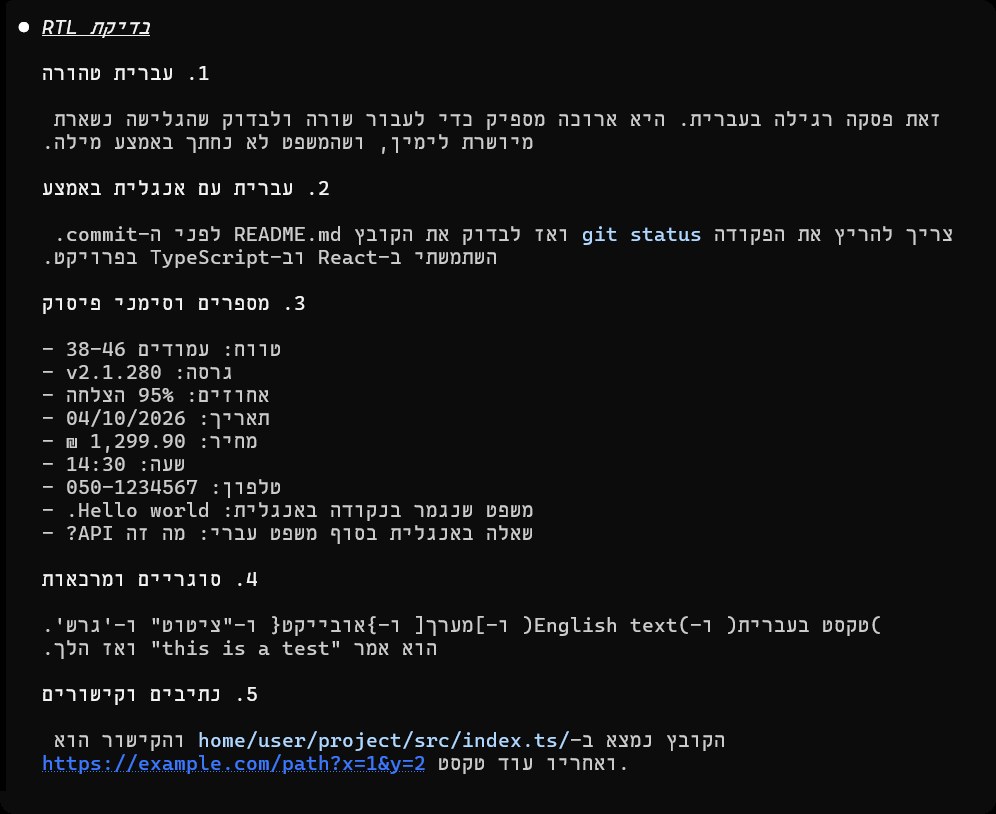
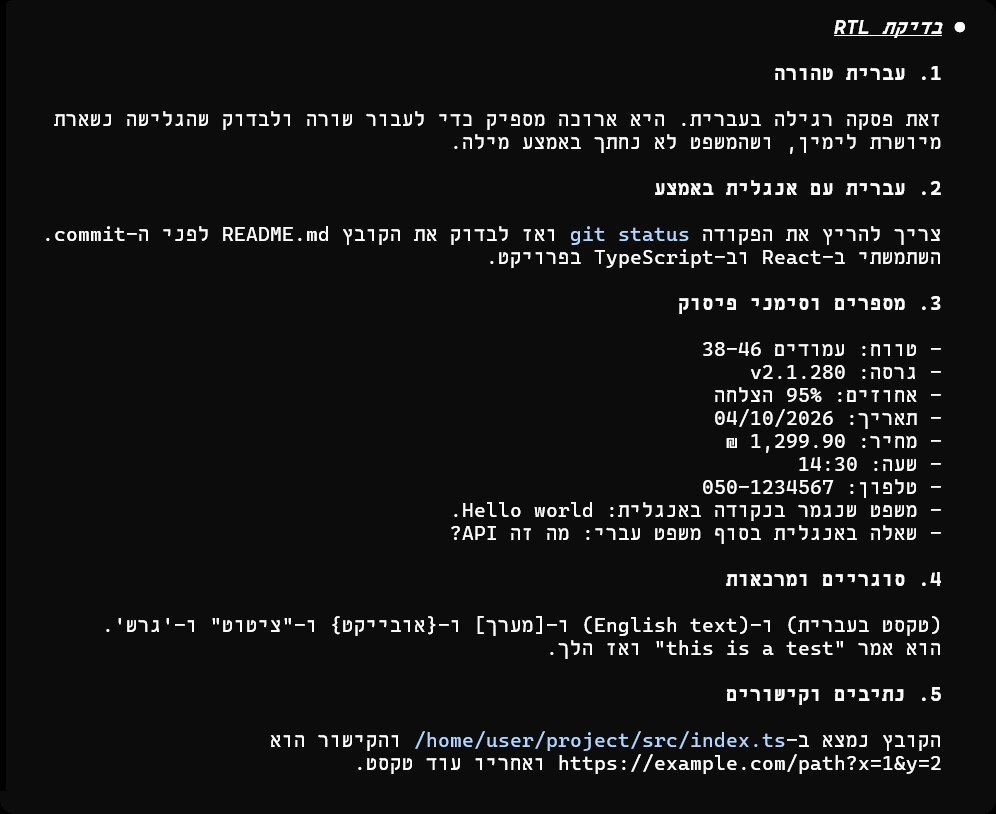
Hebrew, Arabic, and Persian read right to left, but most terminals show that text backward. This user built and released a mod that draws sentences correctly from the right while leaving mixed-in English, numbers, and code as they are. "Now that Anthropic has made the UI customizable with Claude mods, creating an RTL mod is much easier," they wrote.

A Hebrew answer viewed without the mod: left-aligned, with parentheses and list markers flipped
Without the mod: left-aligned, parentheses and list markers flipped
The same Hebrew answer with the mod on: right-aligned, with parentheses the right way round
With the mod: the same answer, reading correctly from the right

The developer also noted a limit: a mod can't redraw the input box or the permission prompts, so those still display backward.

The README's request for having Claude do the install

Install the Claude Code RTL mod for me: https://github.com/ofekbetzalel/claude-code-cli-rtl

For any mod someone has published, you can give Claude the repository URL like this and ask it to install.

Reference 04A user who builds 3D scenes in Blender · Reddit

For 3D scene work, a render queue and a scene thumbnail panel now sit right next to Claude Code

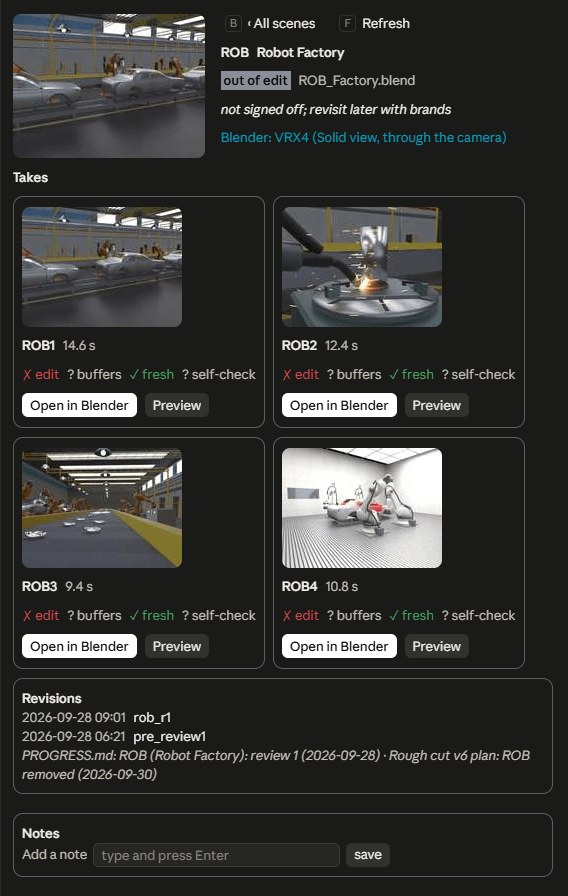
This user, who mostly uses Claude for Blender work, attached a panel as a mod that links to a Blender add-on Claude had built. In a side panel next to Claude Code sit a background render queue, a list of issues to hand to Claude, and a project browser with a thumbnail, shot info, notes, and an "Open in Blender" button for each scene.

The 'ROB Robot Factory' panel beside Claude Code: thumbnails and durations for four takes, Open in Blender and Preview buttons, a September 28 revision history, and a notes field
Four takes of a robot factory scene and their revision history, laid out beside Claude Code.

What people who used it say

People who tried it welcomed that a few requests are enough, and that information they used to go looking for now sits right in front of them. The complaints gathered around the objection that it's "basically just a more advanced form of hooks," other people's mods installing without warning, and mods that vanish in new sessions.

What worked

  • “CC looked at all my hooks, commands, skills, and claude.md and 30 minutes later I have an amazing system.”

    All they did was give it the launch post URL and ask, "This just came out. How can we use it?"

    u/LordLederhosen · Redditreddit.com
  • “Seeing the limits consumption right there while using auto compact has definitely helped me extend my sessions far longer and helped me stop blazing through my usage.”

    u/Antpocalypse_7 · Redditreddit.com
  • “Mods are super easy to make and test; I did this from Claude remote control. Defos my favorite feature in a long while!”

    Built from a phone, through remote control.

    Kurt Buhler · Xx.com
  • “I already tried to have Claude Code write handoff documents pre autocompact window with hooks, but with modding the solution gets a LOT better.”

    u/speciallight · Redditreddit.com

What fell short

  • “At first I was excited, but this is basically just a more advanced form of hooks.”

    The official docs name the difference: unlike hooks, mods can draw on the screen and rewrite events.

    u/OofWhyAmIOnReddit · Redditreddit.com
  • “It installed like any other mod, with no warning about either, and both worked.”

    They uploaded a test mod that runs a program and writes files to the home folder. It installed from the desktop app's list with no warning, and both actions ran. The list looks like an app store, which makes it easy to assume mods are reviewed.

    secondarykey · GitHub issuegithub.com
  • “I've made a few mods, but when I open a new session and try to use the mod, it says the mod doesn't exist.”

    Mods Claude makes run only in the session where they were made. To keep using one, you have to move it.

    @ryguy-c3f · YouTube commentyoutube.com
  • “I will say that setting this up was a major pain. It often didn't work and took a lot of troubleshooting, which isn't ideal for something that should be easy to throw together in a prompt or two.”

    u/MRC2021 · Redditreddit.com

How to start

Mods made by others install in one line, like plugins. But mods run without a sandbox, with the same permissions as Claude Code, so they can read and write your files and connect to the network. Before installing, check what a mod does with claude plugin validate, and only install mods from sources you trust.

  1. 1

    Get a paid plan that includes Claude Code, and the latest version

    Claude Code comes with Claude Pro ($20 a month) and up. Mods are on by default from terminal v2.1.287 and desktop app v2.1.286, so there's nothing to switch on. In the VS Code extension's chat window, screens drawn by mods don't show.

    Claude Code mods docs ↗
  2. 2

    Describe what bugs you and ask for a mod

    After writing the mod file, Claude asks whether to load it in this session right away. Choose 'Enable for this session' to turn it on immediately. If something's off, say so, and it fixes the mod and reloads it.

    The first sample request in the official docs

    make a mod that shows the current git branch above the prompt

    Replace the git branch with whatever you always want to see, or the behavior you want to change.

  3. 3

    To keep it, ask for it to load in every session

    Mods Claude makes run only in the session where they were made, and they get deleted after a while. Ask for it to load in every session, like Paker93's third request above, or move the mod folder into your own folder and load it as a plugin.

    Creating mods docs ↗

How Korean YouTubers asked for it

These are requests two YouTubers wrote while building mods on camera. Gaebal Dongsaeng's advice is to put four things in the request: placement (where to draw it), data (what to show), look (how it should appear), and exceptions (what to do when something fails).

Editor P's request (file explorer)

이 프로젝트 폴더에 모드를 하나 추가할거야 기능은 파일 탐색기 기능인데 오른쪽에 파일 탐색기를 추가해서 그 파일 탐색기를 이용하면 내 프로젝트 폴더에 뭐가 있는지 볼 수 있게 해주면 돼. 파일을 멘션하기 편하도록 멘션할 수 있는 버튼 기능도 추가해서 파일 탐색기 기능을 만들어줘 .

At first it attached above the input box instead of in a right-hand panel, so it had to be asked again. To get a right-hand panel, switch to /tui fullscreen and widen the terminal window.

Gaebal Dongsaeng's request (fare meter in Korean won)

Claude가 일하는 동안 스피너 옆에 이번 요청의 요금을 원화로 보여주는 mod 만들어줘. 요금은 $.session.usage()의 cost.usd를 쓰고 환율은 1400원으로 해줘. 예: Thinking · 🚕 ₩120…

The meter amount is an estimate that converts token usage to API list prices. It isn't money billed separately to subscribers.

What you need

  • Claude Pro ($20 a month) or higher
  • Claude Code terminal v2.1.287 or desktop app v2.1.286 or later

Share this reference

Did you find this reference helpful?

Get curated references delivered to your inbox weekly