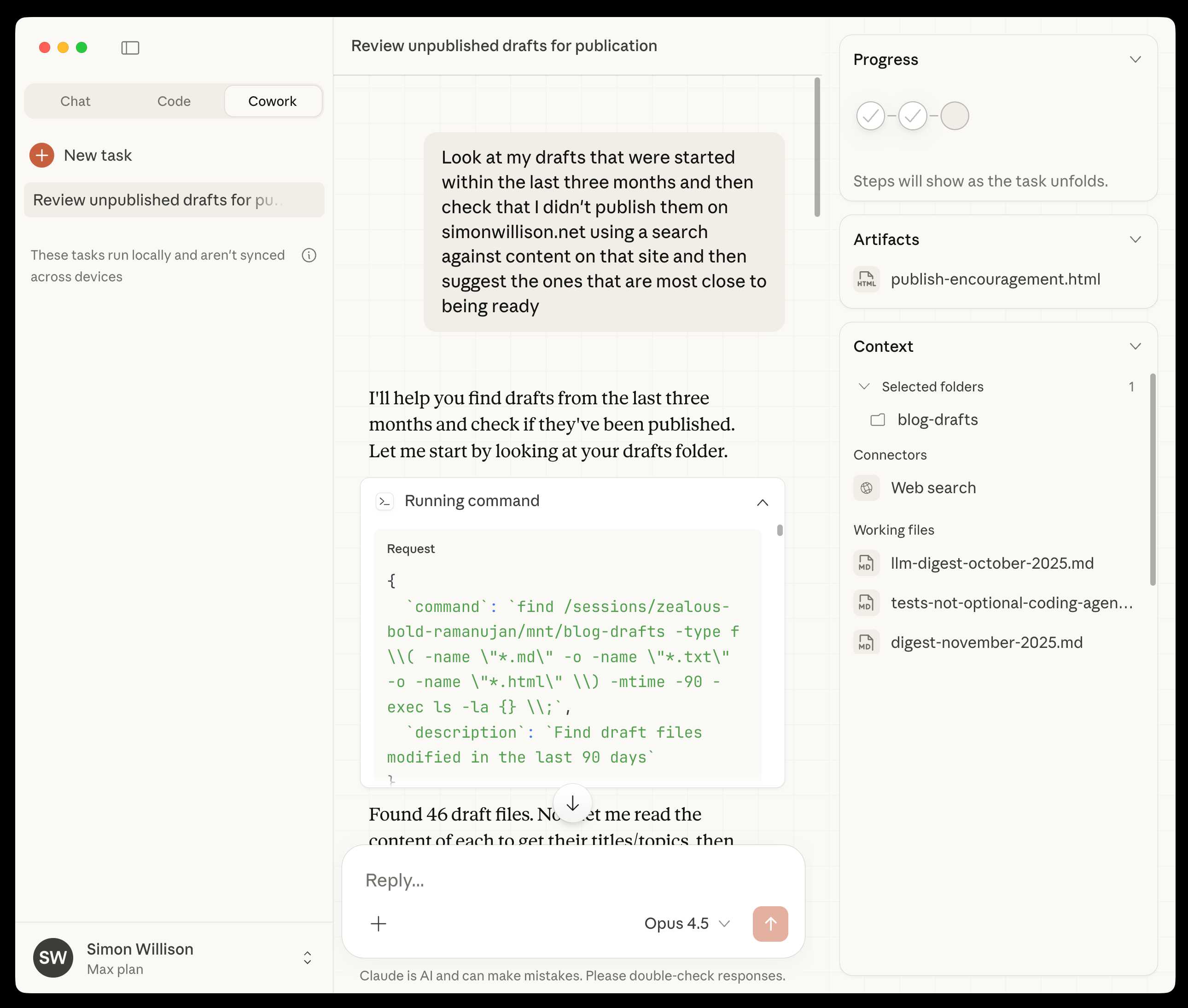
When Claude Code exploded among developers, non-developers asked the obvious question: "Can I use this too?" Anthropic's answer has arrived. Claude Cowork — a desktop AI agent that works without code, without a terminal. Just point it to a folder and tell it what to do.
What Is It?
Claude Cowork is Anthropic's desktop AI agent, released on January 12, 2026. The official tagline says it all — "Claude Code for the rest of your work." It brings the same agentic capabilities that Claude Code gave developers to anyone, regardless of coding ability.
The workflow is remarkably simple. Open the Cowork tab in the Claude Desktop app, point it to a folder, and say "organize this folder." That's it. The AI builds a plan, reads your files, categorizes them, renames them, and hands back the results. If regular Claude chat "told you how," Cowork "does it for you."
The origin story is interesting. Claude Code was built as a coding tool, but developers started using it for everything — file organization, research compilation, report writing. Anthropic noticed and decided to open it up to non-developers. And here's the kicker: Cowork itself was built using Claude Code in roughly two weeks. AI building AI tools.
The impact was staggering. Right after Cowork launched, roughly $285 billion in market cap evaporated from US software stocks. The term "SaaSpocalypse" was coined. Project management tools, document automation platforms, data analysis suites — the fear that a single AI agent could replace core SaaS functionality swept the market.
On February 10, the Windows version launched with full feature parity to macOS. With access to roughly 70% of the world's desktops, Cowork's reach is set to grow even further.
What\'s Different?
Previously, automating work with AI required writing Python scripts or learning tools like n8n. Claude's chat just told you "here's how to do it" without actually doing it. Cowork tears down that wall entirely.
| Traditional Approach | Claude Cowork | |
|---|---|---|
| File Organization | Manually move/rename one by one | Auto-categorize with one sentence |
| Report Writing | Collect data → organize → format manually | Point to folder, say "make a report" |
| Data Analysis | Spreadsheets/Python manual work | Analyze files → insights → PDF report |
| File Conversion | Multiple online converter sites | DOCX→PDF, image compression, all at once |
| Required Knowledge | Coding/automation tool expertise | Plain language is enough |
| Environment | Terminal/CLI | Desktop app GUI |
Simon Willison (prominent developer and blogger) put it well: "Claude Code was really a 'general-purpose agent' disguised as a 'developer tool.' All it needed was a UI that doesn't scare non-terminal users and a name that doesn't intimidate non-developers." Cowork is exactly that answer.
Especially noteworthy are the 11 open-source specialist plugins released on January 30. They cover sales, finance, legal, marketing, customer support, data analysis, product management, and more. Tasks that used to require SaaS subscriptions costing thousands per year can now be handled with free plugins.
Cowork vs Claude Code vs Claude Chat
Claude Chat "tells you," Claude Code "builds for developers," and Cowork "does it for anyone." They share the same agentic architecture, but Cowork swaps the terminal for a familiar desktop app UI.
Real-world use cases are impressive. One user built a YouTube notification bot and a channel discovery bot with Cowork — without ever having used Python. In another test, it organized a Downloads folder with 186 files into 11 clean subfolders, deleted 27 duplicates, and renamed files like "IMG_7818.PNG" to meaningful names based on their content.
The bottom line: Cowork is "the easiest way for non-coders to use an AI agent." It's built for planners, marketers, entrepreneurs — anyone who doesn't know code but is tired of repetitive work.
Quick Start Guide
- Install Claude Desktop
Download the macOS or Windows app from claude.com/download. If you already have it installed, update to the latest version. - Select the Cowork Tab
You'll see three tabs at the top: Chat, Code, and Cowork. Click Cowork to switch to agent mode. Requires a Pro ($20/month) plan or higher. - Point to a Folder + Request a Task
Check the "Work in a Folder" box, select your target folder, and describe what you want in plain language. Something like "Organize the PDFs in this folder by date." - Monitor Progress
The right sidebar shows the AI's plan and real-time progress. You can redirect mid-task or queue additional requests. - Extend with Plugins
Go to Settings > Connectors to link external services, and browse the plugin marketplace for specialist tools in sales, finance, marketing, and more.
Good to Know: Security & Limitations
Cowork has direct access to your local files. Don't connect folders containing sensitive financial documents or personal data. Prompt injection risks exist too. It's still in research preview, so expect occasional mistakes on complex tasks. Always back up important files before use.