Loading...

Design skill · Hallmark v2

I'm not a designer. I handed my blog's design to AI, and now the old version looks embarrassing

Add Hallmark to a coding AI like Claude Code or Codex and ask for a landing page. Before building anything, the AI asks who the page is for and what visitors should click, then picks a theme. It opens the finished page in a real browser, finds the spots that look AI-made, and fixes them. A v2 rebuilt from scratch came out on October 23 (Korea time). You can also have it redesign a page you already have while keeping the links and form fields intact, or just audit it. We collected cases from people who handed it their own sites.

Oct 26, 2026·3 cases

The maker's v2 announcement video. It compares a page built without Hallmark to one built with it. The issue counts on screen come from Hallmark's own checker. Next comes an existing page before and after a redesign. Source: Hassan (@nutlope) on X

Early on October 23 Korea time (October 22 UTC), Hassan of Together AI, who built the design skill Hallmark, announced v2 on X: "We rebuilt Hallmark from scratch." The v2 post drew 148,000 views and 3,395 bookmarks in four days. The v1 launch post from May passed 890,000 views and 10,000 bookmarks in the five months through October 26.

Brian Porter, CTO of an automotive data company in Munich, is open about not being a designer. After redesigning a personal blog with v1 in July, Porter wrote: "What came out was so much better it made the old version look embarrassing."

Hallmark flags these as signs a page was made by AI: a small label above every heading, a headline with one word painted a different color, an email signup box at the bottom of every page, and a form that sends nothing and just says thanks.

In the maker's demo, the AI doesn't start building right away. It asks first. Given the single line "/hallmark a site for Five Mile Gin, a small distillery that forages its botanicals", the AI opened with "Any photos of the still?", "Who buys a bottle?", and "The one thing to click?"

Together AI released the skill for free, and v2 ships with 48 themes and 755 openly licensed photos. According to the maker, Hallmark picks three themes that fit the request and checks the finished page in a real browser at eight screen widths. When it redesigns an existing page, it first records the links, form fields, and headings, and counts the run as a failure if even one goes missing.
Reference 01Brian Porter, CTO of an automotive data company in Munich · personal blog (July, v1)

Pick one of four design directions, and the AI rebuilds the whole blog, screenshotting desktop and mobile on its own

Until then, Brian had built the blog by laying it out in Google Stitch and polishing it in Claude Design. After installing Hallmark as a Claude Code skill, Brian asked for a redesign of the blog and homepage. The AI first checked the scope: "just the blog, or everything?" It then offered four distinct design directions. Once Brian picked one, it asked for another round of choices within that direction, such as whether to add dark mode.

From there, the AI worked alone. It drove the browser itself, took desktop and mobile screenshots, and kept checking and fixing its own work for more than 40 minutes. Brian wrote: "It doesn't just hand me pixels. It does the part I'd skip."

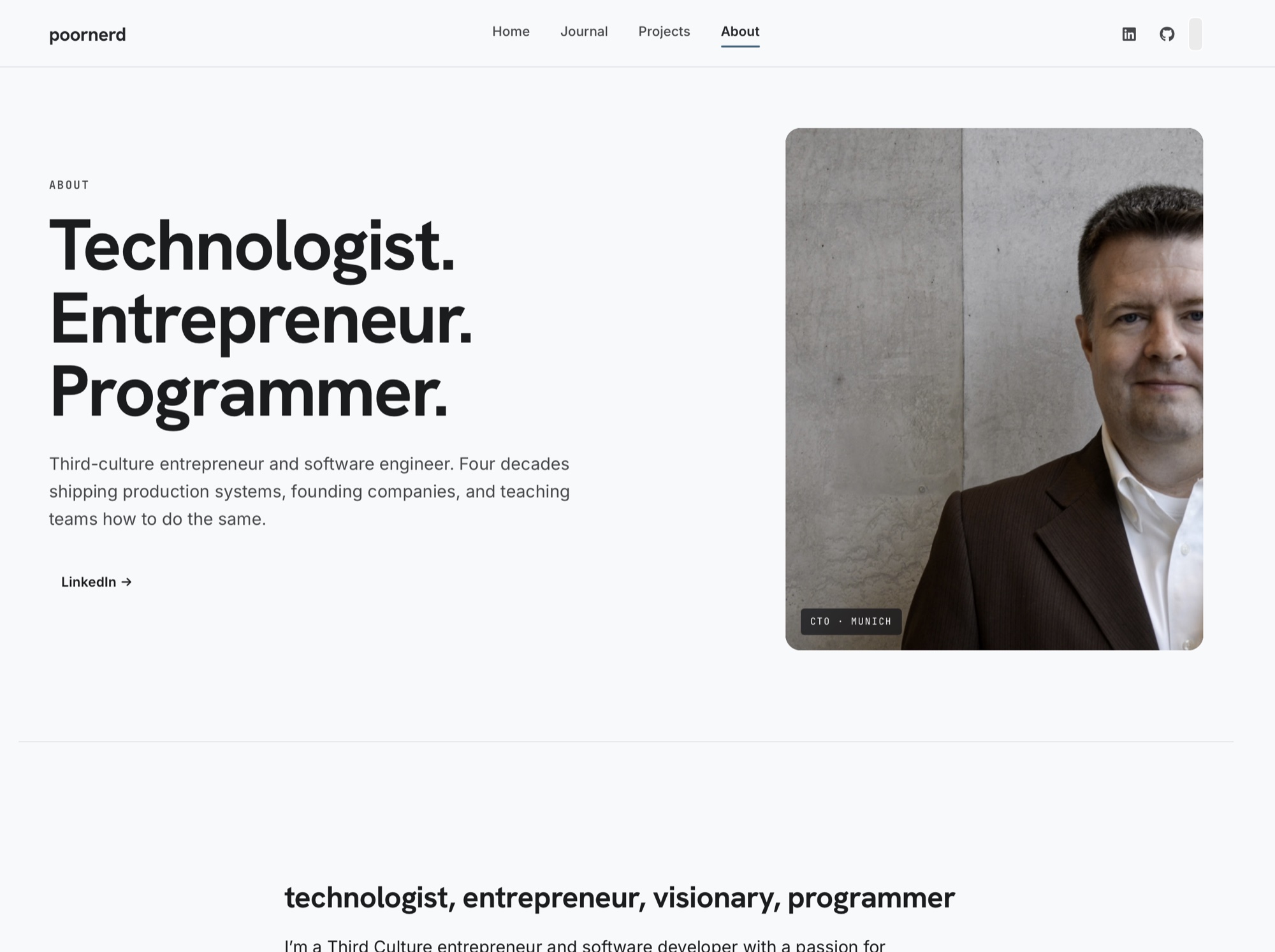
About page of the previous poornerd design, with the line 'Technologist. Entrepreneur. Programmer.' on a light gray background
The About page of the old design, built with Google Stitch and Claude Design.
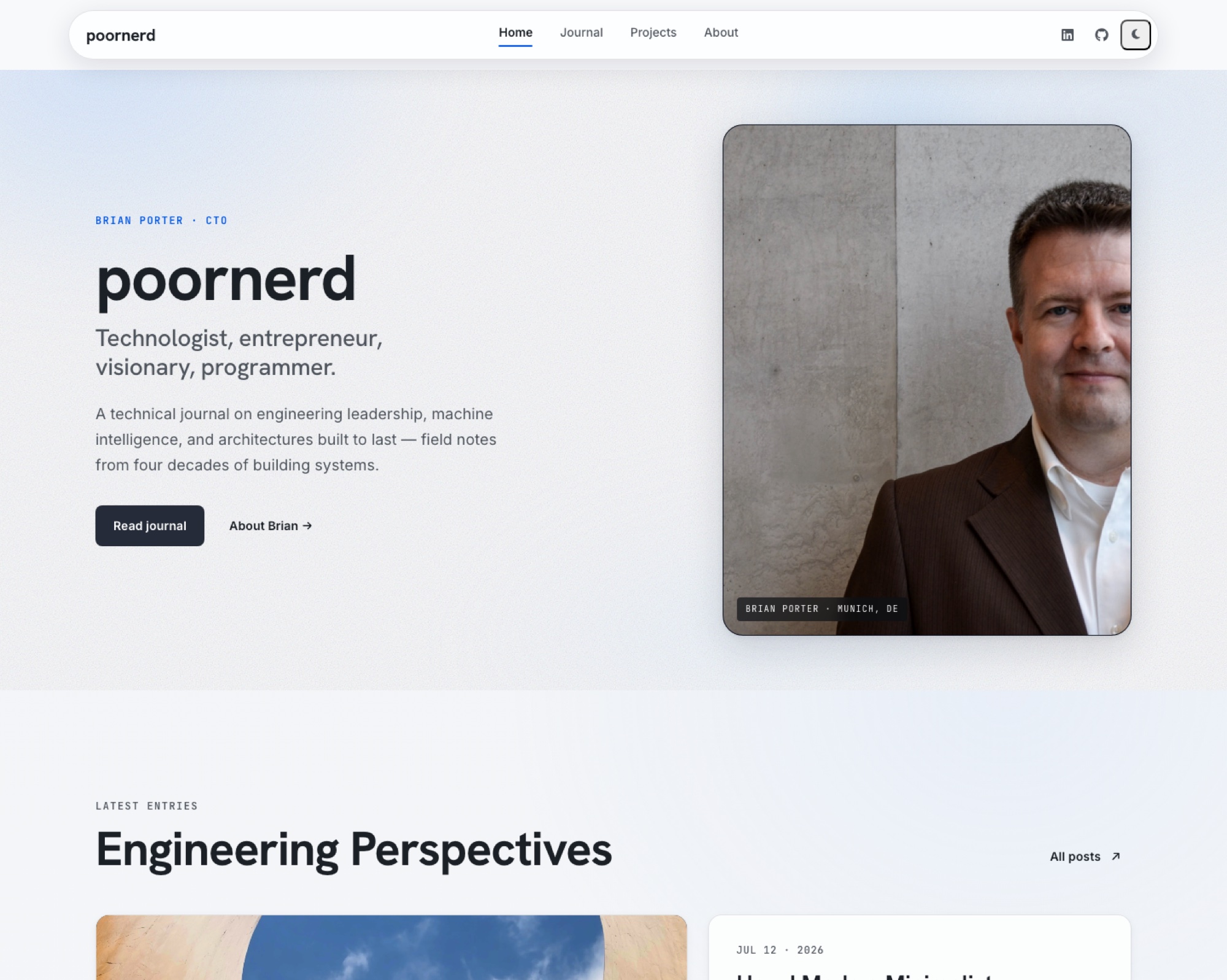
The poornerd home page redesigned with Hallmark: a pill-shaped top bar with a dark mode button, the 'poornerd' title, a 'Read journal' button, and post cards
The home page redesigned with Hallmark. The dark mode button sits at the right end of the top bar.

Reference 02ウミノ (Umino), a Japanese instructor who runs AI courses and a membership · X (June, v1)

Asked only to redesign the site, the AI figured out what the site was for and put the free course on the first screen

Umino added Hallmark to Codex and ran the redesign command on their own official site. Looking at the result, Umino wrote: "「メルマガの無料講座に登録してもらう」という一番の目的を、サイトの構成からAIが自動的に汲み取ってくれたんです。" (The AI worked out my main goal, getting people to sign up for the free newsletter course, from the site's structure on its own.) The first screen went from a layout built around a large message to one that leads straight to the free course signup. Umino said: "一番クリックしてほしいものがファーストビューに入って、かつクリックするとちゃんとそこに飛ぶのが嬉しい。" (I love that the thing I most want people to click is on the first screen, and clicking it really takes you there.)

Asking for an audit of the same site brought back a report. Its conclusion: "結論として、見た目と導線はかなり良い状態です。" (In short, the look and the user flow are in pretty good shape.) Below that came three notes. The first screen is built as an iframe, so scrolling is slightly unstable (P1). The signup links are attached later with JS instead of written directly in the HTML (P2). And index.html is heavy at about 6 MB (P2). The last line named the two fixes to make first: "優先して直すなら、次は iframeのスクロール問題 と リンクのhref直書き化 です。" (If you're prioritizing, the next fixes are the iframe scroll issue and writing the link hrefs directly into the HTML.)

The post ends with a link to Umino's own course.

The previous first screen of Umino's site, with the line 'AIを相棒にして、仕事・発信・商品づくりを、前に進める。' set large on a white background
The first screen before the redesign.
The new first screen: the line 'AIで、今日の仕事をひとつ軽くする。' and three free course cards on a dark green background, with a red box around the cards and the note 'ここが追加'
The first screen after the Hallmark redesign. Umino drew the red box and the note 'ここが追加' ("this was added") by hand.

Reference 03Mihai-Cristian Farcaș, a software engineer in Romania · X (Oct 24, v2)

Two days after Hallmark v2 shipped, a learning app's library, review cards, and concept graph got one new design

Two days after v2 came out, Mihai redesigned the screens of their own learning platform with Hallmark v2 and posted a video of the result. It opens on a "Good afternoon." greeting set in a serif font on a cream background, an "Ask your library anything…" input box, progress on the book being read, and review cards. Then the Library screen with book covers, Notes, and Brain, a graph of linked concepts, pass by one after another.

Mihai wrote: "I used @nutlope 's Hallmark v2 skill to redesign my learning platform and I'm pretty impressed! Smooth transitions, clean animations, mindful of the layout."

How people reacted

What people liked

  • “the only one that didn't make up stats or testimonials: every number is labelled "sample data".”

    From a post that gave eight popular design skills the same landing page request and compared the results side by side (October, based on v1).

    Paralect · a dev agency's comparison of design skillsparalect.com
  • “Every page without the skill had the tell; half the pages with it did not.”

    ktlesr counted by hand whether each page used pure black and white: 40 of 40 without the skill, 14 of 28 with it (September, v1, claude-haiku-4-5).

    ktlesr · GitHubgithub.com
  • “Hallmark by nutlope for UI its a deductiv list and forces AI to make anti slop UI instead of forcing a pattern that quickly becomes recognisable(an issue i spotted with impeccable and others).”

    A comment from before v2 came out (October 16). impeccable is another design skill.

    u/General_Cap_6316 · Reddit r/ClaudeAIreddit.com
  • “Nice skill, much needed these days; I know I'm not the only one that yearns for variety, even in our internal tool pages.”

    A comment on the v1 launch post.

    mondainx · Hacker Newsnews.ycombinator.com
  • “Impeccable and https://www.usehallmark.com/ works well for me.”

    Posted three days after the v2 announcement.

    Thet Hmuu · Xx.com

What fell short

  • “12 of the 40 attempts with the skill ended without building anything”

    Reported that the agent kept asking questions and then stopped, even when the prompt already contained the answers (September, v1, claude-haiku-4-5).

    ktlesr · GitHubgithub.com
  • “The catch: cream, a serif and one accented word is close to the default frontend-design bans.”

    From the same comparison post, about Hallmark's output (October, based on v1). frontend-design is the default design skill published by Anthropic.

    Paralect · a dev agency's comparison of design skillsparalect.com
  • “Has anyone got this or impeccable or any other to actually work? For me it still pretty much looks like slop.”

    A comment on the v1 launch post. The commenter added that in the end you still have to keep giving directions and fixing things.

    aleksiy123 · Hacker Newsnews.ycombinator.com
  • “Loving the collage of screenshots where every one screams of being AI generated”

    A jab at the gallery of example screens in the v1 README. Of the examples, the commenter liked only Cold Snap and Mend Assembly.

    loopmonster · Hacker Newsnews.ycombinator.com

How to start

Paste the prompt below into a coding agent such as Claude Code, Codex, Cursor, or OpenCode. It's free and needs no API key. For the browser checks, you need Chrome on your computer, and the agent may ask for permission to install puppeteer-core.

  1. Starter prompt

    I want to try the Hallmark design skill. Use this article as a reference: https://www.working-ref.com/en/reference/hallmark-v2-2026-10 If it isn't installed yet, install it with npx skills add nutlope/hallmark -g. Then look at my interests and this project and suggest three things I could try with Hallmark (for example: just get an audit of an existing page, redesign while keeping the links and form fields as they are, or build a new landing page). When I pick one, start right away. If none of them fits, start by auditing the pages in this project.

Share this reference

Weekly · Free

Was this reference helpful?

The week in AI: the BEST
just 3, straight to your inbox

Work Smarter with AI

420 readers get it every week

You're in See you in your inbox with the next issue.

I'm not a designer. I handed my blog's design to AI, and now the old version looks embarrassing | References