Making one short-form video takes 2–3 hours. You need to post daily to ride the algorithm, but can a human actually keep that up? Now, a single Make.com scenario handles everything from ideation to publishing.
What Is This?
The short-form video market hit roughly $34.8 billion in 2024 and is projected to grow at over 30% annually to reach $289.5 billion by 2032. 46% of marketers already use generative AI for content creation. The real problem? "I can make content, but I can't keep up with posting every single day."
A Make.com-based automation workflow solves this head-on. The system shared by YouTuber Fabian Markl works like this: enter just 4 topics into Google Sheets, and AI generates subtopics, writes scripts, creates voiceovers, synthesizes videos, and auto-publishes to Instagram, YouTube, Facebook, LinkedIn, and X.
Here are the core building blocks:
- Google Sheets (Input Hub)
Stores 4 main topics and 4 transcript templates. An App Script triggers the Webhook. - Make.com Webhook → Perplexity
Receives topics from Sheets and Perplexity summarizes the latest information. - Router → ChatGPT × 4
Platform-specific prompts (X, LinkedIn, Instagram, Facebook) feed into separate ChatGPT modules for optimized copy. - ElevenLabs TTS
Converts scripts into natural voiceovers. Free plan covers 10 runs/month, $5 plan enables daily use. - Creatomate (Video Synthesis)
Combines voiceover + background video (free from Pexels) + captions into polished output.
Cost Breakdown
Running 1 video/day for 30 days costs roughly $55/month total. AI API $1 + ElevenLabs $5 + Creatomate $49. Make.com's free plan (1,000 ops/month) covers about 35 runs.
Hiring an agency for 30 videos would cost $5,000–$155,000/month. $55 vs $5,000 — that gap is the whole point of automation.
What Actually Changes?
AI short-form tools existed before — we've covered open-source generators like MoneyPrinterTurbo on this site. But the Make workflow is fundamentally different.
| Open-Source CLI Tools | Make Automation Workflow | |
|---|---|---|
| Execution | Manual terminal run each time | Set up once → fully automatic |
| Publishing | Outputs video file only (manual upload) | Auto-publishes to 6 platforms |
| Platform Optimization | Single format | Platform-specific copy |
| Technical Barrier | Python, FFmpeg required | No-code (Make drag-and-drop) |
| Best For | Developers, hackers | Marketers, solo creators, SMBs |
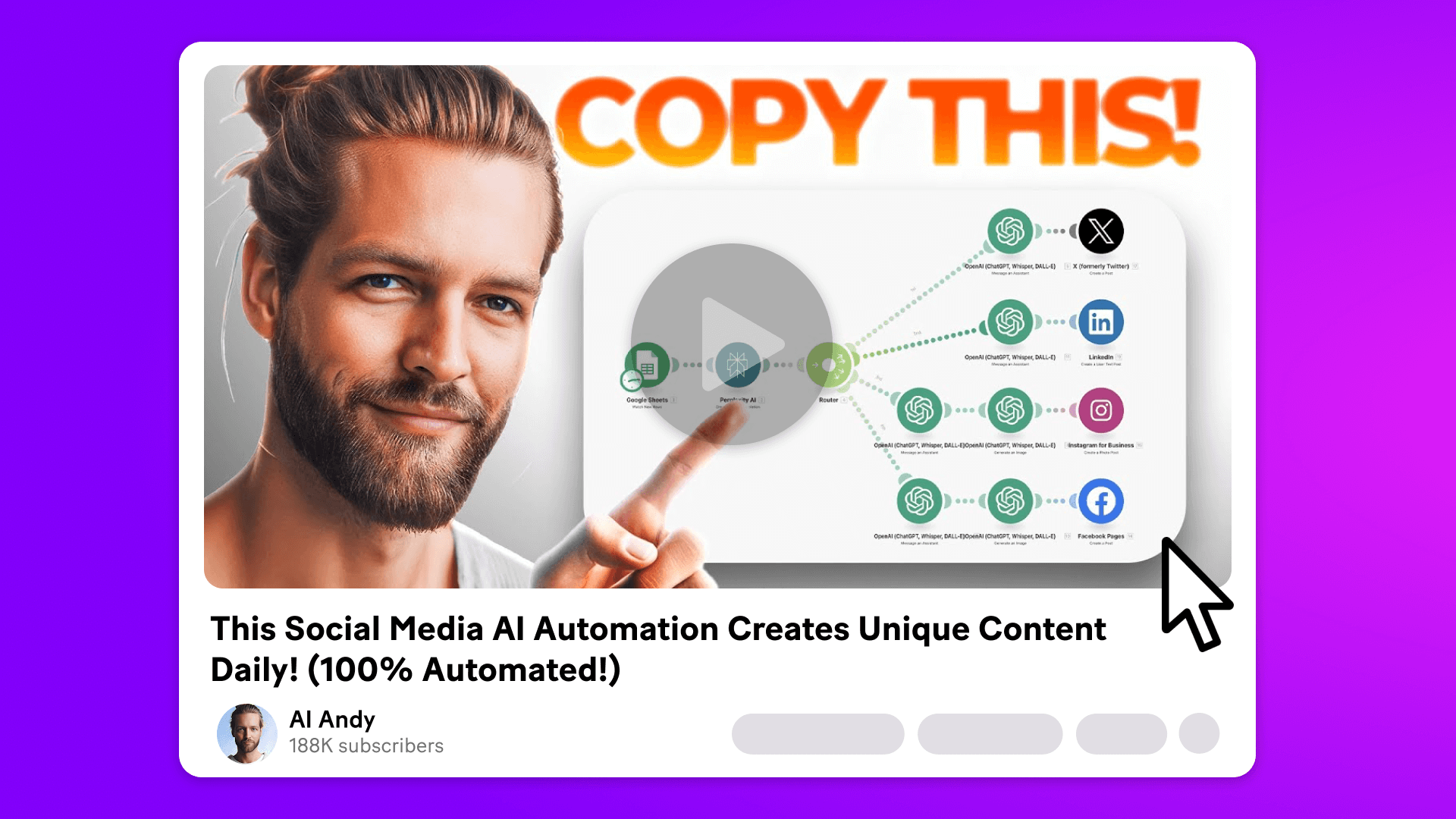
The Make official blog featured influencer AI Andy sharing the same architecture: "With one click, this automation writes and posts for me on X, LinkedIn, Instagram, and Facebook. No need to write from scratch or log in".
AI Andy also drops a key prompting insight: "People think longer prompts mean better results, but that often backfires. Shorter, clearer prompts work best — especially for quick social media posts".
Looking at the broader landscape, creators are now producing 100+ videos per month without a camera. The key features driving this: AI Scene Directors (automatic scene composition), Voice Cloning (for faceless channels), and platform-specific tone auto-adjustment.
Getting Started: The Essentials
- Create a Free Make.com Account
Sign up at make.com. The free plan gives you 1,000 operations per month. - Set Up the Google Sheets Template
Create tabs for input (4 topics), topic (subtopics), template (4 transcript examples), and video (output). Add the App Script with your Webhook URL and email. - Build the Make Scenario
Connect: Webhook → Google Sheets (Search Rows) → Text Aggregator → OpenAI (GPT-4). Use a Router to branch into 4 platform-specific ChatGPT modules. - Connect TTS + Video Synthesis
Set up your voice in ElevenLabs and connect it to Make. Link Creatomate to combine background video (Pexels) + voiceover + captions. - Set the Auto Schedule
Switch from "Run Once" to a scheduled trigger in your Make scenario. Set it to run at a specific time daily and you're done.
TikTok Note
TikTok currently doesn't have direct Make integration. The system sends you the video file via email for manual upload. All other 5 platforms are fully automated.