Loading...

A glossary of motion names for prompting AI · motion-prompt

Pick a motion from 168 live examples, and AI builds your video to match

Browse a gallery of moving examples, pick one you like, and hand it to Claude Code or Codex. The AI keeps the example's timing and easing and fits it to your own text and layout. There are 168 entries in seven sets: camera moves, motion graphics (two sets), UI components, web effects (two sets), and photo looks. It's free. Here are people who made real videos with it.

Oct 26, 2026·3 cases

The launch video from creator Shohei Ohtaki. Ohtaki types 「motion-prompt のライブラリ出して」 (open the motion-prompt library) to bring up the gallery, picks an example, hands it to the AI, and says 「この動画の冒頭をこんな感じに」 (make the opening of this video feel like this). Source: Shohei Ohtaki on X

On October 11, creator Shohei Ohtaki posted on X: 「AIへの指示用に、"動画のカメラワークと切り替えの名前" をまとめました!」 (I put together the names of camera moves and transitions in video, for instructing AI!). The post drew 12,900 bookmarks and more than 430,000 views. Four days later Ohtaki released motion-prompt, which collects names like these alongside moving examples. The launch post reached 300,000 views and 4,884 bookmarks. The GitHub repo has 707 stars (as of October 26).

The reason for the dictionary is a remark from an unnamed person that Ohtaki quotes in the README: "what had been holding them back was not a lack of imagination. It was not knowing what this kind of movement is called."

Blogger Nagi gave Claude Sonnet the same request twice without a motion name and twice with one, then wrote about the results: 「一語を知っているかどうかで、ガチャが注文に変わる。」 (Knowing a single word turns a gacha pull into an order.)

It now has 168 entries in seven sets: 48 motion graphics moves (two sets), 24 camera moves and transitions, 24 UI component names, 48 landing page and web effects (two sets), and 24 photo looks, lighting setups, and art styles. It launched on October 15 with 120, kept adding sets, and on October 24 Ohtaki announced it had reached 168. It's free and released under the MIT license, so commercial use is allowed.

Each name comes with a moving example, a one-line definition, a sample prompt to hand the AI, and timing values. Install it as a skill, and the AI turns the example's motion and timing into code or prompts that fit how your project makes video (Remotion, CSS, After Effects, prompts for video generation models, and so on).
Reference 01Tetumemo (@tetumemo), who runs an AI newsletter · X

An AI newsletter writer handed over one explainer post and got back a 33-second motion graphics promo

Tetumemo packaged Motion Prompt as a skill, loaded it into Claude Sonnet 5.5, gave it their own explainer post on Grok Bot, and asked for a 30-second video. The result runs 33 seconds at 1920×1080. It's a promo for their own post, pointing readers to the prompt collection inside it. Tetumemo didn't say which motions from the dictionary were used.

A first-month price of 「2,640円」 appears on a black screen as a blue circle slides in. Next come three cards for specialized bots, each with a narrow role. Arrows draw in to show work passing from one bot to the next, then lines connect the three bots to “you,” placed in the center like a conductor. The phrase 「たった1回 約3分」 (just once, about 3 minutes) appears with a timeline running from a request at 17:56 to a finished article draft at 18:00. It ends on 「貼るだけで使えるプロンプト 97個」 (97 prompts you can just paste in). The subtitles at the bottom change with each scene.

Tetumemo wrote: 「Claudeのモーショングラフィックス性能は非常に高いので、オススメです!」 (Claude is really good at motion graphics, so I recommend it!)

Reference 02Akihiro Suzuki, CEO of Comix Inc., who writes about AI for executives · note

A 12-second video built from two motions, #005 and #012, kept the examples' exact values for the rising text and the springy shape morph

Suzuki installed motion-prompt on October 17 and set up Claude Code and Codex to read the same dictionary. On October 21, Suzuki used Codex to make a new 12-second video (1920×1080, 30fps, no audio) for a note post.

For the first 3.4 seconds, the two lines of 「かっこよく、を具体的に。」 (Make “cool” specific.) rise out of a mask from below, 0.6 seconds per line (#005 mask reveal). The middle section brings in navy and orange shapes, and starting at 4.55 seconds a rounded rectangle morphs into a circle over 0.58 seconds (#012 shape morph). The last four-plus seconds hold on 「名前が、依頼を変える。」 (A name changes the request.) until the end. Suzuki pulled frames at 1.40, 4.80, 5.60, and 9.50 seconds from the finished video for the post.

Suzuki chose the shape to morph, the navy and orange palette, the length, the layout, and the two lines of copy. The roughly 240 points that form the shape's outline, the pulse that grows and shrinks by 7%, and the easing that overshoots slightly and settles back (backOut 1.6) all came straight from the values listed in #012, Suzuki wrote. The post ends with a link to AI consulting from Suzuki's company.

Suzuki's design request for the 12-second video, as published in the post

役割:あなたは12秒のモーショングラフィックスを設計するディレクターです。/入力:#005と#012、文言「かっこよく、を具体的に。」「名前が、依頼を変える。」、1920×1080、30fps、音声なし。/出力:0.1秒単位のタイムライン、各区間の目的、文字の保持時間、色、終了状態を表にする。実装コードは出さない。/場面:今回の新作と同じ条件を、制作前に設計書へ落とすとき。

Swap in your own numbers and copy. Suzuki recommends not giving only the numbers but writing out the name, what moves, intensity, timing, and what must stay fixed as separate items.

Reference 03Tutorial · Nagi (@tamelog), a blogger who ran each request twice to compare · note

Ask for a “cool” title and the AI did something different each run. Name the motion, and both runs matched.

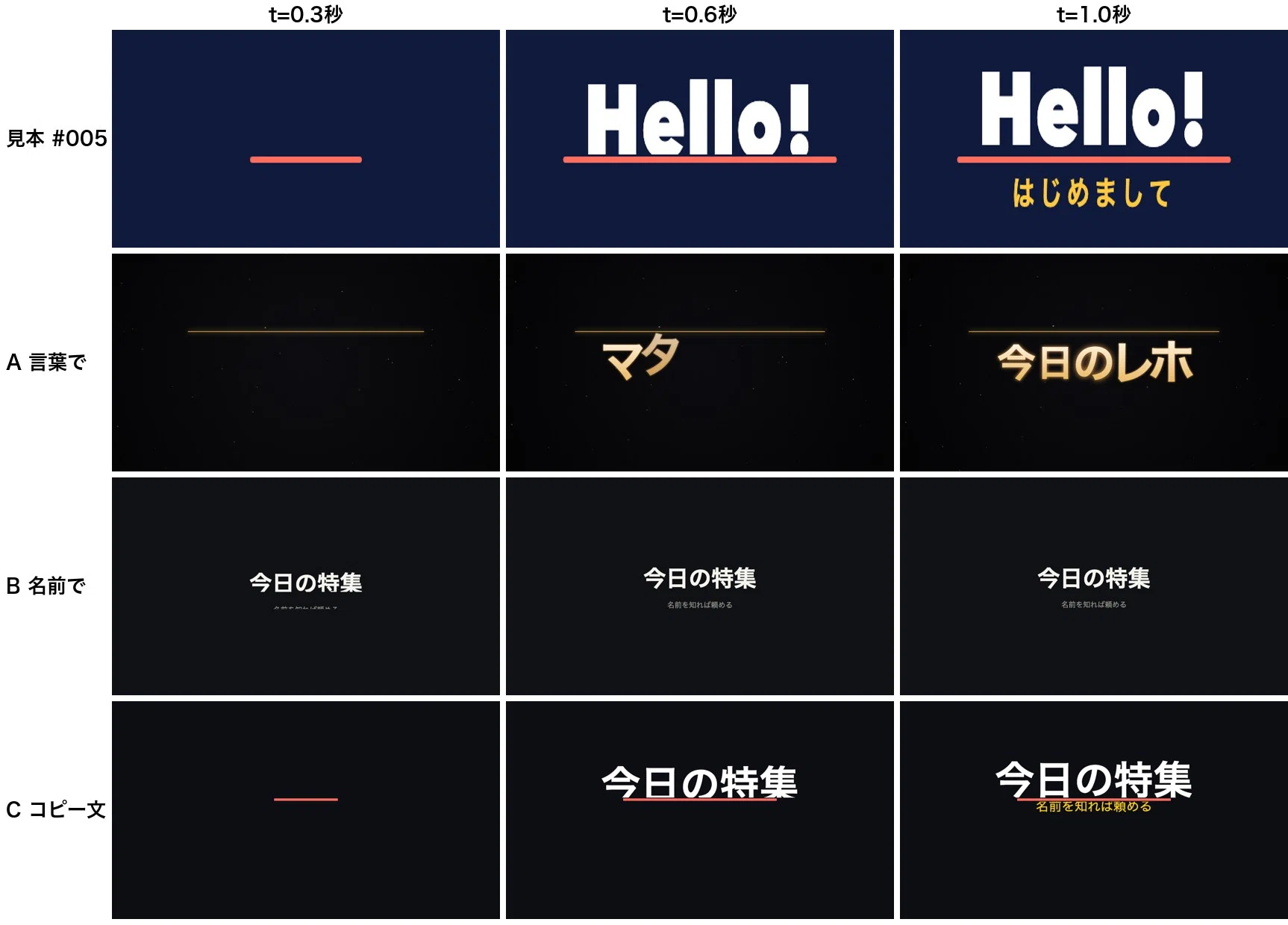
Nagi asked Claude Sonnet, with no tools, for a title animation in a single HTML file. The scene shows the headline 「今日の特集」 (Today's feature) and the line below it, 「名前を知れば頼める」 (Know the name and you can ask for it), appearing. Nagi wrote the request three ways and ran each one twice.

With only 「見出しがかっこよく出てくるようにしてください。」 (Please make the headline come in looking cool.), the first run had the letters shatter and settle alongside a glowing line, and the second had particles gather into the text. When the request named the motion (mask reveal) and gave 0.6 seconds, as below, both runs revealed the text from below over 600ms, with the second line following 150–160ms later. Pasting example #005's copy-ready prompt as-is reproduced the example's timing and even its coral and yellow colors.

Nagi notes this was a small test: one model, Claude Sonnet, two runs per request.

Example #005 next to the first run of each of the three requests (just “cool,” the name plus 0.6 seconds, the copy-ready prompt), captured at 0.3, 0.6, and 1.0 seconds
Example #005 and the first run of each of the three requests, captured at 0.3, 0.6, and 1.0 seconds. Source: Nagi on note
Nagi's request

タイトルをマスクリビールで下からせり上げて。0.6秒、行ごとに少しずらして。

The same request in English (example from the motion-prompt docs)

Bring the title in with a mask reveal from below, 0.6 s, each line slightly after the one before.

You don't need to install the skill. Paste this one line into any AI.

How people reacted

What people liked

  • “名を入れるだけで、文字や図形の動きが狙いに寄る。動く見本つきで名前が引けるのはありがたい。24個分また保存した。”

    Just adding the name brings the motion of text and shapes closer to what I'm aiming for. Being able to look up names with moving examples is great. Saved another 24.

    Takuzo (@tkz_aiart) · Xx.com
  • “毎日SVGアニメーション生産してるので、即プロジェクトにスキル導入しました🙏 「冒頭1分、いい感じにモーショングラフィックス頑張って」という最悪な指示出ししてたので、これで改善目指します!w”

    I crank out SVG animations every day, so I added the skill to my project right away 🙏 I'd been giving the worst instructions, like "first minute, do some nice motion graphics," so I'm aiming to fix that with this! lol

    Shogo (@samuraibrass) · Xx.com
  • “しかも、似た動きの違いまで言葉で分けてある。”

    On top of that, it even spells out the differences between similar motions.

    Nagi pointed to dolly in (#027), zoom in (#028), and dolly zoom (#032) as examples.

    Nagi (@tamelog) · notenote.com
  • “名前は設計の入口であり、数字は調整のつまみです。”

    The name is the entry point to the design, and the numbers are the knobs for fine-tuning.

    Akihiro Suzuki · notenote.com
  • “見れば分かるのに、いざAIへ頼むと名前が出てこない/その悩みを、動く見本とコピペできる指示文で助けてくれる/非エンジニアでも、作りたいものを具体的に伝えやすくなるのがいい”

    You know it when you see it, but when you go to ask the AI, the name won't come. This helps with that, through moving examples and instructions you can copy and paste. I like that even non-engineers can describe what they want to make more concretely.

    Tetumemo (@tetumemo) · Xx.com
  • “Use this: https://showheyohtaki.github.io/motion-prompt/ scroll down to the component names section to see what common things are called.”

    A reply to a post asking how to clean up a UI with Claude.

    alitanveer · Reddit r/ClaudeCodereddit.com
  • “これはいいな…! モーショングラフィックスにも、アプリのUI作りにも、動画生成プロンプトのボキャブラリーにもなる。”

    This is good...! It works for motion graphics, for building app UIs, and as vocabulary for video generation prompts.

    Majin (@Majin_AppSheet) · Xx.com
  • “アニメーションの共通言語としてAI指示以外でも普通に重宝しそう”

    Looks genuinely handy as a common language for animation, even beyond instructing AI

    nguyen-oi · Hatena Bookmarkb.hatena.ne.jp

What fell short

  • “辞書の呼び方と、現場で使ってきた呼び方が違うことはあります。”

    Sometimes the dictionary's name for something differs from what we've called it on the job.

    Akihiro Suzuki · notenote.com
  • “コピー文には切り抜く範囲は書いてあるが、文字をどの高さに置くかは書いていない。”

    The copy-ready text says what area to crop, but not at what height to place the text.

    Written after pasting the example's copy-ready prompt as-is: in one of two runs, the small text at the bottom came out touching the line.

    Nagi (@tamelog) · notenote.com

How to start

Paste the request below into a coding agent such as Claude Code or Codex. Installing it as a skill requires Node.js 18 or later on your computer. You can also skip the install, copy a name from the gallery (https://showheyohtaki.github.io/motion-prompt/), and paste it into any AI.

  1. Starter prompt

    Read https://www.working-ref.com/en/reference/motion-prompt-2026-10 and install the motion-prompt skill from https://github.com/showheyohtaki/motion-prompt in this environment. Then look at my current project and interests, and suggest three things to try with motions from this dictionary, with the entry numbers to use. Explain what each name means in plain English. When I pick one, start building right away. If none fit, start with a first example: turn one of my posts into a short motion graphics video.

Share this reference

Weekly · Free

Was this reference helpful?

The week in AI: the BEST
just 3, straight to your inbox

Work Smarter with AI

420 readers get it every week

You're in See you in your inbox with the next issue.

Pick a motion from 168 live examples, and AI builds your video to match | References