44% of Roblox's top 1,000 creators already use AI to build games. After this update, that number is going to climb a lot higher. Roblox just transformed its AI assistant from a code-suggestion tool into something that plans, builds, and self-corrects through agentic loops — autonomously.
What's Going On?
The old Roblox Assistant worked like this: you type a prompt, it spits out code or a 3D object. The problem? It often missed the creator's actual intent. Ask for a "park mini-game" and you'd get something completely off-base.
The fix is Planning Mode. Instead of acting immediately, the AI first asks clarifying questions — "What visual style do you want? Cartoony, realistic, or fantasy?" — then presents a detailed, editable action plan before touching a single line of code. This plan functions as a mini game design document.
Roblox SVP of Engineering Nick Tornow put it this way:
"The launch of our agentic features in Roblox Studio reduces barriers between creative vision and execution. Creating with Planning Mode and our Procedural Generation tools is a powerful new method for creators to turn their concepts into gameplay."
— Nick Tornow, Roblox SVP of Engineering
Three core tools shipped with this update:
- Planning Mode
Analyzes your existing game code and data model, asks clarifying questions, then produces an editable step-by-step action plan. You review and approve before any changes are made. - Mesh Generation + Procedural Models
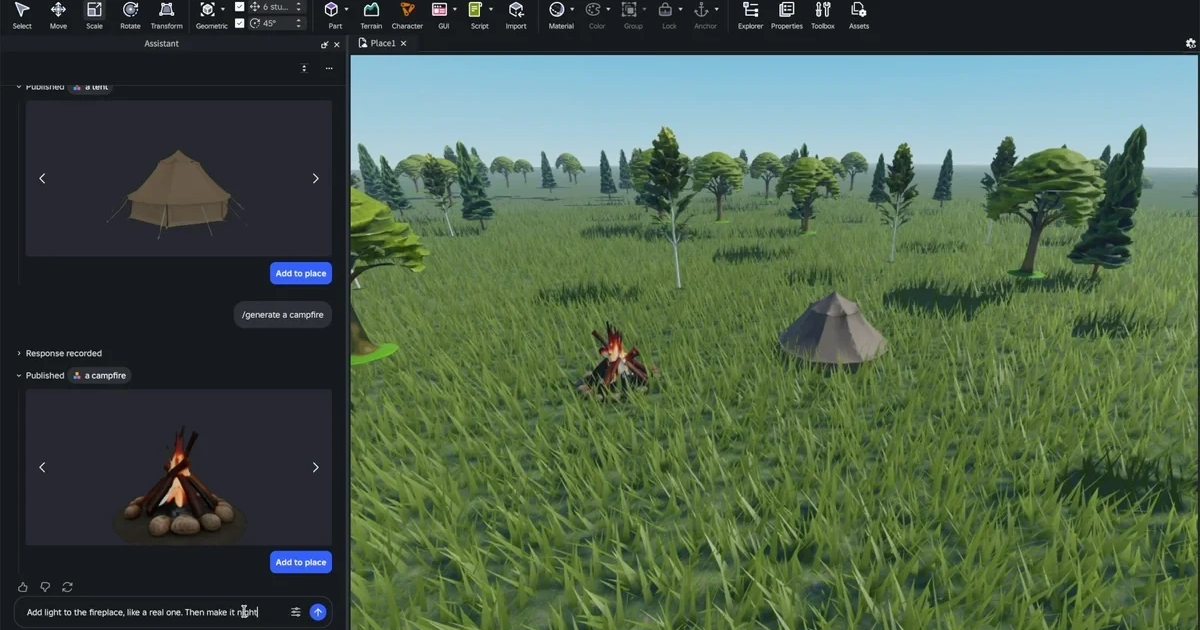
Generate fully textured 3D meshes directly in your game world via text prompts. Coming soon: Procedural Models — parametric 3D objects where attributes like staircase height or bookshelf count can be dynamically adjusted. - Playtesting Agent (Beta)
After building, the AI plays your game as an automated QA tester — reading logs, capturing screenshots, finding bugs, and automatically applying fixes. Results feed back into the next planning loop.
What Changes?
Here's the context that matters: Roblox has 380 million monthly active users, and many of them are young creators with limited coding experience. Until now, making a game meant learning Lua scripting or stitching together community modules.
| Old Roblox Assistant | New Agentic Assistant | |
|---|---|---|
| Workflow | Prompt → immediate code output | Prompt → plan review → step-by-step execution |
| 3D Assets | Low-quality placeholder meshes | Mesh Generation creates textured assets instantly |
| Testing | Manual testing by developer | Playtesting Agent runs automated QA |
| Bug Fixing | Copy error → re-prompt | Self-correcting loop (automatic) |
| External AI | Not supported | Claude, Cursor, Codex via MCP integration |
The biggest friction in game development has always been the translation cost — having a great idea but not knowing how to express it in code. This agentic loop dramatically collapses that translation cost.
TNW noted that third-party Roblox AI tools (Lemonade, SuperbulletAI, BloxBot) had already emerged. By building agentic capabilities directly into Studio, Roblox is making sure the core creation experience stays on its platform rather than fragmenting across external tools it doesn't control.
Real-world experiment from Medium
CTO Josh English connected Codex CLI to Roblox Studio via MCP server and had a complete 10-stage obstacle course game (Skyline Sprint) built in 30 minutes. The AI inspected the environment, wrote the code, read runtime errors, fixed them — all autonomously.
How to Start: The Essentials
Planning Mode is currently available in Roblox Studio Beta. For external AI integrations (Claude, Cursor, etc.), use Roblox Studio's built-in MCP server.
- Activate Planning Mode
In the Roblox Studio Assistant panel, open the dropdown and select "plan," or type/planin the input field. - Start with a detailed prompt
Describe specifically what you want: "Make a park mini-game where characters collect coins — with a fountain and foliage, cartoony style." The Assistant will ask follow-up questions and present a plan. - Review and edit the plan
Check each step, reorder or remove as needed, then approve. Nothing executes until you say so. - Add assets with Mesh Generation
Need a 3D asset in your scene? Use/generate_mesh campfireto create it instantly. Image prompts are also supported (with BYOK enabled). - Run Playtesting Agent for QA
Once your game is roughly done, fire up the Playtesting Agent. It plays the game, finds bugs, and feeds fixes into the next planning loop automatically.
Current limitations
Attaching reference images to your plan requires BYOK (Bring Your Own Key) setup. Planning Mode is still in beta — a bug where the AI says "I will complete this" but never starts has been reported. Hitting Pause breaks out of the loop. Roblox is actively fixing this.



