Loading...

Room scans into 3D scenes · scan-to-threejs

Walk your iPhone around a room once, and a coding AI rebuilds it as a 3D room you can walk through in the browser

scan-to-threejs is a skill and an iPhone scanning app that developer Wes Bos released on October 22, and every example below is a demo by the creator. You walk around a room with a LiDAR-equipped iPhone and hand the data to a coding AI. The AI renders its 3D scene from the same spots and angles where the photos were taken, compares the render with the original photos, and fixes it, over and over. The result is a 3D scene where the desk, the shelves and the 3D printers can each be edited on their own. Here is what the creator showed and how the first people to try it reacted.

Oct 26, 2026·2 cases

The launch video creator Wes Bos posted on X.

On October 22, Wes Bos, a developer and host of the podcast Syntax, posted a 14-second video on X. In a 3D rebuild of the office, lights, wall panels, cushions and chairs fly off and scatter across a gray floor. Then the office's objects line up in neat rows on the floor. Four days later, on October 26, the post had passed 380,000 views and had been bookmarked 5,981 times.

On the YouTube video Wes posted the same day, viewer @deziomakes, who has been modeling the rooms and furniture of their own home by hand in the 3D design program Fusion, left this comment: "This is incredible. … I modeled most of my rooms and most of my furniture, decor, textures, lighting the hard way. … I probably have 3000 man-hours put into that."

The method is free on GitHub under the name scan-to-threejs (MIT license). You scan a room with a LiDAR-equipped iPhone or iPad, hand the data to a coding agent, and have it build the scene with the skill. Wes used Codex.

A scan leaves behind the layout of the walls and doors, measurements taken with LiDAR, and hundreds of photos, each tagged with the position and angle it was shot from. The AI renders its 3D scene from those exact positions and angles, compares it with the original photos, and fixes the biggest mismatch first, again and again.

Reference 01Official demo by the creator · Wes Bos YouTube video (sponsored by OpenAI, made with Codex)

Four rooms scanned, stitched together by AI: a whole 3D house you can run around in

Wes shows a 3D house made by scanning four spaces and joining them into one: the office, Wes's wife's studio, a playroom and a home gym. You can run around inside it. Wes says the office is "modeled to the inch" and the home gym is "modeled down to every single little piece of equipment."

The video walks through three approaches in turn. Feeding only photos of the office into Codex "worked okay … AI can only go so far with depth detection inside of photos." Scanning the living room with the Polycam app and giving that to Codex was "pretty good … but it's not perfect," and a toy car, the sofa cushions and the pillows came out different from the real ones. Wes called the approach using the app and skill Wes built "the holy grail."

The skill is a bundle of Python scripts and instructions. It also pulls textures from the photos, like the wood grain on the desk or the pattern on the acoustic foam. When a result fell short, Wes pushed further: "Not good enough. Keep going. Keep going." Wes's read is that the model seems to be balancing quality against saving tokens.

OpenAI sponsored this video. In it, Wes says: "I built this whole thing in Codex with GPT-6 Astra. I would have anyways, but thank you to OpenAI for sponsoring this video."

A frame from Wes Bos's video

Reference 02Official demo by the creator · Wes Bos blog post and live demo

An iPhone scan of an office, now a 3D demo anyone can open and walk through in a browser

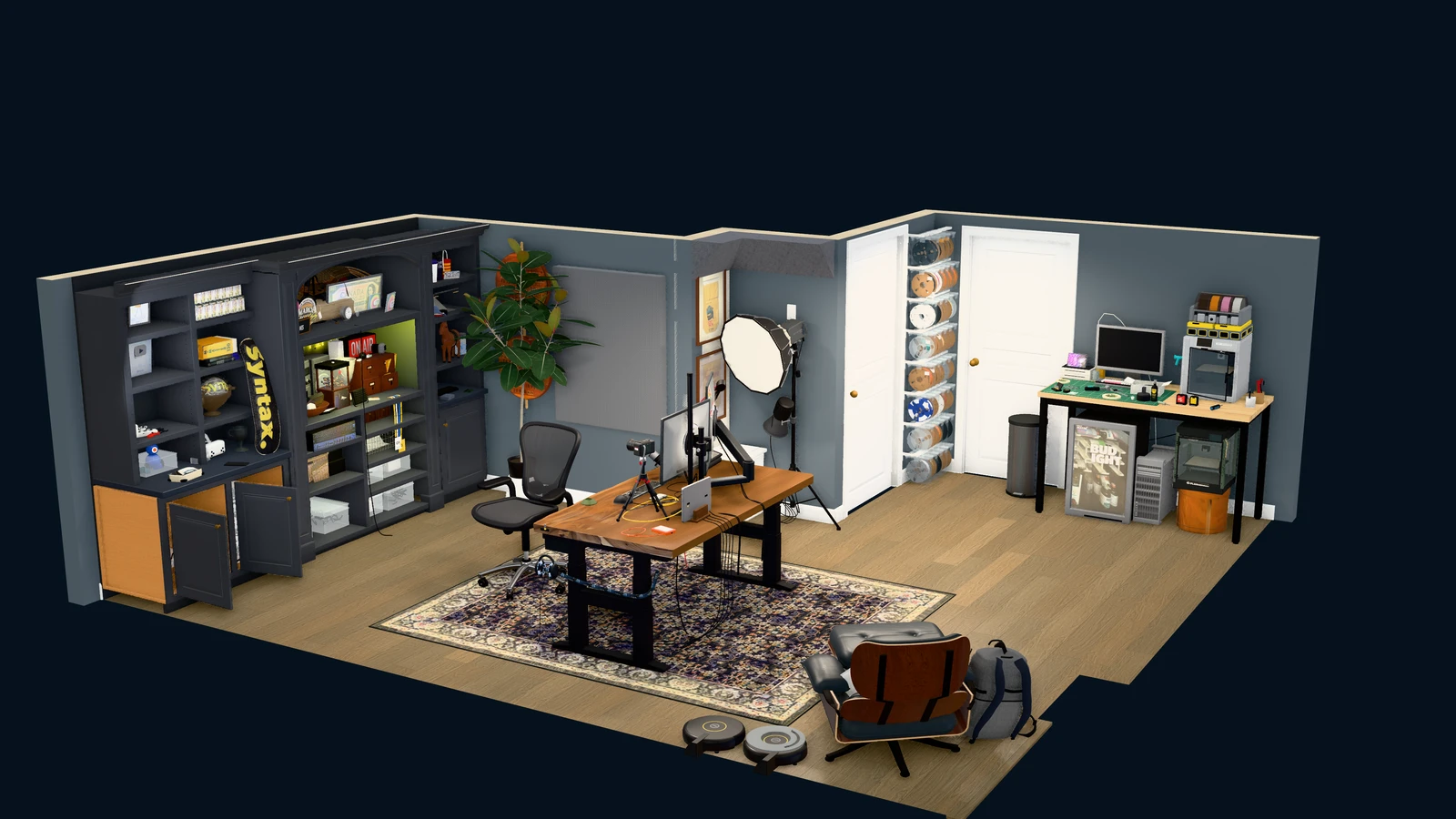
On the blog, Wes wrote: "I scanned my office with my iPhone, then used Codex to rebuild it in Three.js. My desk, the shelves, the 3D printers, the wall of filament rolls. All editable geometry, running in a browser." The office is open as a live demo, so you can explore it yourself as a dollhouse, a floor plan, a knolling view with every object laid out in rows, or a walk-through view.

Each kind of data the scan leaves behind does a different job. The wall and door layout (RoomPlan) is "Great for the layout; pretty basic to look at." The surface measured by LiDAR (the mesh) needs more work before small objects and details line up. The photos fill those gaps with materials, labels, cables and the things sitting on the shelves.

It did not come together in one pass. Wes wrote: "This took a lot of iteration. Getting the layout right is one pass. Getting the materials, lighting, shadows and tiny details right is a whole other job." Wes added that "the measurements are still worth checking against the real thing."

A 3D render of the rebuilt office with two walls cut away. A bookshelf with a "Syntax" skateboard and an "ON AIR" sign, a wooden standing desk with monitor arms, a chair, a rug, softboxes, shelves of filament rolls, a 3D printer on a workbench, a fridge, a lounge chair and two robot vacuums
Wes's rebuilt office. The blog caption reads "My office rebuilt as an editable Three.js scene."
The request Wes wrote in the README

Use scan-to-threejs to rebuild the room in data/captures-in/my-room. Inspect the measurements and photos, create an editable scene, and compare rendered views with the original photographs.

Replace my-room with the name of the folder where you unpacked your scan.

How people reacted

What people liked

  • “… In this case you give the agent ground truth to check itself against and quality goes way up.”

    Trevin Chow (product leader) · Xx.com
  • “What I like here is the checking loop. Every object has a reference, and the model keeps going back to it, which is how a good set builder or 3D artist works too. Scan one room you know well, and measure a few objects against the model before you build anything on top of it.”

    Laurence Moroney (AI book author, formerly at Google and Microsoft) · Xx.com
  • “I've been working on my house for the last couple of days, it's a very long process, but it's quite fun and I can see it getting better on every iteration.”

    Sam Castillo · YouTube commentyoutube.com
  • “I work in retail, and have manually 3D modelled full stores for quite some time … Keen to see how well this works on a larger scale, and exporting to cad tools.”

    @BlighHedges · YouTube commentyoutube.com
  • “I have to do this 😍”

    @levelsio (runs InteriorAI) · Xx.com

What fell short

  • “on a real scan every door, opening and wall was dropped. Connect rooms then showed "A doorway is missing" for every pair of rooms.”

    A bug found while testing a real scan on an iPad. dervish666 opened a fix (PR #9), but as of October 26 it has not been merged.

    dervish666 · GitHubgithub.com
  • “I've sent a pull request for better door detection as I was having some trouble getting the rooms to connect at first.”

    Sam Castillo · YouTube commentyoutube.com
  • “While trying to build and run the app on my own iPhone with Xcode 26.6, compilation failed”

    renderScripter reported the same error in issue #10.

    ArthurSens · GitHubgithub.com
  • “I'd love to try out 3D Model Anything on my iPhone with LiDAR, but unfortunately I don't have access to a Mac to build the app using Xcode.”

    Borna07 · GitHubgithub.com
  • “Is it possible to add the functionality to export the model to other formats like , .step, .igs, .stl, parasolid … I have not fully used the program just the example file”

    There is no export to CAD formats such as STEP or STL yet.

    CPBPILOT · GitHubgithub.com
  • “This isn't a good reproducible method of building a model. Splat to mesh also exists and would probably get really close to this with a couple reference measurements and some comfyui 3d ai models. For a fraction of the compute/cost.”

    @SquintyGears · YouTube commentyoutube.com
  • “is this possible to re-create on adroid?”

    For Android there is only a draft app (PR #2) that has not been run on a real device yet.

    @Auarhau · YouTube commentyoutube.com
  • “the most difficult part about this, is that you have to clean your house first”

    It's a joke, but Wes also wrote on X that the office was a mess and had to be tidied up and scanned again.

    @ChiDuly · YouTube commentyoutube.com

How to start

Paste the request below into a coding agent that can use local skills (Wes used Codex). To scan a room, you need a LiDAR-equipped iPhone or iPad running iOS 17 or later. The scanning app is not on the App Store, so you have to install it on your phone yourself with Xcode on a Mac.

  1. Starter prompt

    Read https://www.working-ref.com/en/reference/scan-to-threejs-2026-10 first. I want to try the scan-to-threejs skill from the https://github.com/wesbos/3d-model-anything repository. Ask me whether I have a LiDAR iPhone or iPad and a Mac, and what space I want to turn into 3D, then suggest three things worth trying. If I pick one, start right away. If none of them fit, start by opening Wes Bos's office example from the repository in my browser.

Share this reference

Weekly · Free

Was this reference helpful?

The week in AI: the BEST
just 3, straight to your inbox

Work Smarter with AI

420 readers get it every week

You're in See you in your inbox with the next issue.