Loading...

Decision model · Jev

Jev skips the writing and just makes the call: 500 emails sorted in 25 seconds for 3.5 cents

Instead of writing, Jev is built for judgment calls: pick one of the given options, or answer yes or no. That makes it fast and cheap. Four people handed it a job: an inbox, a screenshot folder, 1,891 ads from one brand, and a publication's head of evaluation checking writing for AI tells.

Sep 30, 2026·4 cases

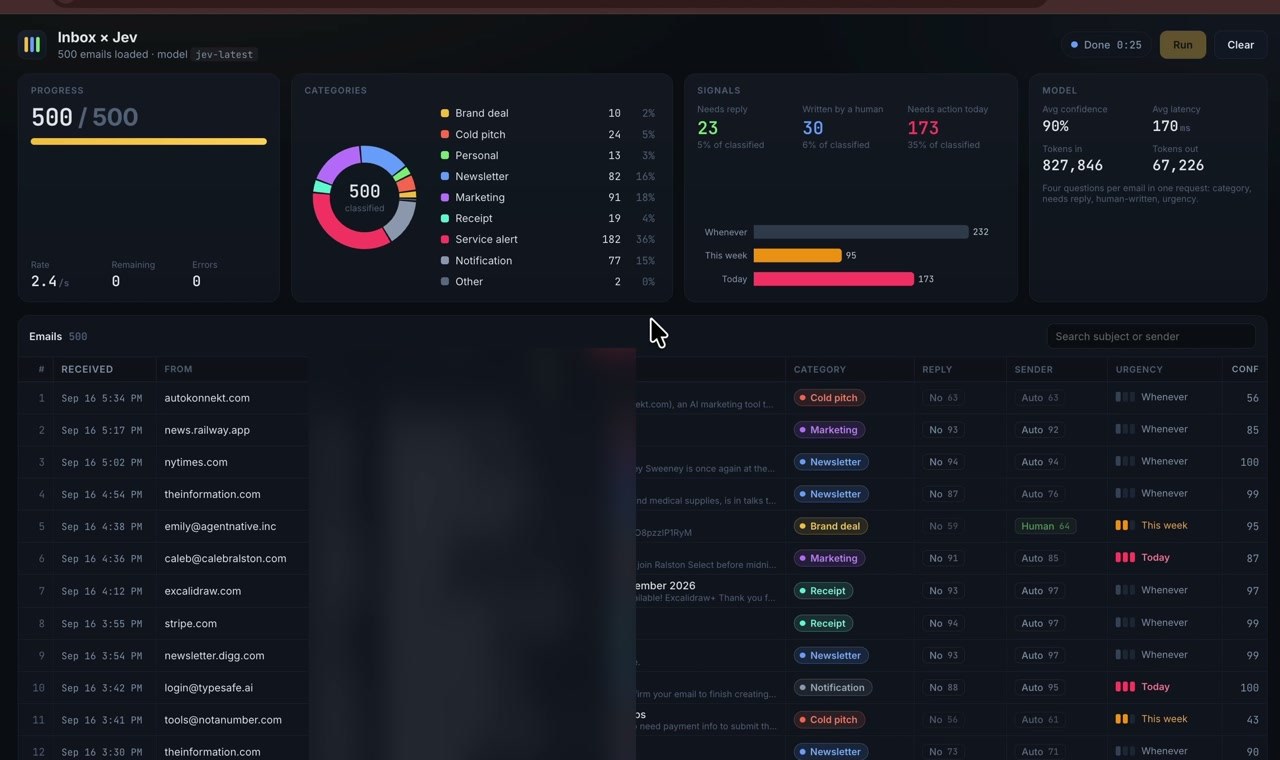
Inbox × Jev screen: 500 emails sorted in 25 seconds, with counts by category, 23 emails needing a reply, and urgency levels
The Inbox × Jev screen Riley Brown built. Sorting 500 emails took 25 seconds. Subject lines and previews are blurred.

A lot of what people hand to AI isn't really writing. It's judgment. Does this email need a reply? Which customer is this ad aimed at? Which folder does this screenshot go in? Give those calls to a model like ChatGPT or Claude, though, and it spells out the answer in prose. Each one takes anywhere from a few seconds to tens of seconds, and across thousands of items the bill climbs fast.

Jev, released by TypeSafe on September 15, doesn't write at all. It picks one of the options you set, answers yes or no, or gives a score, and it returns a probability for how sure it is of that answer. It costs $0.042 per million input tokens, and the answers it sends back are free.

It was built by Diogo Almeida, a co-author of InstructGPT, the paper ChatGPT was built on. His launch post passed 39.8 million views on X, and within three days Vercel, Cloudflare, and OpenRouter had made Jev callable from their own services. TypeSafe dropped its waitlist on September 20, paused new sign-ups two days later under the rush, and reopened on September 27. On September 29, OpenAI previewed its Decisions API, which does the same job. It picks one of a set of fixed answers, and it takes images as well as text.

Once fast, cheap judgment was available, the first things people fed Jev were the piles they had let build up: inboxes, screenshot folders, ad libraries, old writing.
Reference 01Creator Riley Brown · his own inbox

500 emails, four questions each, 25 seconds: Jev pulled out the 23 that needed a reply

Riley Brown loaded 500 emails from his inbox into a screen he built himself and handed them to Jev. Each email got one request with four questions: what kind of email it is, whether it needs a reply, whether a person wrote it, and how urgent it is.

The on-screen timer stopped at 25 seconds. The 500 emails fell into nine categories, such as service notifications, marketing, and newsletters. Jev marked 23 as needing a reply and 30 as written by a person. Brown put the cost at 3.5 cents, and added in a reply that 1,000 requests cost 7 cents.

The question setup shown on screen

Inbox × Jev · 2026-09-17

Four questions per email in one request: category, needs reply, human-written, urgency.

Reference 02Fayaz Ahmed, developer educator at Cloudflare · his own screenshot folder

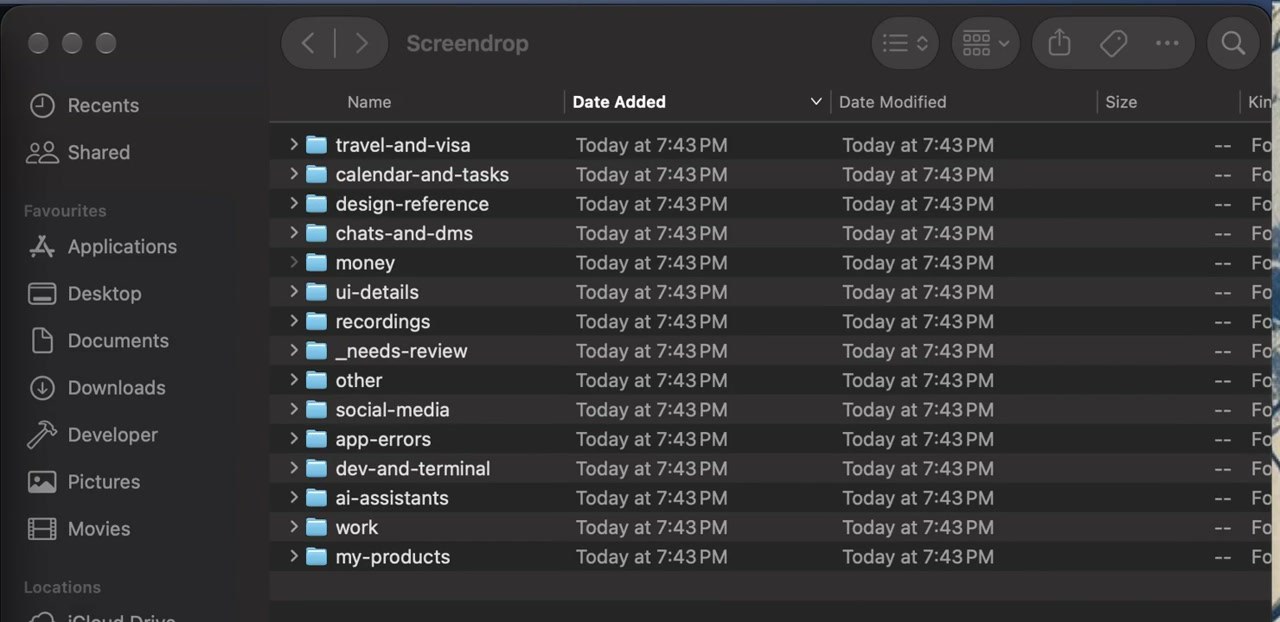
970 screenshots from months of saving, sorted into 15 folders like travel, work, and money in 40 seconds

Fayaz Ahmed's Mac had 970 captures piled up from months of a screenshot app saving everything. He first pulled the text out of each image with the Mac's built-in text recognition, then had Jev read that text and choose a folder. Jev never looks at the image, only the text.

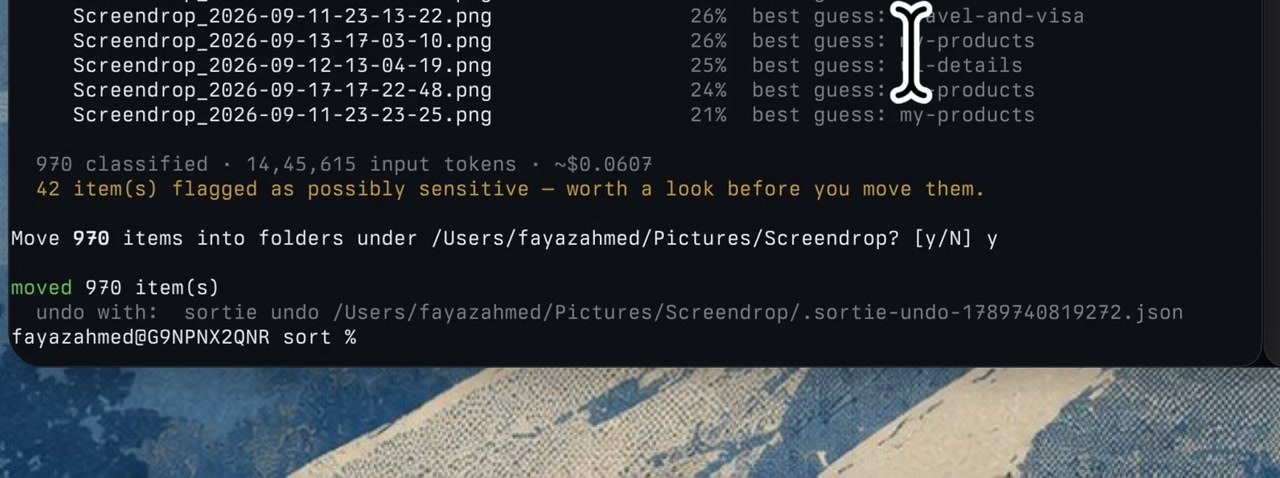
Sorting took about 40 seconds and cost around 6 cents. It asked for confirmation before moving any files and flagged 42 captures that looked sensitive. After the move, it left a single command that undoes everything.

Finder window: 15 new folders inside the Screendrop folder, including travel-and-visa, calendar-and-tasks, money, and work
The 15 folders created once sorting finished. Source: Fayaz Ahmed, X (2026-09-18)
Terminal output: 970 files sorted, cost about $0.0607, 42 possibly sensitive items, a move confirmation, and an undo command
970 files sorted for about $0.06, 42 possibly sensitive items, and an undo command. Files Jev was less sure about carry an estimated probability.

Reference 03Stav Zilbershtein of the marketing AI tool Maxfusion · a demo of the company's own tool

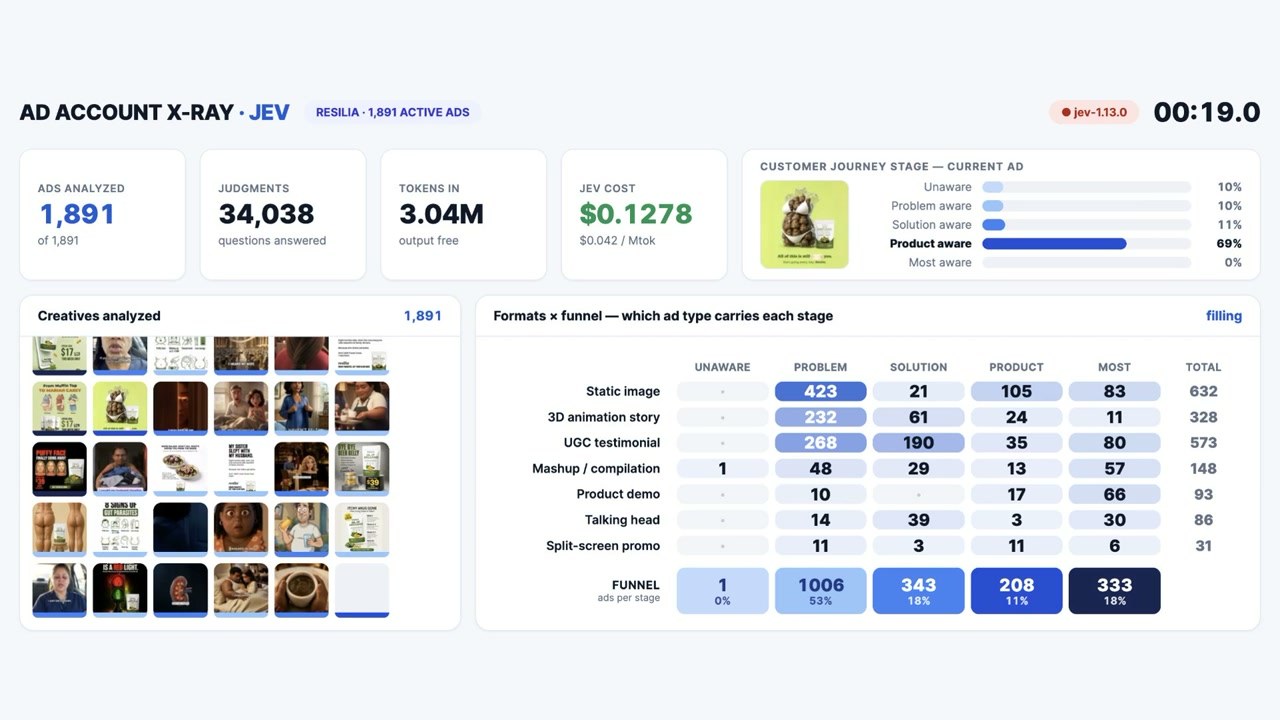
1,891 ads from one brand, sorted by customer journey stage in 19 seconds

Stav handed Jev the 1,891 ads that a brand called Resilia had in its ad library. For each ad, the questions were which of five customer journey stages it targets and what format it uses. The five stages run from people who don't yet know they have a problem to people ready to buy. Gemini first described each ad image in text, and Jev read that text to make its choice.

In 19 seconds it produced 34,038 judgments for 13 cents. More than half the ads, 1,006 of them, targeted people who had noticed the problem, and 333 targeted people ready to buy. Stav said the feature will go into the company's own tool.

AD ACCOUNT X-RAY screen: 1,891 ads, 34,038 judgments, $0.1278, 19 seconds, and a table crossing ad format with customer journey stage
Ad format (rows) crossed with customer journey stage (columns). Source: Stav Zilbershtein, X (2026-09-18)

Reference 04Mike Taylor, head of evaluation at the US publication Every · 27 of his own pieces

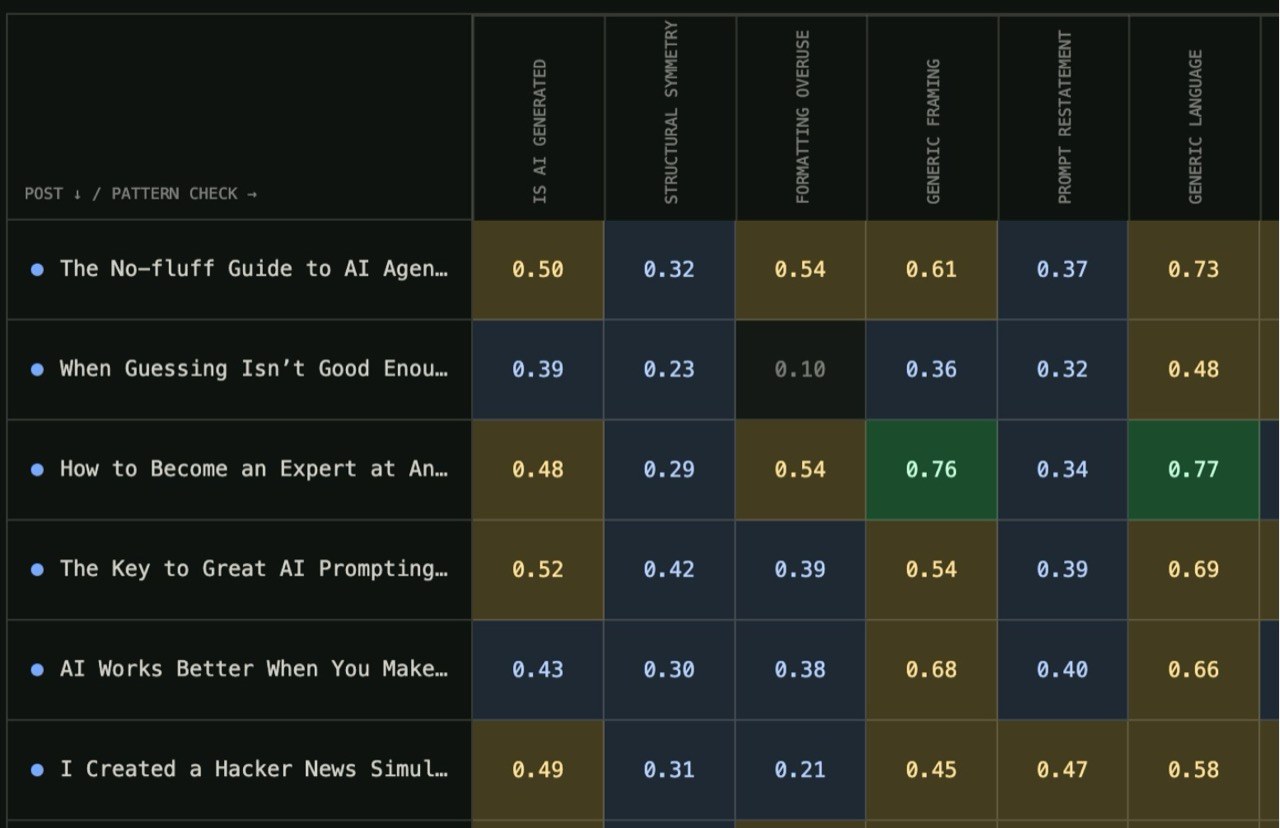
37 pieces of writing, 21 questions about AI tells, 777 verdicts in 0.7 seconds

Every is a US publication about working with AI, and it had early access to Jev a week before launch. Mike Taylor, its head of evaluation, fed Jev 27 pieces he had written plus 10 pieces written on purpose in an AI style. The 21 questions came from the checklist Every had been using to catch AI tells in writing. The 777 verdicts came back in under 0.7 seconds, for about a quarter of a cent.

Averaging the scores across style patterns didn't work, though. Mike's real writing also leans on polished structure and rhetorical frames, so its average came out higher than the AI-style pieces. In a separate test run by CEO Dan Shipper, Jev caught 6 of 7 deliberately planted flaws. Claude Fable 5.1 caught all 7 in the same test, but Jev was about 25 times faster and cost about 1/580th as much.

Mike wrote that he'd want to check its accuracy further before putting it to real use, but that as an early alarm it beats not checking at all.

A table with article titles as rows and AI-style patterns such as IS AI GENERATED and STRUCTURAL SYMMETRY as columns, each cell holding a probability between 0 and 1
Rows are pieces of writing, columns are AI-style patterns. The closer to 1, the more AI-like Jev judged it. Source: Every (screenshot courtesy of Mike Taylor)
5 of the 21 questions Every asked
  1. 1Does this writing appear likely to have been generated primarily by an AI? Judge only the text, not its topic or author metadata.
  2. 2Does the writing rely on generic framing instead of concrete context?
  3. 3Does the writing explain straightforward points more than necessary?
  4. 4Does the writing repeat the same idea without adding new evidence?
  5. 5Does the writing end with a generic offer to help or continue?

All 21 are on Every's experiment site.

What people who used it say

Speed and price get overwhelming praise. Accuracy splits opinion. Some say it matches or beats small LLMs at classification with clear-cut options, but more say it fell short of Haiku and Gemini on subtle calls or security calls. The claim behind its probabilities, that an answer of 0.8 is right 80% of the time, drew plenty of counterexamples. The most common conclusion: use Jev as a first-pass filter and send the unclear cases to a bigger model or a person.

The official site claims 193.6 times faster and 444.6 times cheaper. Pool the numbers users posted on X in the four days after launch, though, and the median comes out at 7 times faster and 30 times cheaper.

What worked

  • “Probably around 750,000 classification problems, cost 26 cents and it did great job.”

    Tagging a recipe collection.

    u/natlight · Redditreddit.com
  • “737 predictions had ≥99% confidence. Every one matched the reference label. Below 70% confidence, nearly half were wrong.”

    Useful for deciding which items need a human review.

    Nikhil Mudholkar (Bryo CTO) · Xx.com
  • “On Korean medical questions, taking only its most confident half cuts the error rate from 20% to 2%.”

    Questions from Korea's medical licensing exam.

    MahlerLab · medical data researcherahn-lab.org
  • “Claude, codex 등 플러그인으로 사용해 봤는데 검증 결과가 나오는 속도가 장난 아닙니다.”

    I tried it as a plugin in Claude, Codex, and others, and the speed at which the check results come back is unreal.

    @parktaegyun · YouTube commentyoutube.com

What fell short

  • “Jev's own verdict loses clearly on accuracy (McNemar p < 0.0001) and wins on speed and cost.”

    On 2,000 phishing emails, Jev got 62.6% right and Haiku 81.3%. A two-line regex rule scored 91.6%.

    anisselbd · GitHubgithub.com
  • “Jev always chose face 1 and the probability it returned was about 83%”

    The test: asking it to roll a fair die, 400 times.

    kantahayashi · Hacker Newsnews.ycombinator.com
  • “Jev's median call was 6.3× faster than Sonnet's. Fast, but not 40–200×.”

    40–200× is the official figure.

    dchristopoulos · Hacker Newsnews.ycombinator.com
  • “0.9 이상이면 확실하다고 판단해도 될 줄 알았다. 그런데 애매한 task에 오히려 높은 confidence가 찍히는 경우가 나왔다.”

    I assumed anything above 0.9 could be trusted. But ambiguous tasks sometimes came back with even higher confidence. The writer traced the cause not to Jev but to their own setup, which had options with overlapping boundaries.

    Choco Cookie's Notebook · Tistoryjjeongil.tistory.com

How to start

  1. 1

    Create an account in the TypeSafe console

    Sign-ups reopened on September 27, and new accounts no longer get free credits. If you already use OpenRouter or Vercel AI Gateway, you can call Jev from there instead.

    console.typesafe.ai ↗
  2. 2

    Try one question in the playground

    Paste in any text and attach a yes-or-no question, and the answer and its probability come back right away. Here's the sample question from the official docs.

    Official sample question

    Does this message express urgency?

  3. 3

    Add the official skill to the AI agent you use

    Install the skill in an agent like Claude Code, Codex, or Cursor, and the agent writes the code that calls Jev for you.

    Install

    npx skills add typesafe-ai/skills --skill typesafe-ai

  4. 4

    Describe the call you want made in one line

    This sample request comes from the skills repo. It even includes the condition that low-confidence calls go to a person.

    Official sample request

    Use TypeSafe to route incoming support tickets by department, with human review for uncertain decisions.

  5. 5

    Outside English, test a few dozen items first

    The official docs say English is the main training language and that Korean, Japanese, and Chinese aren't at the same level. Arithmetic and date comparisons are also listed as weak spots, and the docs suggest leaving those calls to code.

What you need

  • An API key from TypeSafe, OpenRouter, or Vercel AI Gateway
  • Text to judge (emails, support tickets, text pulled from files)
  • For the skill route, the AI agent you already use

Share this reference

Did you find this reference helpful?

Get curated references delivered to your inbox weekly