How many Creative Cloud apps do you have open right now?
Photoshop, Premiere, Lightroom, Illustrator, Express, Firefly…. If you're making social content, you probably have 6+ tabs going — and at some point it stops feeling like creating and starts feeling like managing. Adobe just said they want to end that.
What just changed in Creative Cloud?
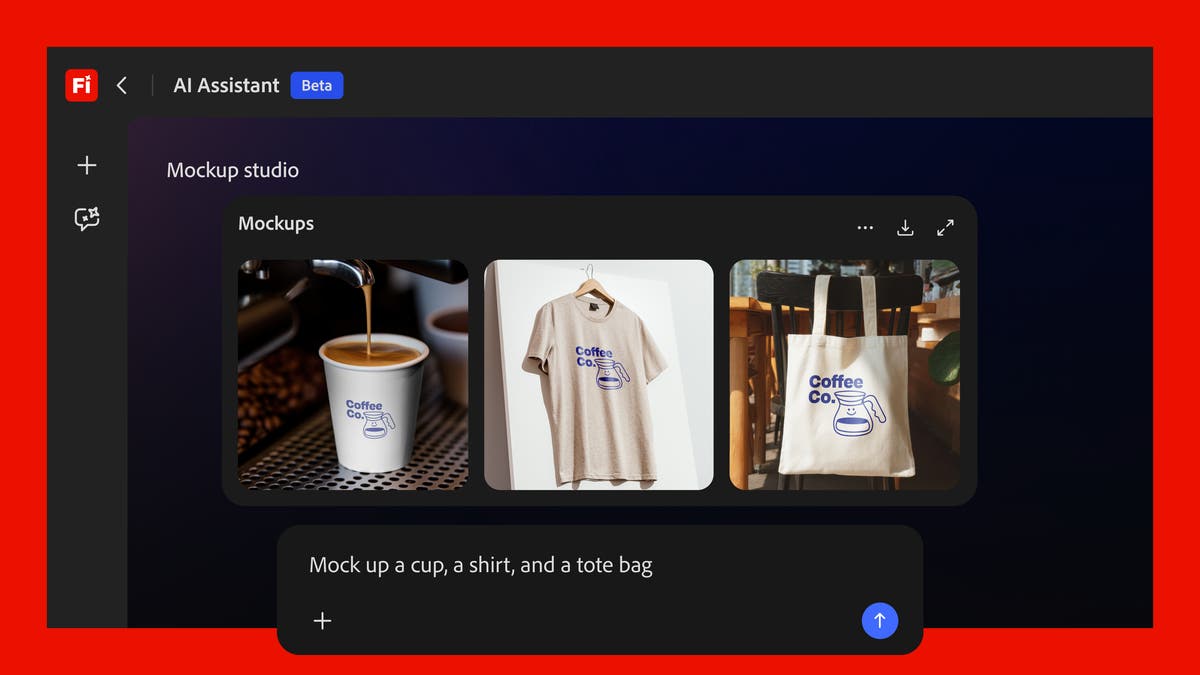
Meet Firefly AI Assistant — the creative agent Adobe first previewed as "Project Moonlight" at Adobe MAX in October 2025. It entered public beta on April 27, 2026.
Here's what makes this different from existing Adobe AI features: tools like Generative Fill (Photoshop) or Auto Tone (Lightroom) live inside their respective apps — you still have to find and apply them yourself. Firefly AI Assistant is an agent that coordinates all those tools from a single conversation window. You describe what you want, it figures out which app and feature to use, then runs it.
Adobe VP Alexandru Costin put it plainly: "We have the opportunity to remove some of the friction in learning this large catalog of tools we have and bring all of that value to our customers." Translation: you shouldn't need to know Adobe tools to benefit from Adobe tools.
The competitive context matters. According to The Next Web, this launch is Adobe's strategic pivot against Canva (260M+ monthly active users) and Figma (80–90% UI/UX design market share). After the $20B Figma acquisition fell through, Adobe is shifting from per-app subscriptions to an AI agent–powered platform.
What does it actually do?
Auto Tone, Generative Fill, Remove Background, Vectorize, Presets — Photoshop alone has dozens of features. Firefly AI Assistant connects Photoshop, Premiere, Lightroom, Illustrator, Express, Firefly, and more — 60+ tools total — through natural language.
The most compelling demo: social media asset automation. Tell it "adapt this photo for Instagram, TikTok, Snapchat, and Facebook," and it handles cropping, per-platform formatting, file size optimization, and saving to Creative Cloud — automatically. No more hunting for each platform's spec sheet.
| Old Adobe workflow | Firefly AI Assistant | |
|---|---|---|
| Social resizing | Manual per-app resizing, repeated | One instruction → all platforms handled |
| App switching | Photoshop → Express → Premiere manually | Single chat window, auto-coordinated |
| Finding features | Navigate menus, search for functions | Just describe the outcome you want |
| Mid-task edits | Re-open the app, find the feature again | Jump in and edit at any step |
| Session memory | None — start fresh every time | Learns your tools, workflows, aesthetic |
Here's what matters most for creatives: every step is transparent, and you can intervene at any point. Adobe President David Wadhwani described it this way: "Creators provide the vision, judgment, and creative direction, while the assistant handles the orchestration and execution."
Context also persists across sessions — the more you use it, the more it adapts to your preferred tools, workflows, and aesthetic choices. It integrates 30+ partner AI models including Anthropic's Claude, and Frame.io integration enables automated edits based on collaborative feedback.
What are Creative Skills?
Pre-built multi-step workflow templates. "Batch photo editing," "mood board creation," "portrait retouching," "product mockups" — all executable with a single prompt. You can also create and save Custom Skills for workflows you repeat often.
Can you try it right now?
- Check your subscription
You need Creative Cloud Pro or a paid Firefly plan (Pro, Pro Plus, or Premium). Check your current plan at adobe.com/account. - Access the beta
Go to adobe.com/firefly to enter the Firefly AI Assistant beta. Global rollout started April 27, 2026, so access may be phased by region. - Start with a Creative Skill
Try the "social media assets" skill first. Upload a photo and say "optimize this for Instagram, TikTok, and Snapchat." Watch it run without any app switching. - Practice intervening mid-task
While the AI is working, stop it and adjust a slider or edit the layout directly. This is the core of Firefly AI Assistant — automation where you stay in control. - Build a Custom Skill
When you find a workflow you repeat, save it as a Custom Skill. Next time, a single prompt triggers the entire sequence.
Beta caveats
This is a public beta — some features are rolling out gradually. Adobe is offering complimentary daily generative credits during the beta period. Pricing post-launch hasn't been announced yet.