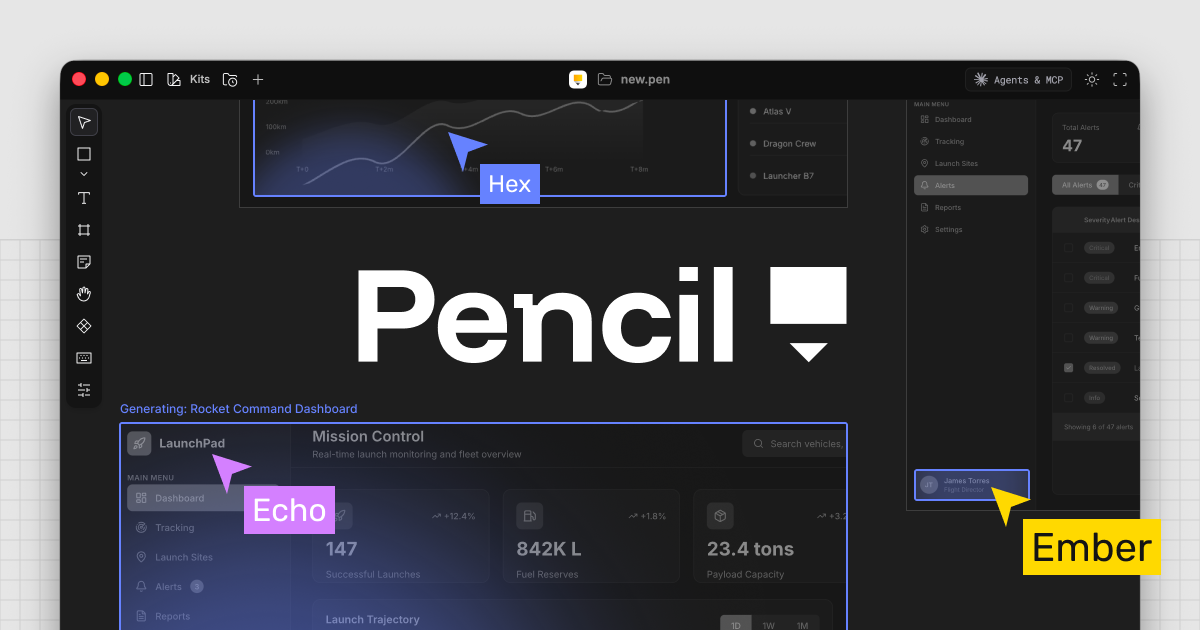
Instead of hiring six designers, imagine watching six AI agents design your screens simultaneously, right in front of you. One handles layout, another picks typography, a third drops in components — all happening on a single canvas in real time.
What Is It?
Pencil is an AI-powered design canvas built on MCP (Machine-Centered Protocol). It was created by Tom Krcha — a serial founder who co-built Around (the video calling app acquired by Miro) and Alter avatars (acquired by Google).
Here's the thing — what makes Pencil different is that design files (.pen) are just JSON. You can version-control them with Git like code, branch, merge, and let AI agents read and write them directly. You know that loop where you design in Figma → hand off to developers → they interpret it differently → you revise again? Pencil eliminates that entire cycle.
And the newly revealed SWARM mode is the centerpiece. Up to 6 AI design agents work on a single canvas simultaneously. You can see each agent's cursor moving in real time as the screen fills up in front of you. Tom calls this an "autonomous design agency".
What Changes?
The biggest problem with AI design tools right now is that they're single-threaded. One prompt → one result → not happy with it → prompt again. SWARM mode breaks that bottleneck.
| Existing AI Design Tools | Pencil SWARM | |
|---|---|---|
| How it works | 1 prompt → 1 result | 1 prompt → 6 agents in parallel |
| File format | Proprietary format (black box) | .pen = JSON (Git-compatible) |
| Code handoff | Design → handoff → coding | Design = code (one step) |
| IDE integration | Separate app | Built into Cursor · VSCode · Claude Code |
| Real-time feedback | Review output, then revise | Watch agent cursors live |
Peter Yang (Behind the Craft) actually demoed designing a travel app in SWARM mode, and described watching 6 agents build out different screens simultaneously as a "brain-rewiring" experience.
What's especially significant is that Pencil is creating a new category called "vibe designing". If Cursor opened the door to vibe coding, Pencil is doing the same for design. Tom himself said he started the Pencil prototype because describing UI in text while using Cursor was just too painful.
MCP (Machine-Centered Protocol) is a protocol that lets AI agents directly manipulate external tools. Pencil's MCP server lets AI add frames to the canvas, insert components, apply styles, and organize layouts — all on its own. The key is that write access is fully open, not just read — that's what sets Pencil apart.
Getting Started
Pencil is free right now. Five minutes is all you need to get going.
- Download the Pencil desktop app
Go to pencil.dev/downloads — Mac, Windows, and Linux are all supported. You get an infinite canvas the moment you install it. - Connect an AI agent
Go to Settings → Agents & MCP and toggle on Claude Code, Cursor, or VSCode — whichever you use. On Mac it auto-detects. For Claude Code, type/mcpin the terminal to confirm the connection. - Generate your first design in SWARM mode
Add an AI model (Claude is recommended) → enable SWARM mode → enter a prompt like "Design a travel app with booking flow." Watch the agents fill in the screens in real time. - Boost quality with design kits
Use built-in design systems like Shadcn UI, Lunaris, or Halo to have the AI design with actual components. The results feel professional rather than "AI-generated." - Convert to code
Once you're happy with the design, runclaude 'Generate HTML/CSS/React based on the design in app.pen'to convert it directly. Since.pen is JSON, the AI fully understands the structure.
Pencil launched in January 2026 and is still a young tool. Manual editing features are limited compared to Figma, and two-way sync — where design changes automatically update the code — isn't available yet. Unlike Lovable or V0, edits don't instantly reflect in code; you'll need to re-prompt the AI after making changes. Think of it as a strong tool for early prototyping and idea exploration, not a full production workflow replacement.
Deep Dive Resources
A 50-minute deep dive showing 6 AI agents designing a travel app in real time. Covers how.pen = JSON works, Cursor integration, and code conversion.
A step-by-step tutorial covering setup, building a dashboard, designing a multi-page website, and exporting to code.
An honest designer's take on Pencil's interface, Prompt Block, UI Kit, and where the limits are.
Pencil's official profile from a16z's early-stage investment program. Good place to learn about Tom Krcha's background and vision.