You have the melody you want, but describing it in words is even harder
When making background music for short-form content or product videos, a phrase like “calm synth-pop” can sometimes fall short. The melody in your head is clear, but text generation produces a different track, and one unsatisfying part means generating the whole thing again.
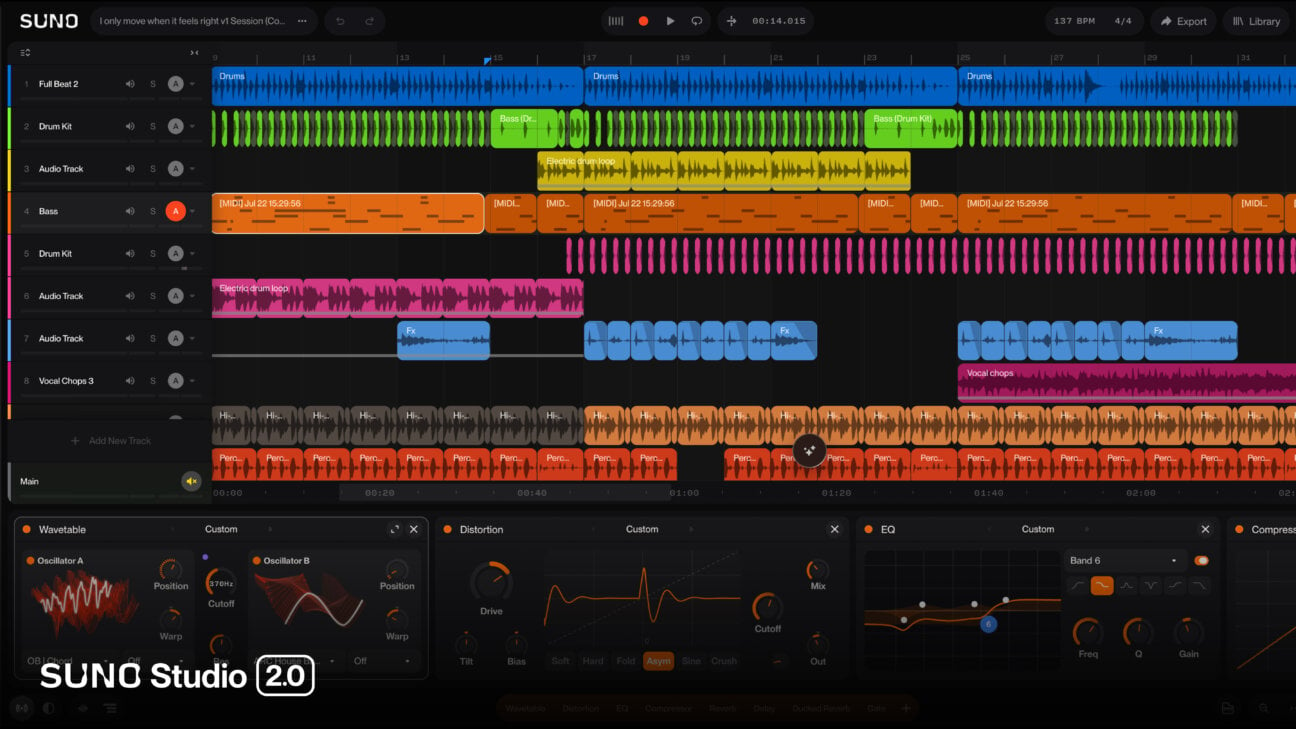
Suno Studio 2.0 narrows that gap. You can capture a melody or chord progression you play as a MIDI clip, then generate new audio using that clip as a condition. Rather than your ability to write highly refined prompts, your ability to enter even a few bars of the notes you want yourself is reflected at the starting point.
Still, it should not be considered a complete replacement for a general-purpose DAW. It cannot load external VSTs or Audio Units, or sync directly with an existing DAW, so it is closer to a production environment where you draft inside Suno, export stems, and hand them off for subsequent work.
Start with a short MIDI clip, no installation needed
Studio 2.0 is currently a browser tool available to Premier subscribers. According to the official guidance, it requires a screen width of at least 768px, a CPU supporting SIMD (SSE4.1 or Neon), and at least 4GB of RAM; the latest Chrome is recommended. If you use an external MIDI controller, you also need to grant MIDI permission in your browser. Safari does not support Web MIDI.
- Log in on the official Suno Studio page and select Open Studio. You do not need to install a separate program. If it does not open, first check whether your account has an active Premier subscription on the pricing page.
- Create a MIDI track in a new project. Press + Track or Shift+T at the bottom of the screen, then select MIDI. You are ready once a track with the default Wavetable synth loaded appears.
- Enter a short melody. Open the performance keyboard using the keyboard icon at the bottom right. On a Mac, you can also use Cmd+K. To record, arm the track and press Shift+R. If playing is difficult, create an empty MIDI Clip and place notes directly in the piano roll.
- Select the MIDI clip and open Chat. Press Enter or the circular sparkle icon. For example, your first prompt could be: “Create a calm synth-pad alternative audio take based on the selected MIDI melody. Preserve the core pitches and rhythm.” This is an example for checking the feature flow, not official wording that guarantees preservation of the original melody.
- Listen to the candidates and Commit just one. Compare generated alternatives in Audition, then Commit the take you want to keep. Next, turn on the metronome and solo that track to check whether the core notes and rhythm are audible and whether the timing drifts beyond what you can accept. The official documentation also advises closely checking the timing of some generated results.
Your first success criterion is not a finished track. Once an alternative audio take based on the selected MIDI appears, you can compare it in Audition and Commit one, you have learned the basic flow. You need to judge melody preservation and acceptable timing tolerance yourself based on the project’s purpose.
Chat is a session editor, not just a chatbot that answers questions
What makes Studio Chat different is that it reads the currently selected tracks, clips, and project tempo, then makes actual changes. It can generate MIDI or audio, edit song structure, or create custom effects. You can listen to alternative takes before committing them, and changes made through Chat can also be undone.
That is why it is more practical to include the target and preservation conditions in a request instead of only describing the mood. Rather than saying “make it better,” define the scope: “Add a warm sense of space only to the selected vocal, but do not change its original volume or the other tracks.” This too is only a prompt example and does not guarantee the result.
Chat is still in beta and may ask follow-up questions for ambiguous requests. There is also no published success rate showing how accurately it follows musical instructions. So it is safer to repeat Audition, Commit, and undo in small editing units rather than immediately locking in the first result.
Custom plugins are not VST plugins
Studio includes Compressor, Convolution, Delay, Distortion, EQ, Gate, and Reverb. You can automate plugin parameters over time as well as volume and pan. You can describe an effect you want in Chat to create a custom effect for use inside Studio, save it to your personal library, and reuse it in other Studio projects.
The plugins meant here differ from VST and AU files installed in a conventional DAW. Studio cannot load external VSTs or Audio Units, and it cannot sync directly with an existing DAW. If you need to retain your usual virtual instruments and mixing chain, create ideas and parts in Studio, then transfer them as files.
| What you need to do | Possible inside Suno Studio | What to move to an external DAW |
|---|---|---|
| Enter melodies | Import MIDI, record it, and edit in the piano roll | Direct synchronization with an existing session |
| Edit sound | Built-in effects, custom effects, and automation | Use your own VSTs and AUs |
| AI generation | Generate alternative audio using a MIDI clip as a condition | Precision post-production with external plugin chains |
| Delivery | Export multitracks and individual WAV stems | Final mixing and mastering in your existing production environment |
Judge completion by whether you can hand off the stems
Studio lets you export an entire song or a selected section as 32-bit WAV or MP3, and you can also deliver multitracks and individual WAV stems. The official launch announcement describes high-quality multitrack and stem export as 32-bit/48kHz.
If you create content, listen for three things before worrying about generation count: whether it maintains timing that fits the video cuts, whether instruments overlapping dialogue can be lowered as individual stems, and whether the files are separated enough for an external editor to continue working. If these conditions are met, Studio can serve as a drafting room for custom background music even if it is not a complete DAW.
Premier displays a limit of 60 monthly downloads for regular Suno songs, but the official help center says that this download limit does not apply to the Studio workflow. Plan policies may change, so check the latest pricing and download pages again before exporting in bulk.
Creating something on a paid plan does not automatically guarantee copyright. The current terms assign Suno’s rights in eligible outputs generated during a Pro or Premier subscription, but they do not guarantee that copyright subsists in those outputs. Before commercial use, check the latest terms to confirm that the output was downloaded through an approved method, that you hold the necessary rights to the audio and lyrics you entered, and whether Remix restrictions apply.
If you want to dig deeper
Introducing Studio 2.0 You can review the official launch scope, including MIDI, Chat, automation, and multitrack export. suno.com
MIDI in Studio It lays out the practical steps for creating MIDI tracks, playing with a computer keyboard, recording, and piano-roll editing. help.suno.com
Studio Chat Useful for learning how to make requests based on a selected clip and understanding the Audition and Commit flow. help.suno.com
Audio Effects and Plugins in Suno Studio You can check built-in effects and automation, the storage scope for custom effects, and external-plugin limitations. help.suno.com