Loading...

AI video editing · DaVinci Resolve AI Assistant

Connect AI to DaVinci Resolve, go to sleep, wake up to 1,168 client Shorts re-edited

Connect Claude or ChatGPT to DaVinci Resolve Studio 21.1, and the AI carries out the edits you ask for in a chat window, working directly inside Resolve. It can pull reels from long footage, edit a whole video, or repeat the same job across hundreds of timelines. Here are real editing jobs people handed it.

Oct 6, 2026·4 cases

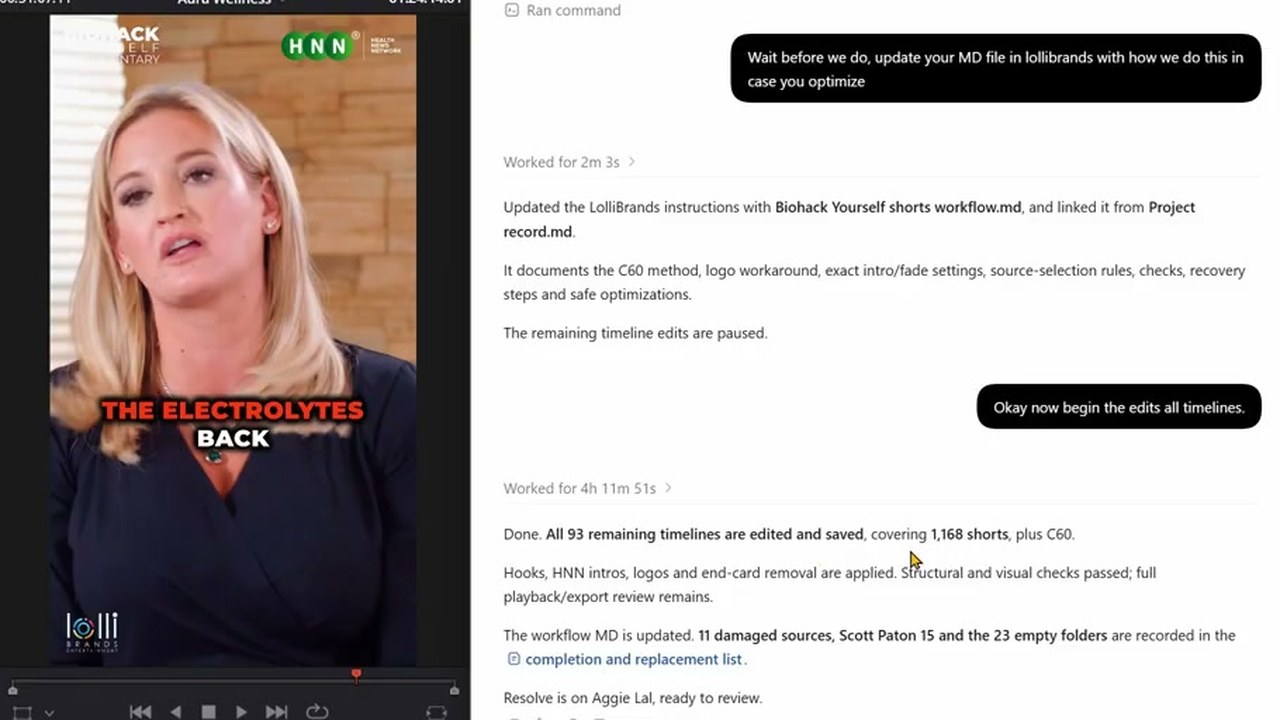
Left, a vertical Short with the HNN logo in the Resolve viewer. Right, the ChatGPT window showing 'Worked for 4h 11m 51s' and a report that 1,168 Shorts were edited and saved
Checking the results the morning after handing off the Shorts re-edit and going to sleep. Source: The David Shutt on YouTube

The video at the top records the night video editor David Shutt handed ChatGPT a job and went to sleep. He wanted a client's old Shorts republished with new hooks, intros, and logos. The next morning, the app showed "Worked for 4h 11m 51s" along with a report that 1,168 Shorts had been edited and saved. "it would have taken me a few days anyway," he said.

When Blackmagic Design added AI assistant connections to DaVinci Resolve 21.1 on September 8, a post on Reddit's video editing board titled "So Claude can now edit videos and I’m having a bit of a panic attack" drew more than 300 comments.

Working through this connection, the AI doesn't click around Resolve's interface. It turns the request from the chat into Resolve scripts and runs them. That makes it especially good at jobs that repeat the same steps hundreds of times.
Reference 01Video editor David Shutt · runs a Resolve tutorial channel on YouTube

He edited one Short by hand as a model, and the AI repeated that edit across the remaining 1,168

David Shutt's request to ChatGPT

I have Davinci Resolve open. Each folder in Biohack yourself shorts has a person and there final shorts (some have thumbnails and submagic shorts which are unsubtitled shorts we dont need those) I have made a C60 and Aggie Lal timeline to get us started. in the C60 timeline you can see I have taken the first short. Found a hook in it, Copied and pasted that hook to the front (But left it in the actual short) THEN put the HNN Video intro over the top (I made a cut where the fade is so you can align the short after the video intro) And the LOGO goes over the top of all of it (but not the hnn intro). I also cut off the end card of biohack yourself which you could do too. SO the task would be. Find a hook, take hook to front, but HNN video intro on it, put logo over the top, cut off end cards. and I'd need you do do it for each folder in here.

Rather than only describing the job in words, he pointed to a timeline where he had already fixed the first Short by hand. He then suggested a test run on the C60 folder first.

The request sent before handing over the full job

Wait before we do, update your MD file in lollibrands with how we do this in case you optimize

Sent after the C60 test. The AI left a file in the client folder documenting how the work is done.

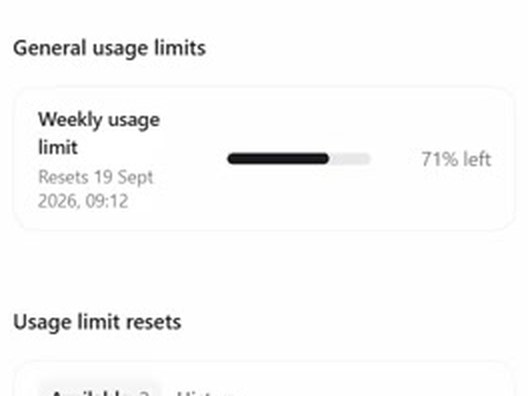
Weekly usage bar in ChatGPT settings: 71% left
The night the job started: 71% of weekly usage left
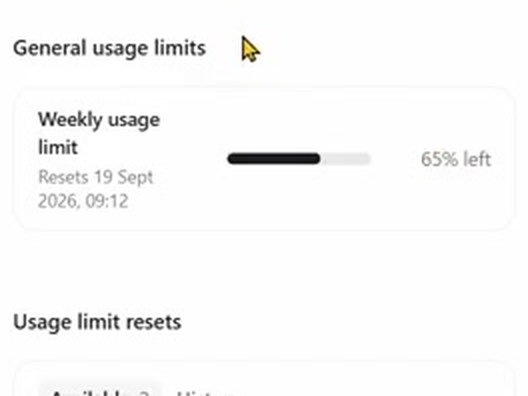
Weekly usage bar in ChatGPT settings: 65% left
The next morning: 65% left

The job used 6 percentage points of the weekly allowance on the ChatGPT Pro plan (£200 a month). Resolve's scripting couldn't stretch the logo graphic past its default 5 seconds. When the AI switched to operating the screen, David Shutt stopped it, and the AI got the same effect by remaking the logo as a video with a transparent background. It listed 11 files with damaged originals and 23 empty folders separately.

Reference 02The same editor, David Shutt · client: an aesthetic treatment educator

Four hours of treatment footage became 12 vertical reels, and one went up on the client's channel

He gave ChatGPT (GPT-6 Astra) the treatment footage, with solid-color frames separating each patient, plus reels he had made by hand before as examples, and asked it to pull out reels. One of those reels went up on the client's channel on September 23.

David Shutt's request

In Davinci Resolve I've made an Ai timeline for you. Transcribe it, cut out the best reels you find. Make sure if he is talking and not injecting you try and show injecting footage (by moving footage from further head over the top) Injection should always be used as a hook, and make double sure whatever he is talking about is what is shown. For example if he's marking up the cheek and pointing at it, analyze the image, check where he's pointing at, then just use that injection which should be the next time he goes in with the needle. I have seperated the patients with a solid colour so you don't mix them up. Text hooks should be as simple as possible and try to be a HOW TO INJECT this area or HOW TO TREAT this etc. you can grab the hook text from Ali reels or tech tuesdays timeline and copy and paste. I'll add the music after

Ali reels and tech tuesdays are the names of reel timelines he had made before. Swap in the names of timelines that hold your own past work.

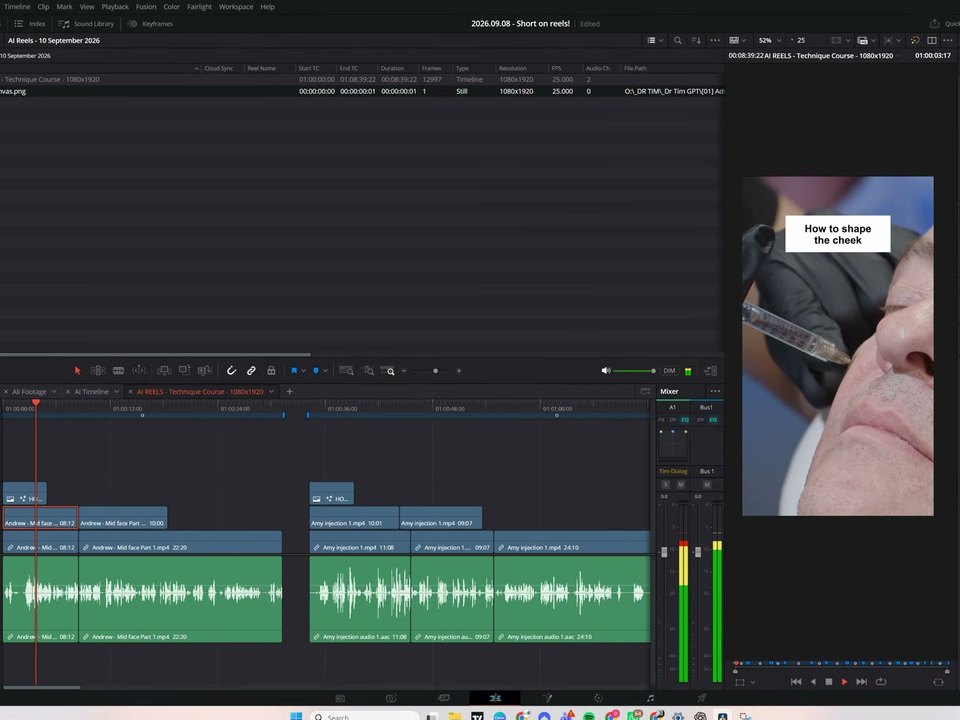
DaVinci Resolve screen: the AI REELS timeline, with the title 'How to shape the cheek' over an injection shot in the viewer
Reel 01, made by the AI inside Resolve
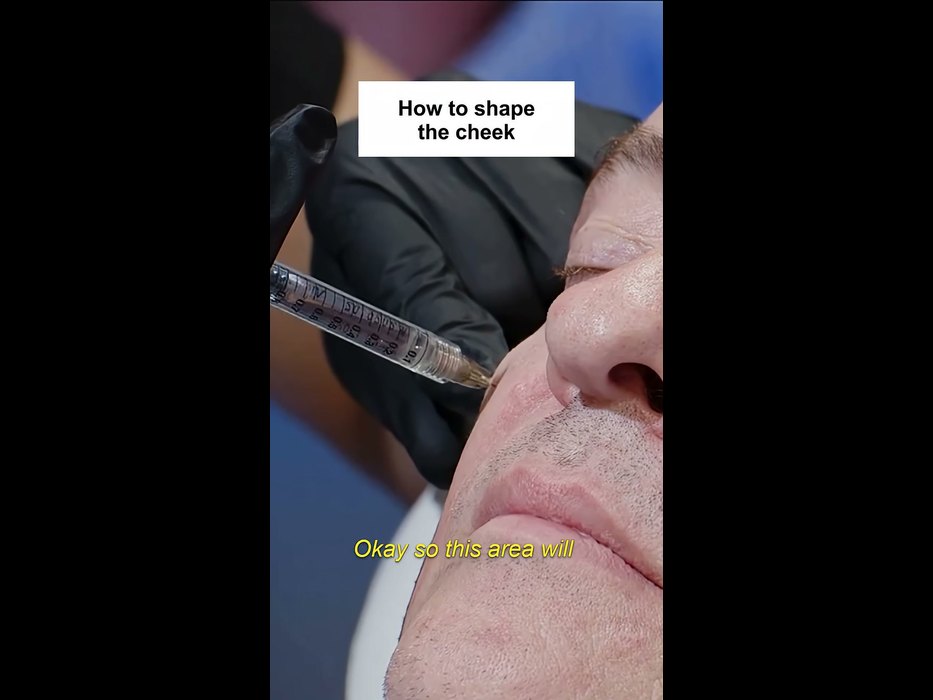
The opening frame of the client channel's Short: the same injection shot, the title 'How to shape the cheek', and yellow captions
The Short posted on the client's channel on September 23

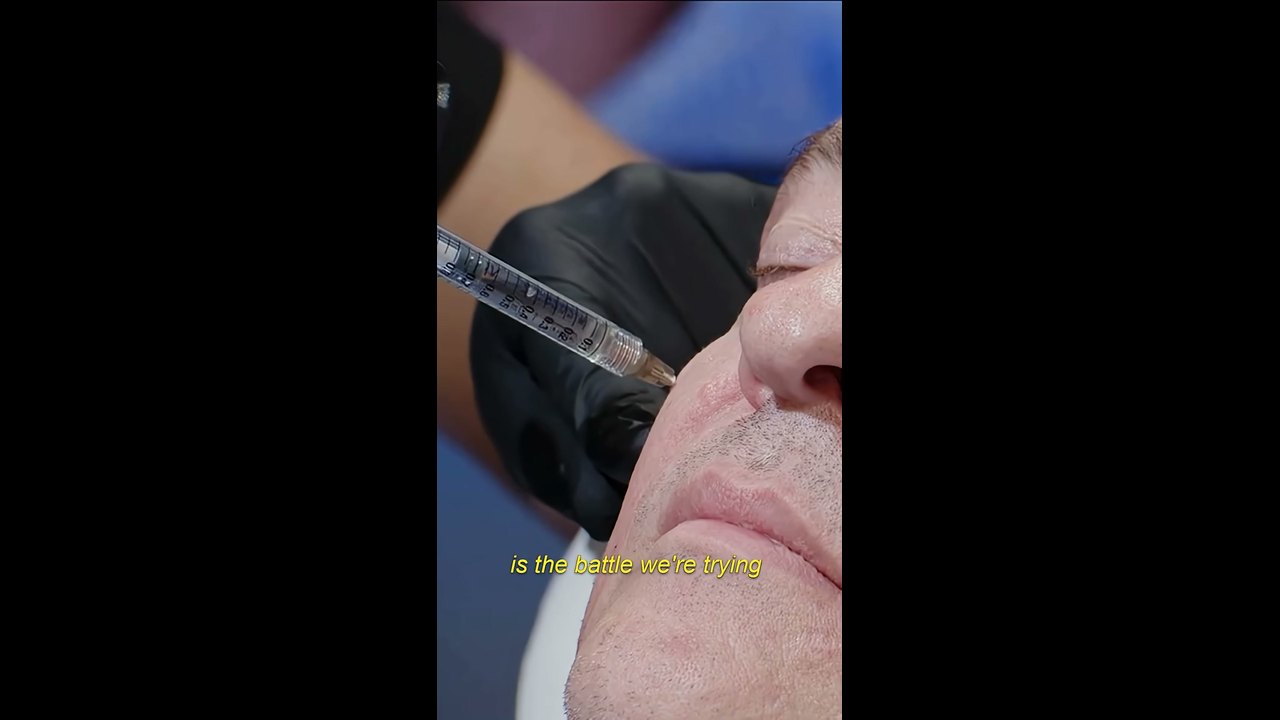
The AI saved all 12 on one vertical timeline, split by markers, and left music and captions to the human. The Short on the client's channel has the same opening shot, title, and first line as the AI's cut, with yellow captions added.

A frame from the client channel's Short: a gloved hand injecting a cheek with a syringe, with yellow captions on top

Still, after the first request, David Shutt sent more than ten more messages. He used screenshots to flag shots where the needle went out of frame, and when the AI kept deleting and rebuilding the timeline, he asked "Why do you delete and rebuild everything? whats the purpose of that". He said 70% of the reels could be used as is and 30% needed work.

Reference 03AI Shot Studio, a YouTube channel teaching AI video · 87K subscribers

Given the script and asset folder paths, Claude edited a 4-minute YouTube video in Resolve from start to finish

The creator connected Resolve to Cowork mode in the Claude desktop app and gave Claude the script they had written together earlier, plus folder paths for screenshots, narration, brand assets, and sound effects. Claude didn't start editing right away. It first laid out a five-step plan and three questions. By the timestamps the creator put in the video, the first cut was ready in 41 minutes.

AI Shot Studio's request to Claude

Now, my friend, there is a big test for you. Remember you animated my raw videos using my PC terminal and Claude Code? Now I have DaVinci Resolve Studio, and I want to see if you can do almost all video editing work for me. When you use or create new assets, add them along with my branding assets and information “D:\MY SITES\AiShotStudio\AIShotStudio-Brand-Assets“ and existing sound effects “D:\MY SITES\AiShotStudio\Audio Library” to Resolve for future reuse. What I want from you is to create a complete video with all your overlay cards you suggested in the script and other animations that will make the video engaging. Create a new project in DaVinci Resolve Studio named Higgsfield API. All screenshots and the video clip you asked for in the script, along with ElevenLabs voiceover, you will get here: “D:\MY SITES\AiShotStudio\YouTube\Tech Info\Higgsfield API\Work files“ Do all the edits, cuts, and everything as you imagined it in the script. If you need timestamps for voiceover, I believe you can generate an SRT file in Resolve. So, can you do that?

Put your own folder paths in place of the quoted D:\ paths. The script was written with Claude earlier in the same conversation.

Feedback sent after the first cut

As for video editing, perfect. Now I know who will do this work :D about the video itself, good, but there are a lot of places without animation. Quite long clips that look boring. Maybe highlight the text part the voiceover is talking about, or add branded animated captions there. The zoom-in in every clip also is kind of odd. Think about a different animation there. Music in the background is like an annoying hum. Woosh transition sound is totally off. If you need sound effects or music from me, describe what you want. Maybe write an ElevenLabs prompt for sound effects and a Suno prompt for background music, the type you want and I will generate them and add them to the audio library. Also, for some parts of the voiceover, I will add my talking avatar. I will do lip-sync clips on Higgsfield for that.

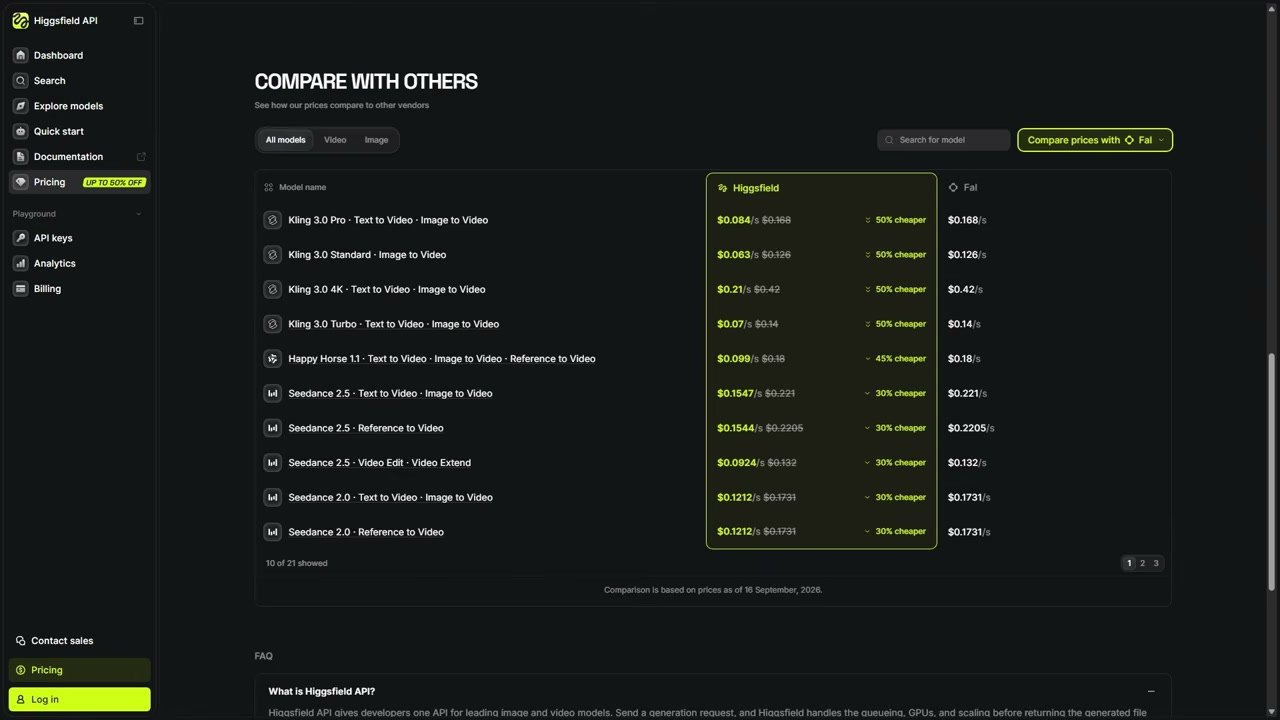
Instead of a vague thumbs-down, the feedback named each problem: the boring stretches, the odd zoom, the music, the sound effects. The second cut added table highlights, a pricing card, and the avatar.

A pricing comparison card from the published video: Kling 3.0 Pro, Higgsfield API $0.084, FAL $0.168, 50% CHEAPER

Claude also wrote down its own limits. Because "Resolve's API cannot write keyframes," it rendered the slow push-in moves into the clips ahead of time. The video made this way went up on the channel on September 18.

Reference 04Wedding filmmaker Justin Porter Media · 91K subscribers

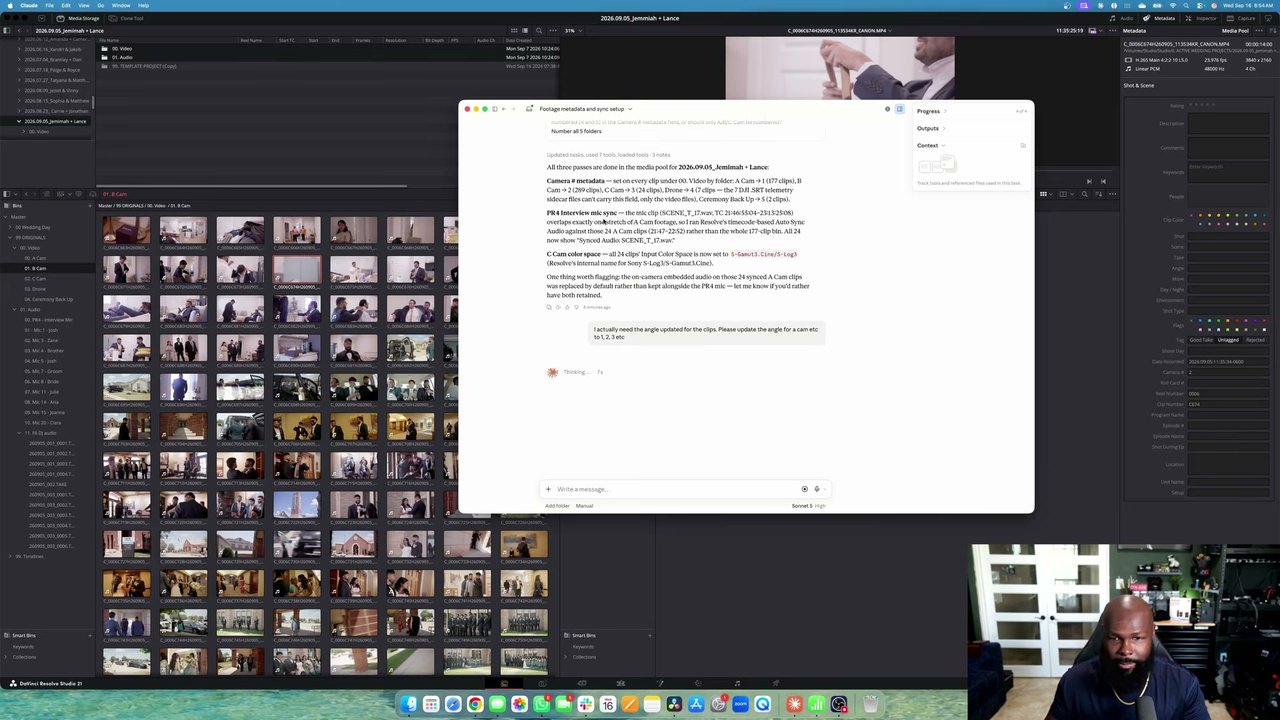
Before the edit began, Claude sorted out camera numbers, audio sync, and color space for 499 wedding clips

He handed Claude the prep work he does every time he opens a new wedding project. The goal was to let the freelance editor handling the next step, the multicam edit, group clips by camera number.

Justin Porter Media's request

Inside the new project, there is a main folder of footage. I need to update all the metadata first as camera angles. A cam is 1, b cam is 2, c cam 3 etc for all angles. Then I need to sync the PR4 Interview mic to the A Cam footage synced based on timecode. Then, for C cam clips, set the input color space to Sony slog 3/s gamut 3 cine.

Because he wrote 'camera angles,' Claude first filled in the Camera # field and had to be told to use the Angle field instead. Name the exact field to fill, and you won't need to ask twice.

Next to the Resolve media pool, the Claude window shows a report on organizing 499 clips

Claude synced only the 24 A-cam clips that overlapped in time with the interview mic recording, and flagged up front that those clips' in-camera audio had been swapped for the mic audio. At the proxy step, it asked separately for permission to operate the screen. Once allowed, it used the mouse to pick the media folder (bin) and carried on.

What people who used it say

People who tried it wrote that it saved them a lot of time on rough cuts and repetitive cleanup for talk-driven material like interviews, lectures, and podcasts. The complaints centered on sloppy cuts and B-roll choices, actions the scripts can't perform, and usage that runs out fast.

What worked

  • “I just edited a ful 50 minute interview into a good 10 minute version by linking Codex to resolve. Took 5 minutes when It would have taken me 3 hours.”

    u/ShoroukTV · Redditreddit.com
  • “These used to take an hour each.”

    After training Codex on four lectures they had edited before, they now drop in the raw footage and slides, ask for an edit by the Tuesday lecture rules, and get a nearly finished lecture about 20 minutes later.

    u/Keys_r_Us · Redditreddit.com
  • “It did all of that and it only took about 40 minutes for the whole process. It did an excellent job. Normally it would take me all day to do the same job.”

    From an editor working since 1998. The job: pulling selects from two-camera footage, drafting a story, and assembling it.

    @trelstudios · YouTube commentyoutube.com
  • “I used it with Codex to relink 423 video project folders that I had moved and resorted into other folders during a NAS migration.”

    @michaelvarney. · YouTube commentyoutube.com

What fell short

  • “It handled the spoken parts really well, adding b-roll it had no clue.”

    The job was a vertical social edit they didn't want to do. The interview portion was done in 5 minutes.

    u/24mc-xyz · Redditreddit.com
  • “Even simple interactions like moving a clip 3 seconds in the timeline will not work with the MCP.”

    It can only do what Resolve's scripting exposes.

    kolibril13 · Hacker Newsnews.ycombinator.com
  • “In the end, I don’t know if what I asked AI to do here saved me any time or not. But I am a very fast editor, so for some, it could be a huge timesaver.”

    A working editor had it prep 19 client videos. It misread the first instruction and had to be told again, and one stringout took 2 minutes 31 seconds, versus about 30 seconds by hand.

    Scott Simmons · ProVideo Coalitionprovideocoalition.com
  • “Tried it with Plus account and astra worked on davinci for 20 minutes and daily usage limit is gone”

    @Botamais1Post · YouTube commentyoutube.com

How to start

  1. 1

    Get DaVinci Resolve Studio 21.1 or later

    The AI connection is only in the paid version, Studio. The official price in Korea is ₩509,800 (excluding tax), and it's a one-time license, not a subscription. Projects opened in 21.1 can't be reopened in earlier versions, so back up real work projects and test on a copy first.

    DaVinci Resolve Studio Korea page ↗
  2. 2

    Install the Claude or ChatGPT desktop app on the same computer and sign in

    The AIs that connect are Claude Desktop, Claude Code, ChatGPT's Codex, Google Antigravity, and Grok Build. The connection works on free plans too, but people who tried it wrote that on Plus or another $20-a-month plan they hit the limit after a little over 20 minutes. The 1,168-Short job at the top ran on the ChatGPT Pro plan.

  3. 3

    In Resolve, choose File > Setup AI Assistants, then restart the AI app

    Resolve finds the installed AI apps and connects them automatically. When the 'AI Assistants Configured' window appears, quit and reopen the AI app. Claude Desktop shows one more extension install window, so click Install.

    Setup guide on the Blackmagic forum ↗
  4. 4

    Ask in the AI app's chat window, and include an example

    Type your request in the AI app's chat window, not in Resolve. In every case above that went well, the person first gave it an example, past work, or folder paths. Once an approach works, have the AI save it as a rules file. Scripts the AI writes have the same file and network permissions as the AI app.

Good first requests after you connect

These examples come from Blackmagic's reference manual. Start with jobs whose results you can check right away, like rendering, cleanup, renaming, and checking settings.

Sample requests from the manual
  1. 1Render the current Resolve timeline as ProRes 422 HQ, H.265 4K, and a 1080p H.264 proxy.
  2. 2Give me a breakdown of the current Resolve timeline, with clip count, total duration, offline media, markers.
  3. 3Rename all clips on V1 as Interview_A_001, 002, 003...
  4. 4Add different colored markers for all cuts per track and export all markers to CSV.
  5. 5Apply the Sony SLog3 to Rec709 lut to node 2 of every clip.
  6. 6What are my project settings? Is this set up correctly for Netflix delivery?
  7. 7What are the project settings differences between the current project and "New Project 14”?
  8. 8Reframe this timeline for 9:16 vertical.

What you need

  • DaVinci Resolve Studio 21.1 or later (₩509,800 in Korea, excluding tax)
  • The Claude or ChatGPT desktop app
  • An Apple silicon Mac on macOS 15 or later, or a Windows 10 or 11 PC

Share this reference

Did you find this reference helpful?

Get curated references delivered to your inbox weekly