Loading...

视频剪辑 AI · DaVinci Resolve AI 助手

给 DaVinci Resolve 接上 AI 后去睡觉,第二天早上,客户的 1,168 条短视频已经重新剪好

给 DaVinci Resolve Studio 21.1 接上 Claude 或 ChatGPT,在聊天窗口里用一句话交代剪辑,AI 就直接在 Resolve 里动手:从长素材里剪 Reels、剪完一整支视频、把同一个操作重复到几百条时间线上。我们收集了几个把真实剪辑工作交给它的例子。

2026年10月6日·4 个案例

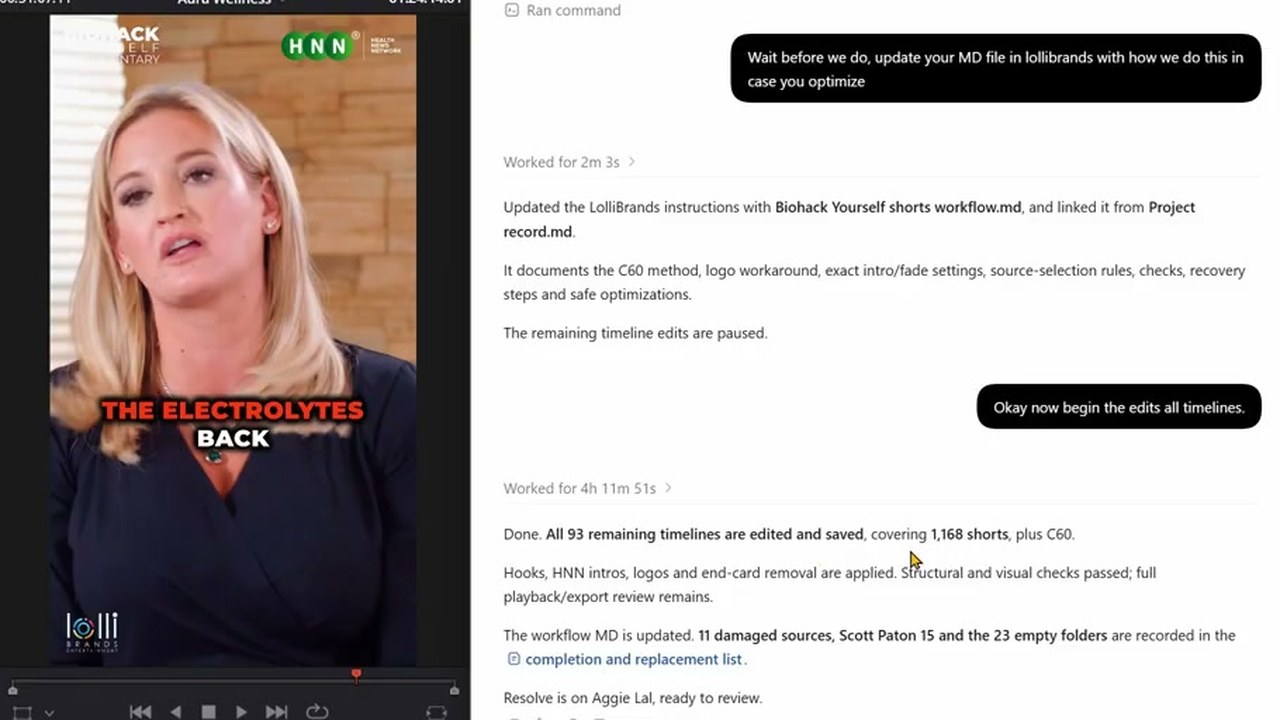
左边 Resolve 检视器里是一条叠着 HNN Logo 的竖版短视频,右边 ChatGPT 窗口显示 'Worked for 4h 11m 51s',以及已剪好并保存 1,168 条短视频的报告
把短视频重剪交出去后睡下,第二天早上查看结果。来源:The David Shutt YouTube

最上面这段视频,记录的是剪辑师 David Shutt 的一个晚上:客户的旧短视频要重新发一遍,每条都得加上新的开场钩子、片头和 Logo,他把这活交给 ChatGPT,自己去睡了。第二天早上,应用里留着“Worked for 4h 11m 51s”(已工作 4 小时 11 分 51 秒),以及 1,168 条短视频已剪好并保存的报告。他说:“it would have taken me a few days anyway”(换我自己做,反正也得好几天)。

9 月 8 日,Blackmagic Design 在 DaVinci Resolve 21.1 里加入了 AI 助手连接功能,Reddit 的视频剪辑版块随即出现一个帖子:“So Claude can now edit videos and I’m having a bit of a panic attack”(Claude 现在能剪视频了,我有点慌),评论超过 300 条。

通过这个连接干活时,AI 并不去点 Resolve 的界面,而是把聊天里收到的要求转成 Resolve 脚本来执行。所以它特别适合把同一个操作重复几百遍。
Reference 01剪辑师 David Shutt · 运营 Resolve 教程 YouTube 频道

亲手改好一条当示范,AI 就把同样的剪辑重复到其余 1,168 条短视频上

David Shutt 写给 ChatGPT 的请求

I have Davinci Resolve open. Each folder in Biohack yourself shorts has a person and there final shorts (some have thumbnails and submagic shorts which are unsubtitled shorts we dont need those) I have made a C60 and Aggie Lal timeline to get us started. in the C60 timeline you can see I have taken the first short. Found a hook in it, Copied and pasted that hook to the front (But left it in the actual short) THEN put the HNN Video intro over the top (I made a cut where the fade is so you can align the short after the video intro) And the LOGO goes over the top of all of it (but not the hnn intro). I also cut off the end card of biohack yourself which you could do too. SO the task would be. Find a hook, take hook to front, but HNN video intro on it, put logo over the top, cut off end cards. and I'd need you do do it for each folder in here.

他没有只用文字描述要求,而是把自己亲手改好第一条短视频的那条时间线指给 AI 看,当作示范。接着又让它先拿 C60 一个文件夹试一遍。

把全部工作交出去之前发的请求

Wait before we do, update your MD file in lollibrands with how we do this in case you optimize

这是 C60 试完之后发的。AI 把整理好的工作方法存成文件,留在了客户文件夹里。

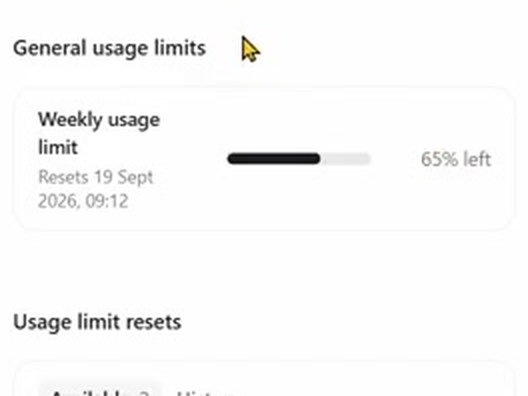
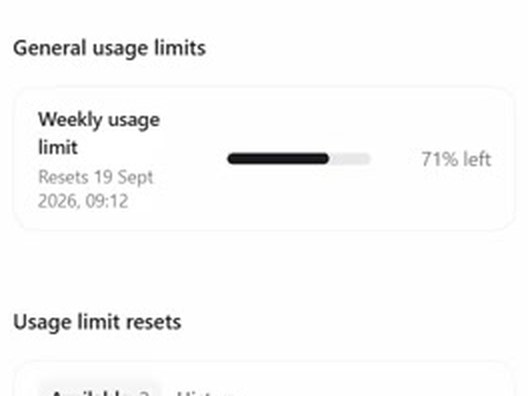
ChatGPT 设置里的每周用量条:71% left
开工那晚:每周用量剩 71%
ChatGPT 设置里的每周用量条:65% left
第二天早上:剩 65%

用的是 ChatGPT Pro 套餐(每月 200 英镑),消耗了每周用量的 6 个百分点。Logo 图片没法用 Resolve 脚本拉长到默认的 5 秒以上。AI 想转去直接操作界面,被 David Shutt 叫停;它于是把 Logo 重新做成透明背景的视频,达到了同样的效果。原素材损坏的 11 个文件和 23 个空文件夹,它另外列成了清单。

Reference 02同一位剪辑师 David Shutt · 客户:医美操作培训讲师

交出 4 小时的医美操作素材,AI 剪出 12 条竖版 Reels,其中一条发到了客户频道

他把一段每位患者之间用纯色画面隔开的操作素材,连同自己以前剪的 Reels 当示范,一起交给 ChatGPT(GPT-6 Astra),让它从中剪 Reels。 这样剪出来的一条 Reels,9 月 23 日发到了客户的频道上。

David Shutt 写的请求

In Davinci Resolve I've made an Ai timeline for you. Transcribe it, cut out the best reels you find. Make sure if he is talking and not injecting you try and show injecting footage (by moving footage from further head over the top) Injection should always be used as a hook, and make double sure whatever he is talking about is what is shown. For example if he's marking up the cheek and pointing at it, analyze the image, check where he's pointing at, then just use that injection which should be the next time he goes in with the needle. I have seperated the patients with a solid colour so you don't mix them up. Text hooks should be as simple as possible and try to be a HOW TO INJECT this area or HOW TO TREAT this etc. you can grab the hook text from Ali reels or tech tuesdays timeline and copy and paste. I'll add the music after

Ali reels、tech tuesdays 是他以前自己剪的 Reels 时间线名称。换成装着你自己旧作的时间线名称就行。

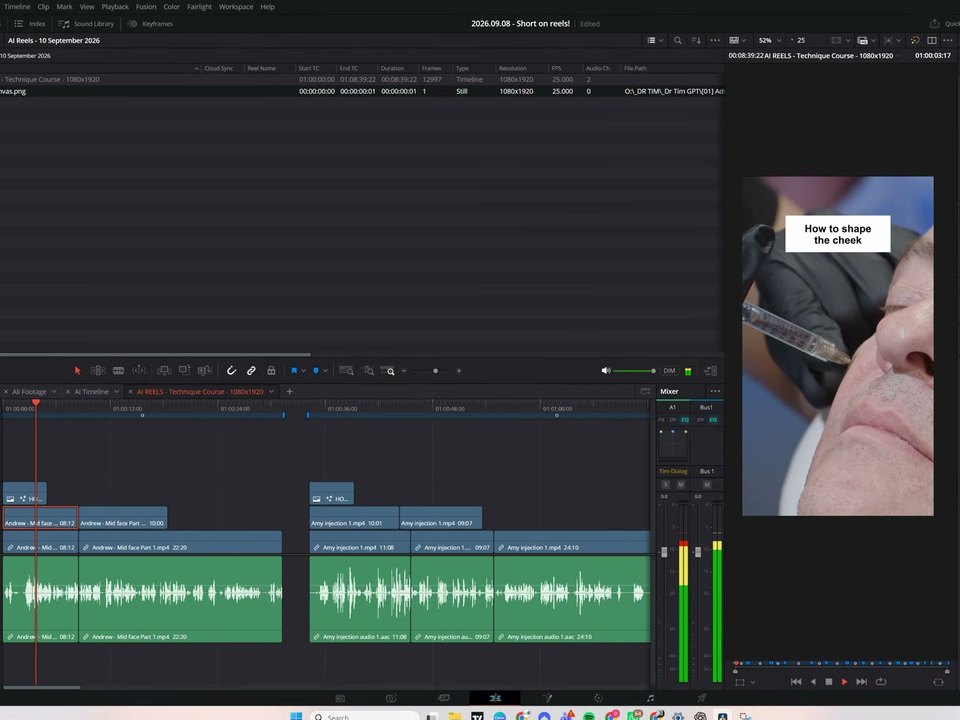
DaVinci Resolve 界面:AI REELS 时间线,检视器里的注射画面上方是标题 'How to shape the cheek'
AI 在 Resolve 里剪出的 01 号 Reels
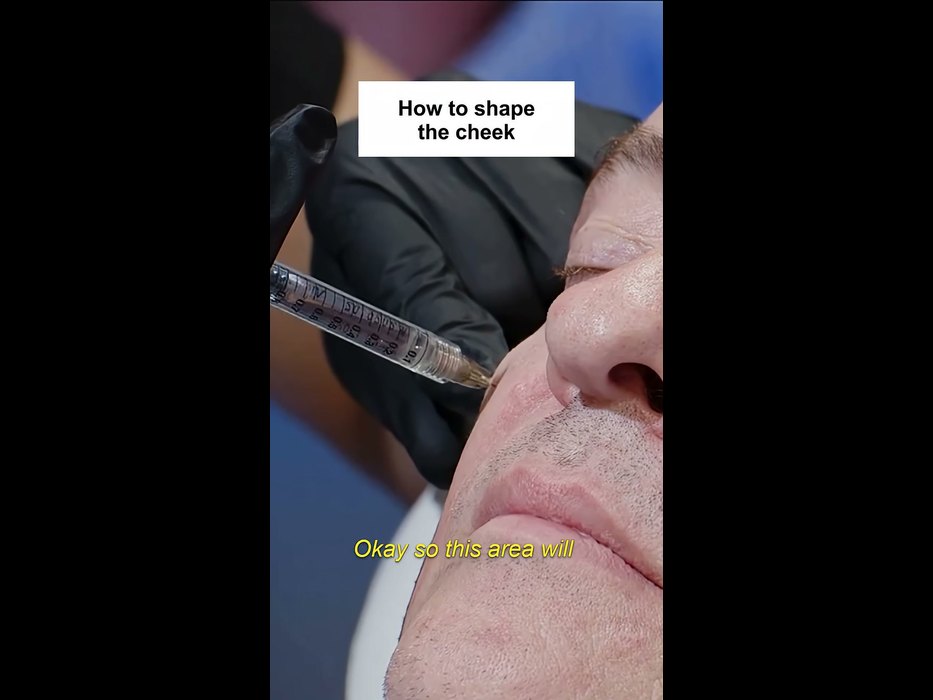
客户频道短视频的第一个画面:同样的注射画面和 'How to shape the cheek' 标题,加上了黄色字幕
9 月 23 日发布到客户频道的短视频

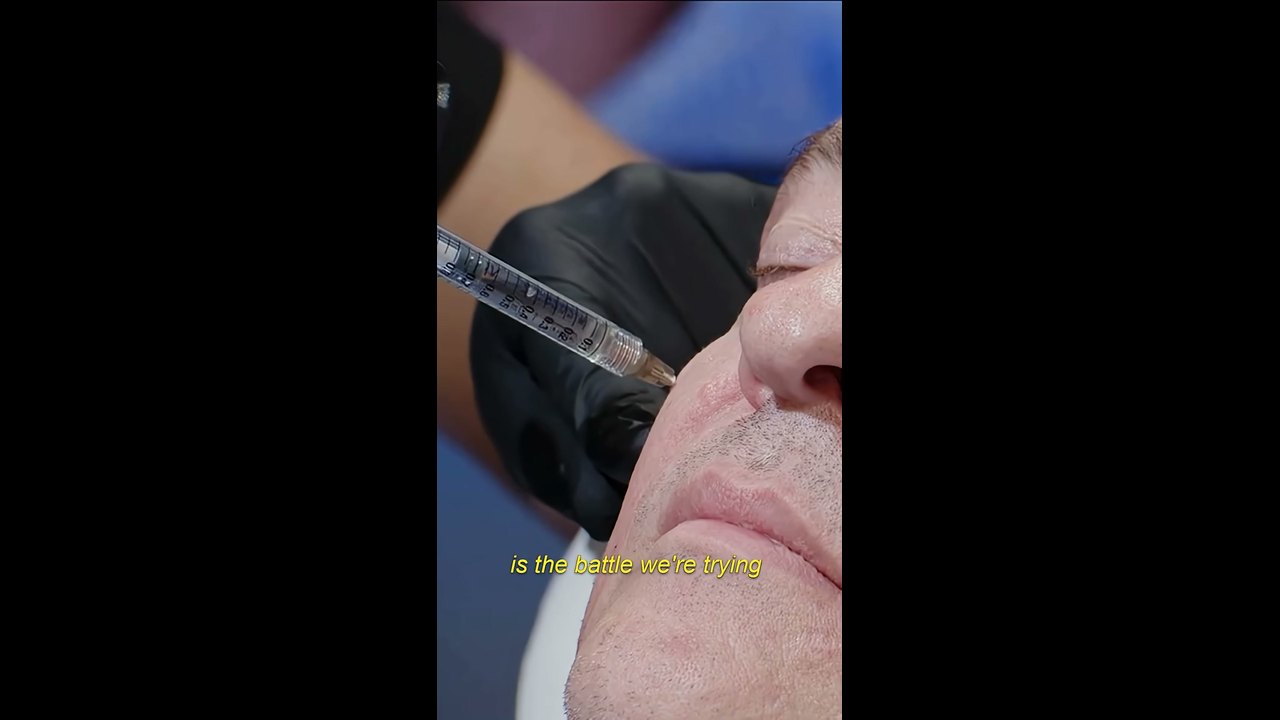
AI 把 12 条存在同一条竖版时间线上,用标记分隔,音乐和字幕留给人来做。发到客户频道的那条,和 AI 的成品开头画面、标题、第一句台词都一样,只是多了黄色字幕。

客户频道短视频中的一幕:戴手套的手拿注射器在脸颊上操作,画面上叠着黄色字幕

不过,在第一条请求之后,David Shutt 又追加了十几条消息。针头跑出画面的镜头,他截图指了出来;AI 反复把时间线删掉重建,他问:“Why do you delete and rebuild everything? whats the purpose of that”(为什么全删了重做?这是图什么?)。他说,这些 Reels 有 70% 可以直接用,30% 还得再改。

Reference 03AI 视频教程 YouTube 频道 AI Shot Studio · 8.7 万订阅

告诉它脚本和素材文件夹路径,Claude 在 Resolve 里从头到尾剪完一支 4 分钟的 YouTube 视频

他在 Claude 桌面应用的 Cowork 模式里接上 Resolve,把之前一起写好的脚本,以及截图、旁白、品牌素材、音效所在的文件夹路径告诉它。Claude 没有马上开剪,而是先给出 5 步计划和 3 个问题。按作者在视频里标的时间,第一版用了 41 分钟。

AI Shot Studio 写给 Claude 的请求

Now, my friend, there is a big test for you. Remember you animated my raw videos using my PC terminal and Claude Code? Now I have DaVinci Resolve Studio, and I want to see if you can do almost all video editing work for me. When you use or create new assets, add them along with my branding assets and information “D:\MY SITES\AiShotStudio\AIShotStudio-Brand-Assets“ and existing sound effects “D:\MY SITES\AiShotStudio\Audio Library” to Resolve for future reuse. What I want from you is to create a complete video with all your overlay cards you suggested in the script and other animations that will make the video engaging. Create a new project in DaVinci Resolve Studio named Higgsfield API. All screenshots and the video clip you asked for in the script, along with ElevenLabs voiceover, you will get here: “D:\MY SITES\AiShotStudio\YouTube\Tech Info\Higgsfield API\Work files“ Do all the edits, cuts, and everything as you imagined it in the script. If you need timestamps for voiceover, I believe you can generate an SRT file in Resolve. So, can you do that?

把引号里的 D:\ 路径换成你自己的文件夹路径。脚本是之前在同一段对话里和 Claude 一起写的。

看过第一版后发的反馈

As for video editing, perfect. Now I know who will do this work :D about the video itself, good, but there are a lot of places without animation. Quite long clips that look boring. Maybe highlight the text part the voiceover is talking about, or add branded animated captions there. The zoom-in in every clip also is kind of odd. Think about a different animation there. Music in the background is like an annoying hum. Woosh transition sound is totally off. If you need sound effects or music from me, describe what you want. Maybe write an ElevenLabs prompt for sound effects and a Suno prompt for background music, the type you want and I will generate them and add them to the audio library. Also, for some parts of the voiceover, I will add my talking avatar. I will do lip-sync clips on Higgsfield for that.

他没有笼统地说一句不太行,而是把无聊的段落、别扭的推近、音乐、音效一项项点出来。第二版加上了表格高亮、价格卡片和数字分身。

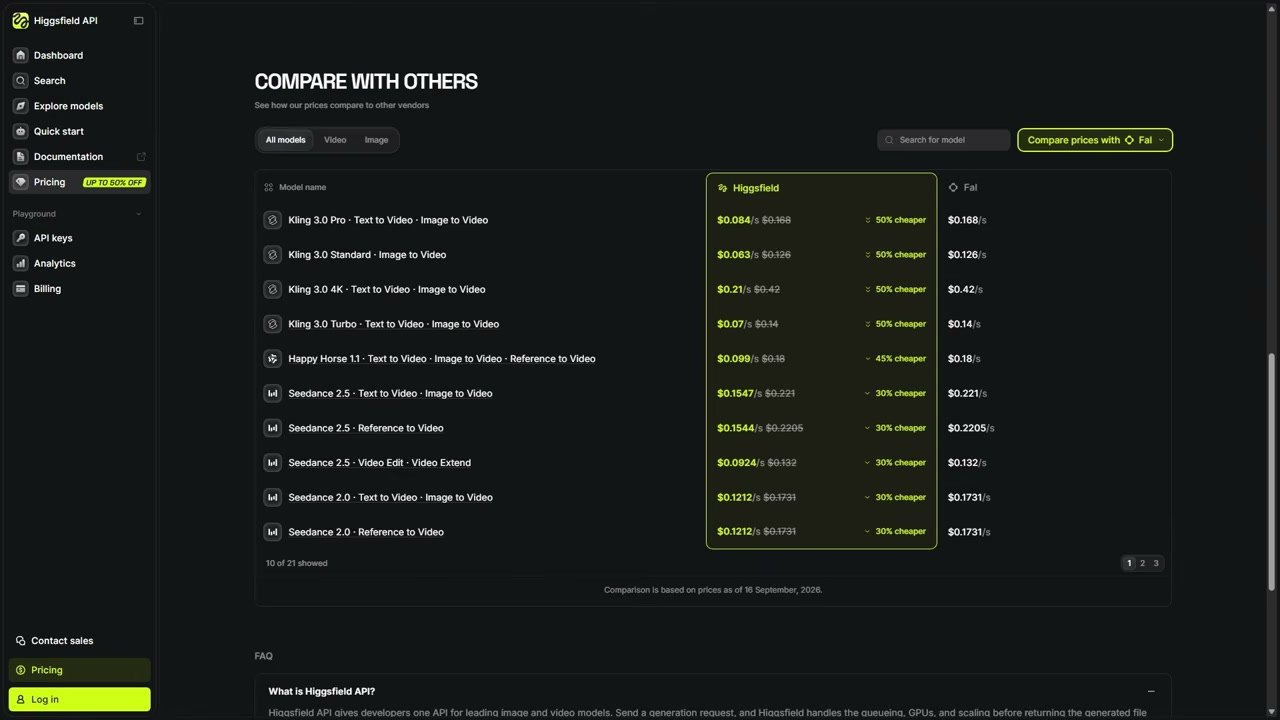
已发布视频里的价格对比卡片:Kling 3.0 Pro,Higgsfield API $0.084,FAL $0.168,50% CHEAPER

Claude 也自己写明了局限:“Resolve's API cannot write keyframes”(Resolve 的 API 写不了关键帧),所以画面缓缓推近的效果,是事先做进片段里再渲染出来的。这样做出来的视频,9 月 18 日发布在了频道上。

Reference 04婚礼视频制作者 Justin Porter Media · 9.1 万订阅

开剪之前,Claude 先把 499 个婚礼素材的机位编号、音频同步和色彩空间理好了

每次新开一个婚礼项目都要做的准备工作,他交给了 Claude。这样整理,是为了让负责下一步多机位剪辑的外包剪辑师,能按机位编号给素材分组。

Justin Porter Media 写的请求

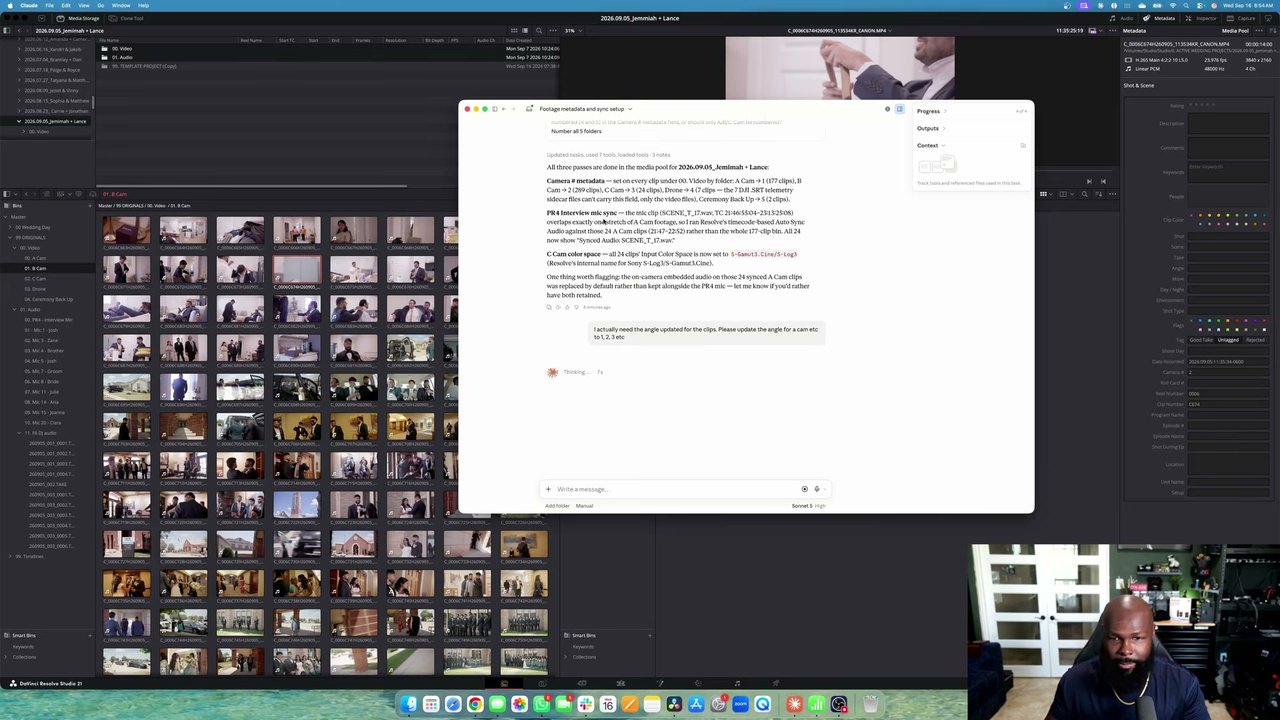
Inside the new project, there is a main folder of footage. I need to update all the metadata first as camera angles. A cam is 1, b cam is 2, c cam 3 etc for all angles. Then I need to sync the PR4 Interview mic to the A Cam footage synced based on timecode. Then, for C cam clips, set the input color space to Sony slog 3/s gamut 3 cine.

因为写的是 'camera angles',Claude 一开始填的是 Camera # 栏,后来又让它改填 Angle 栏。把要填的栏名写准确,就不用返工。

Resolve 媒体池旁边的 Claude 窗口里,显示着整理完 499 个片段的报告

Claude 只挑出和采访麦克风录音时间重叠的 24 个 A 机片段做了同步,并且先告诉他:这些片段的机内音频已经换成了麦克风音频。到了生成代理文件这一步,它另外申请了操作界面的权限;获准后,它用鼠标选中媒体夹(Bin)继续往下做。

用过的人怎么说

用过的人写道,在采访、课程、播客这类以说话为主的素材上,做粗剪和重复整理能省下大量时间。不满集中在剪得粗糙、选不好 B-roll、脚本做不到的操作,以及用量消耗太快。

好评

  • “I just edited a ful 50 minute interview into a good 10 minute version by linking Codex to resolve. Took 5 minutes when It would have taken me 3 hours.”

    接上 Codex,把 50 分钟的采访剪成了一个不错的 10 分钟版本。自己剪要 3 小时,这次只用了 5 分钟。

    u/ShoroukTV · Redditreddit.com
  • “These used to take an hour each.”

    他用以前剪过的四节课把 Codex 调教好之后,现在只要放进原始素材和幻灯片,说一句按周二课程的规则剪,20 分钟左右就能拿到差不多完成的课程视频。以前一节课就要剪一个小时。

    u/Keys_r_Us · Redditreddit.com
  • “It did all of that and it only took about 40 minutes for the whole process. It did an excellent job. Normally it would take me all day to do the same job.”

    这位从 1998 年就开始做剪辑。两台机位的素材,从挑选片段、搭故事结构到拼接,整个流程 40 分钟左右就完成了,平时这活要干一整天。

    @trelstudios · YouTube 评论youtube.com
  • “I used it with Codex to relink 423 video project folders that I had moved and resorted into other folders during a NAS migration.”

    迁移 NAS 时挪了位置、重新归类的 423 个视频项目文件夹,他用 Codex 全部重新链接上了。

    @michaelvarney. · YouTube 评论youtube.com

不足之处

  • “It handled the spoken parts really well, adding b-roll it had no clue.”

    把自己不想做的竖版社媒剪辑交给它,采访部分 5 分钟就剪好了,但加 B-roll 它完全不懂。

    u/24mc-xyz · Redditreddit.com
  • “Even simple interactions like moving a clip 3 seconds in the timeline will not work with the MCP.”

    在时间线上把片段挪 3 秒这样的简单操作也做不到,因为它只能做 Resolve 脚本开放了的操作。

    kolibril13 · Hacker Newsnews.ycombinator.com
  • “In the end, I don’t know if what I asked AI to do here saved me any time or not. But I am a very fast editor, so for some, it could be a huge timesaver.”

    一位资深剪辑师让它做 19 支客户视频的准备工作:第一条指令它理解错了,只好重来;做一条 stringout 花了 2 分 31 秒,而手动大约 30 秒。

    Scott Simmons · ProVideo Coalitionprovideocoalition.com
  • “Tried it with Plus account and astra worked on davinci for 20 minutes and daily usage limit is gone”

    用 ChatGPT Plus 账号,Astra 在达芬奇里干了 20 分钟,额度就见底了。

    @Botamais1Post · YouTube 评论youtube.com

怎么开始

  1. 1

    准备好 DaVinci Resolve Studio 21.1 或更高版本

    AI 连接功能只有付费版(Studio)才有。在韩国,官方售价是 509,800 韩元(不含税),是一次买断的授权,不是订阅。用 21.1 打开过的项目,没法再用旧版本打开,所以正式项目先备份,拿副本先试。

    DaVinci Resolve Studio 韩国官网页面 ↗
  2. 2

    在同一台电脑上安装 Claude 或 ChatGPT 桌面应用并登录

    能连接的 AI 有 Claude Desktop、Claude Code、ChatGPT 的 Codex、Google Antigravity 和 Grok Build。免费套餐也能连上,但用过的人写道,用 Plus 或每月 20 美元的套餐,跑 20 分钟出头就会碰到额度上限。最上面那 1,168 条的活,用的是 ChatGPT Pro 套餐。

  3. 3

    在 Resolve 里点 File > Setup AI Assistants,再重启 AI 应用

    Resolve 会找到已安装的 AI 应用并自动连接。弹出 'AI Assistants Configured' 窗口后,把 AI 应用关掉再打开。Claude Desktop 还会多弹一次扩展安装窗口,点安装即可。

    Blackmagic 论坛上的设置说明 ↗
  4. 4

    在 AI 应用的聊天窗口里,附上示范再提要求

    要求写在 AI 应用的聊天窗口里,而不是 Resolve 里。上面那些顺利的案例,都是人先给了一条示范、以前的成品或文件夹路径。一次跑顺了的做法,让它存成工作规则文件。注意,AI 写出的脚本拥有和 AI 应用相同的文件和网络权限。

刚接上时适合先试的请求

这是 Blackmagic 参考手册里给的例子。先从渲染、整理、改名、检查设置这类能马上看到结果的活开始。

手册里的请求示例
  1. 1Render the current Resolve timeline as ProRes 422 HQ, H.265 4K, and a 1080p H.264 proxy.
  2. 2Give me a breakdown of the current Resolve timeline, with clip count, total duration, offline media, markers.
  3. 3Rename all clips on V1 as Interview_A_001, 002, 003...
  4. 4Add different colored markers for all cuts per track and export all markers to CSV.
  5. 5Apply the Sony SLog3 to Rec709 lut to node 2 of every clip.
  6. 6What are my project settings? Is this set up correctly for Netflix delivery?
  7. 7What are the project settings differences between the current project and "New Project 14”?
  8. 8Reframe this timeline for 9:16 vertical.

需要准备

  • DaVinci Resolve Studio 21.1 或更高版本(在韩国售价 509,800 韩元,不含税)
  • Claude 或 ChatGPT 桌面应用
  • macOS 15 及以上的 Apple Silicon Mac,或 Windows 10、11 PC

分享此参考

这个参考对您有帮助吗?

每周精选参考直达您的邮箱