Loading...

영상 편집 AI · DaVinci Resolve AI 어시스턴트

다빈치 리졸브에 AI를 연결해 두고 잤더니, 아침에 고객사 쇼츠 1,168편의 재편집이 끝나 있었어요

DaVinci Resolve Studio 21.1에 Claude나 ChatGPT를 연결하면, 채팅 창에 말로 부탁한 편집을 AI가 리졸브 안에서 직접 해요. 긴 촬영본에서 릴스 뽑기, 영상 한 편 편집, 수백 개 타임라인에 같은 작업 되풀이하기까지요. 실제 편집 일을 맡긴 사례를 모아 봤어요.

2026.10.06·사례 4

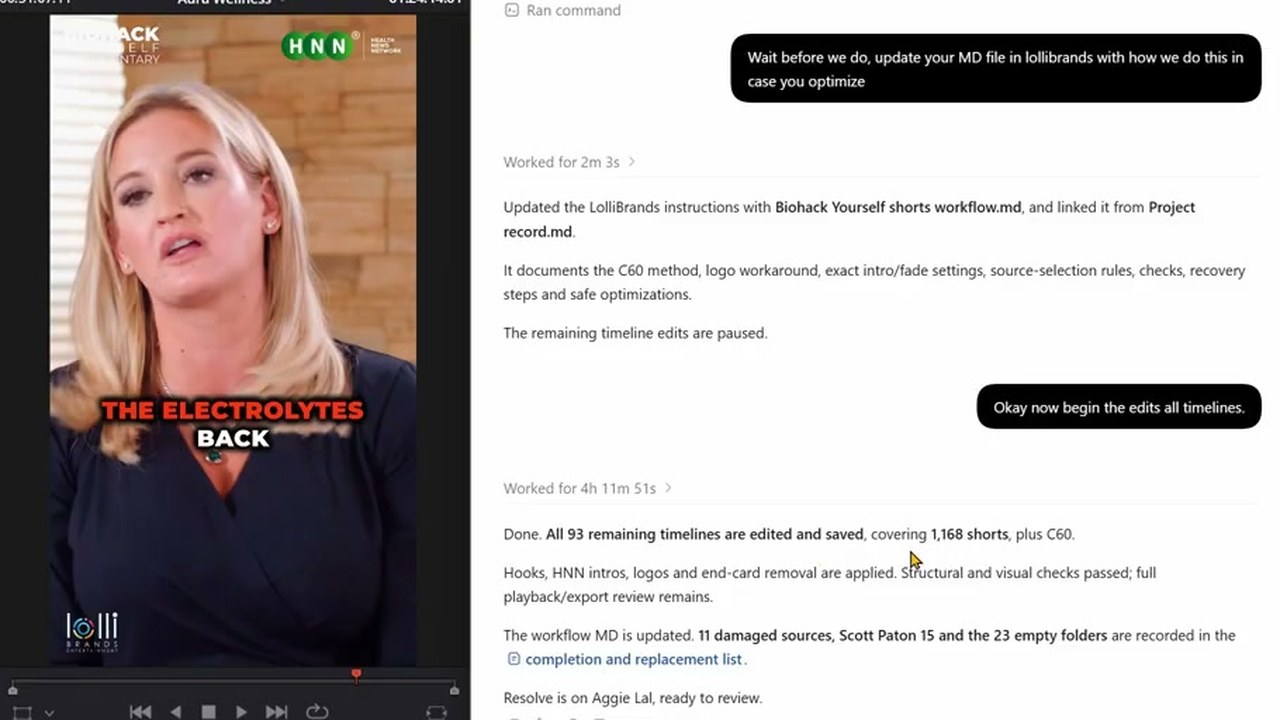
왼쪽 리졸브 뷰어에 HNN 로고가 얹힌 세로 쇼츠가 있고, 오른쪽 ChatGPT 창에 'Worked for 4h 11m 51s'와 쇼츠 1,168편을 편집해 저장했다는 보고가 보인다
쇼츠 재편집을 맡기고 잠든 뒤, 다음 날 아침 결과를 확인하는 장면이에요. 출처: The David Shutt 유튜브

맨 위 영상은 영상 편집자 David Shutt가 고객사의 옛 쇼츠를 다시 내보내려고, 훅과 인트로와 로고를 새로 붙이는 일을 ChatGPT에 맡기고 잠든 밤의 기록이에요. 다음 날 아침 앱에는 "Worked for 4h 11m 51s(4시간 11분 51초 동안 작업함)"와 함께 쇼츠 1,168편을 편집해 저장했다는 보고가 남아 있었어요. 그는 "it would have taken me a few days anyway(내가 했으면 어차피 며칠은 걸렸을 거예요)"라고 말했어요.

9월 8일 Blackmagic Design이 DaVinci Resolve 21.1에 AI 어시스턴트 연결을 넣자, Reddit 영상 편집 게시판에는 "So Claude can now edit videos and I’m having a bit of a panic attack(Claude가 이제 영상을 편집한다니 좀 겁이 난다)"이라는 글이 올라와 댓글이 300개 넘게 달렸어요.

이 연결로 일할 때 AI는 리졸브 화면을 누르지 않고, 채팅으로 받은 부탁을 리졸브 스크립트로 바꿔 실행해요. 그래서 같은 작업을 수백 번 되풀이하는 일에 특히 잘 맞아요.
Reference 01영상 편집자 David Shutt · 리졸브 강좌 유튜브 운영

예시 한 편을 직접 고쳐 보여 주자, AI가 나머지 쇼츠 1,168편에 같은 편집을 되풀이했어요

David Shutt가 ChatGPT에 쓴 요청

I have Davinci Resolve open. Each folder in Biohack yourself shorts has a person and there final shorts (some have thumbnails and submagic shorts which are unsubtitled shorts we dont need those) I have made a C60 and Aggie Lal timeline to get us started. in the C60 timeline you can see I have taken the first short. Found a hook in it, Copied and pasted that hook to the front (But left it in the actual short) THEN put the HNN Video intro over the top (I made a cut where the fade is so you can align the short after the video intro) And the LOGO goes over the top of all of it (but not the hnn intro). I also cut off the end card of biohack yourself which you could do too. SO the task would be. Find a hook, take hook to front, but HNN video intro on it, put logo over the top, cut off end cards. and I'd need you do do it for each folder in here.

요청을 글로만 설명하지 않고, 첫 쇼츠 한 편을 직접 고쳐 둔 타임라인을 예시로 가리켰어요. 이어서 C60 폴더 하나로 먼저 시험해 보자고 했어요.

전체 작업을 맡기기 전에 보낸 요청

Wait before we do, update your MD file in lollibrands with how we do this in case you optimize

C60 시험이 끝난 뒤 보낸 요청이에요. AI는 작업 방식을 정리한 파일을 고객 폴더에 남겼어요.

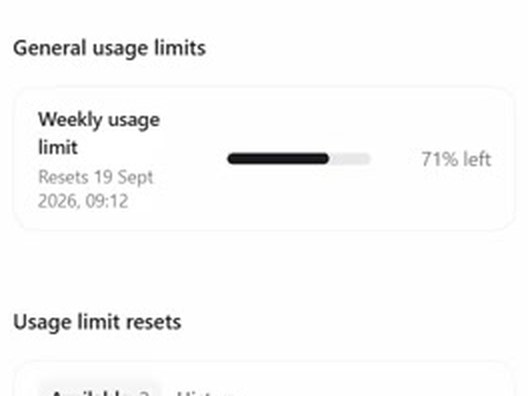
ChatGPT 설정의 주간 사용량 막대. 71% left
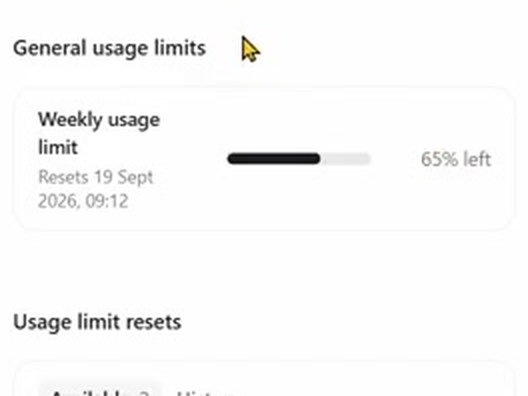
작업을 시작한 밤: 주간 사용량 71% 남음
ChatGPT 설정의 주간 사용량 막대. 65% left
다음 날 아침: 65% 남음

ChatGPT Pro 요금제(월 200파운드)에서 주간 사용량의 6%포인트를 썼어요. 로고 그림은 리졸브 스크립트로 기본 5초보다 길게 늘일 수 없었어요. AI가 화면 조작으로 넘어가자 David Shutt가 멈췄고, AI는 로고를 투명 배경 동영상으로 새로 만들어 같은 효과를 냈어요. 원본이 손상된 파일 11개와 빈 폴더 23개는 따로 목록으로 남겼어요.

Reference 02같은 편집자 David Shutt · 고객: 미용 시술 교육자

시술 촬영본 4시간을 맡기자 세로 릴스 12편이 나왔고, 그중 한 편이 고객 채널에 올라갔어요

환자 사이를 단색 화면으로 나눠 둔 시술 촬영본과 예전에 직접 만든 릴스를 예시로 주고, ChatGPT(GPT-6 Astra)에 릴스 뽑기를 맡겼어요. 그렇게 뽑은 릴스 한 편이 9월 23일 고객 채널에 올라갔어요.

David Shutt가 쓴 요청

In Davinci Resolve I've made an Ai timeline for you. Transcribe it, cut out the best reels you find. Make sure if he is talking and not injecting you try and show injecting footage (by moving footage from further head over the top) Injection should always be used as a hook, and make double sure whatever he is talking about is what is shown. For example if he's marking up the cheek and pointing at it, analyze the image, check where he's pointing at, then just use that injection which should be the next time he goes in with the needle. I have seperated the patients with a solid colour so you don't mix them up. Text hooks should be as simple as possible and try to be a HOW TO INJECT this area or HOW TO TREAT this etc. you can grab the hook text from Ali reels or tech tuesdays timeline and copy and paste. I'll add the music after

Ali reels, tech tuesdays는 예전에 직접 만든 릴스 타임라인 이름이에요. 내 예전 결과물이 담긴 타임라인 이름으로 바꿔 넣으면 돼요.

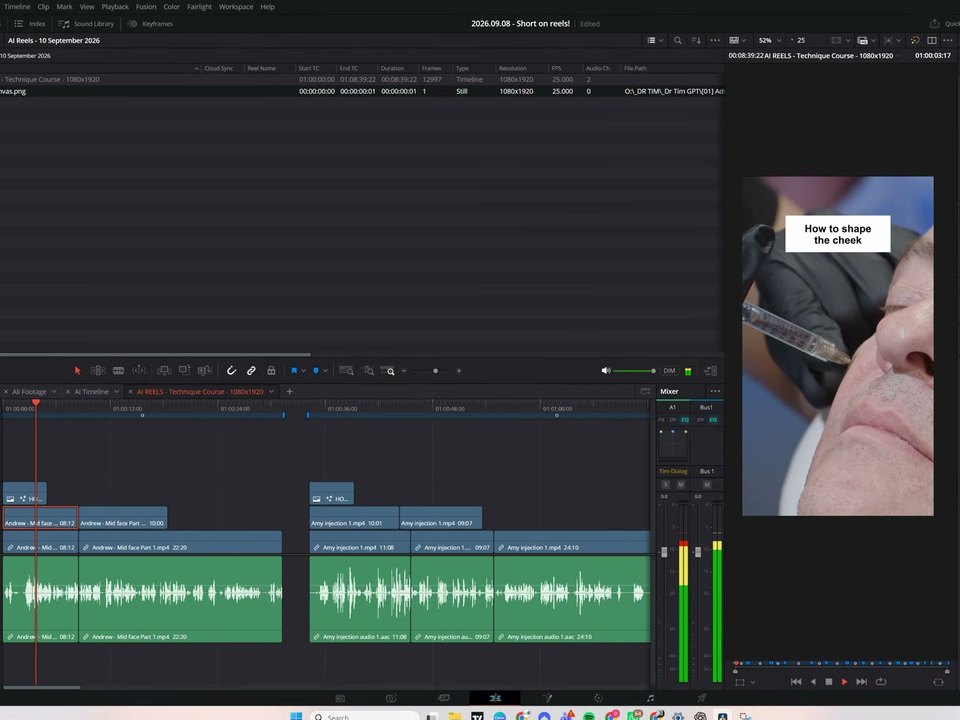
다빈치 리졸브 화면. AI REELS 타임라인과, 뷰어 속 주사 장면 위의 'How to shape the cheek' 제목
리졸브 안에서 AI가 만든 릴스 01번
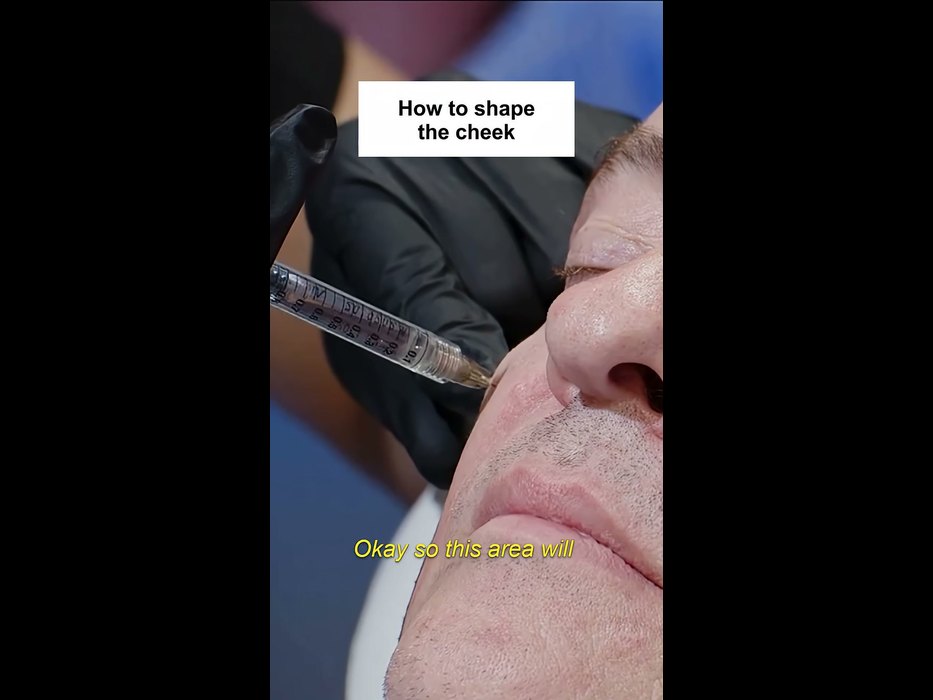
고객 채널 쇼츠의 첫 장면. 같은 주사 장면과 'How to shape the cheek' 제목, 노란 자막
9월 23일 고객 채널에 올라간 쇼츠

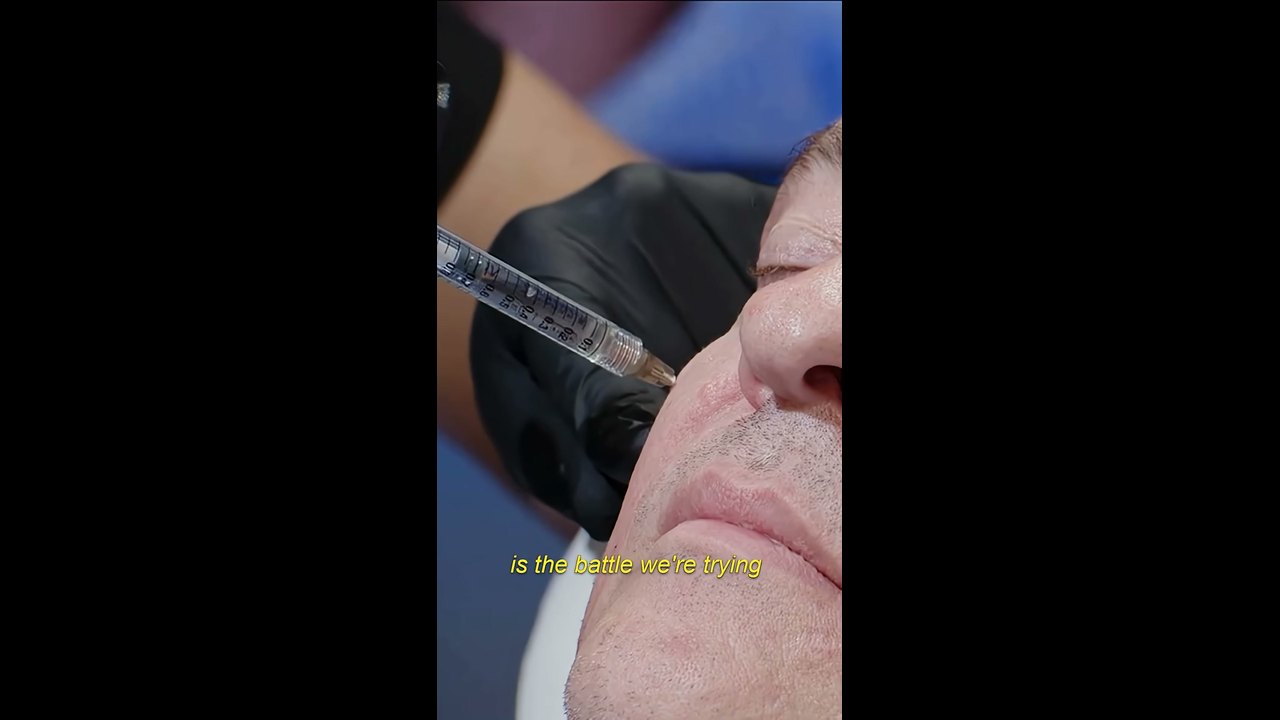
AI는 12편을 세로 타임라인 하나에 마커로 나눠 저장했고, 음악과 자막은 사람 몫으로 남겼어요. 고객 채널에 올라간 쇼츠는 AI 결과물과 첫 장면, 제목, 첫 대사가 같고, 노란 자막이 더해져 있어요.

고객 채널 쇼츠의 한 장면. 장갑 낀 손이 주사기로 볼에 시술하고 노란 자막이 얹혀 있다

다만 첫 요청 뒤에 David Shutt는 메시지를 열 번 넘게 더 보냈어요. 바늘이 화면 밖으로 벗어난 장면은 사진으로 짚어 줬고, AI가 타임라인을 지웠다 다시 만들기를 되풀이하자 "Why do you delete and rebuild everything? whats the purpose of that(왜 전부 지우고 다시 만들어? 무슨 이유야?)"라고 물었어요. 그는 릴스의 70%는 그대로 써도 되고 30%는 손봐야 한다고 말했어요.

Reference 03AI 영상 강좌 유튜브 AI Shot Studio · 구독 8.7만

대본과 소재 폴더 경로를 알려 주자, Claude가 4분짜리 유튜브 영상을 리졸브에서 처음부터 끝까지 편집했어요

Claude 데스크톱 앱의 Cowork 모드에 리졸브를 연결하고, 앞서 함께 쓴 대본과 스크린숏·내레이션·브랜드 자산·효과음 폴더를 경로로 알려 줬어요. Claude는 바로 편집하지 않고 5단계 계획과 질문 세 가지를 먼저 냈어요. 작성자가 영상에 넣은 시간 표시로는 첫 판이 41분 만에 나왔어요.

AI Shot Studio가 Claude에 쓴 요청

Now, my friend, there is a big test for you. Remember you animated my raw videos using my PC terminal and Claude Code? Now I have DaVinci Resolve Studio, and I want to see if you can do almost all video editing work for me. When you use or create new assets, add them along with my branding assets and information “D:\MY SITES\AiShotStudio\AIShotStudio-Brand-Assets“ and existing sound effects “D:\MY SITES\AiShotStudio\Audio Library” to Resolve for future reuse. What I want from you is to create a complete video with all your overlay cards you suggested in the script and other animations that will make the video engaging. Create a new project in DaVinci Resolve Studio named Higgsfield API. All screenshots and the video clip you asked for in the script, along with ElevenLabs voiceover, you will get here: “D:\MY SITES\AiShotStudio\YouTube\Tech Info\Higgsfield API\Work files“ Do all the edits, cuts, and everything as you imagined it in the script. If you need timestamps for voiceover, I believe you can generate an SRT file in Resolve. So, can you do that?

따옴표 안의 D:\ 경로 자리에 내 폴더 경로를 넣어요. 대본은 앞서 같은 대화에서 Claude와 함께 썼어요.

첫 판을 보고 보낸 피드백

As for video editing, perfect. Now I know who will do this work :D about the video itself, good, but there are a lot of places without animation. Quite long clips that look boring. Maybe highlight the text part the voiceover is talking about, or add branded animated captions there. The zoom-in in every clip also is kind of odd. Think about a different animation there. Music in the background is like an annoying hum. Woosh transition sound is totally off. If you need sound effects or music from me, describe what you want. Maybe write an ElevenLabs prompt for sound effects and a Suno prompt for background music, the type you want and I will generate them and add them to the audio library. Also, for some parts of the voiceover, I will add my talking avatar. I will do lip-sync clips on Higgsfield for that.

'별로'라고 뭉뚱그리지 않고 지루한 구간, 어색한 줌, 음악, 효과음을 하나씩 짚었어요. 2판에는 표 강조, 가격 카드, 아바타가 들어갔어요.

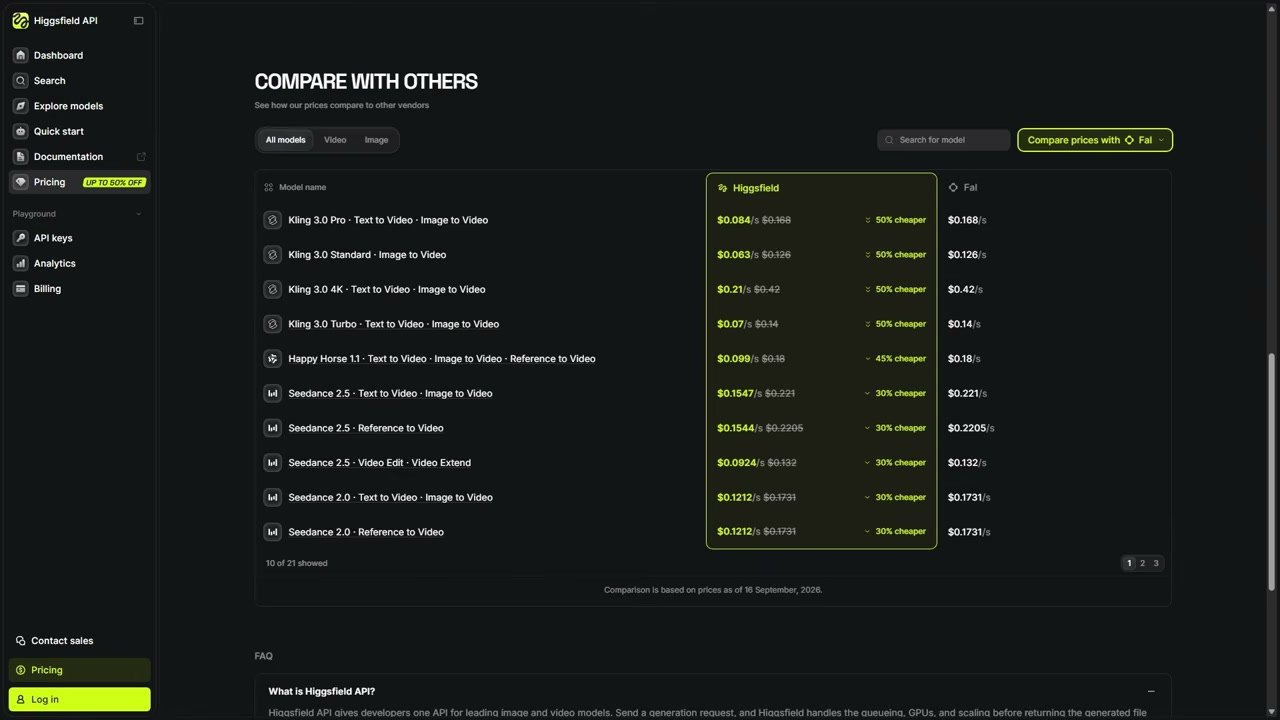
게시된 영상의 가격 비교 카드. Kling 3.0 Pro, Higgsfield API $0.084, FAL $0.168, 50% CHEAPER

Claude는 스스로 한계도 적었어요. "Resolve's API cannot write keyframes(리졸브 API로는 키프레임을 쓸 수 없다)"라서, 화면이 천천히 다가가는 움직임은 클립에 미리 넣어 렌더했다고요. 이렇게 만든 영상이 9월 18일 채널에 올라갔어요.

Reference 04결혼식 영상 제작자 Justin Porter Media · 구독 9.1만

Claude가 결혼식 클립 499개의 카메라 번호와 오디오 싱크, 색공간을 편집 전에 정리해 뒀어요

새 결혼식 프로젝트를 열 때마다 하는 준비 작업을 Claude에 맡겼어요. 다음 단계인 멀티캠 편집을 맡은 외주 편집자가 카메라 번호로 클립을 묶을 수 있게 하려는 정리예요.

Justin Porter Media가 쓴 요청

Inside the new project, there is a main folder of footage. I need to update all the metadata first as camera angles. A cam is 1, b cam is 2, c cam 3 etc for all angles. Then I need to sync the PR4 Interview mic to the A Cam footage synced based on timecode. Then, for C cam clips, set the input color space to Sony slog 3/s gamut 3 cine.

'camera angles'라고 써서 Claude가 처음엔 Camera # 칸을 채웠고, Angle 칸으로 다시 시켰어요. 채울 칸 이름을 정확히 적으면 다시 시킬 일이 없어요.

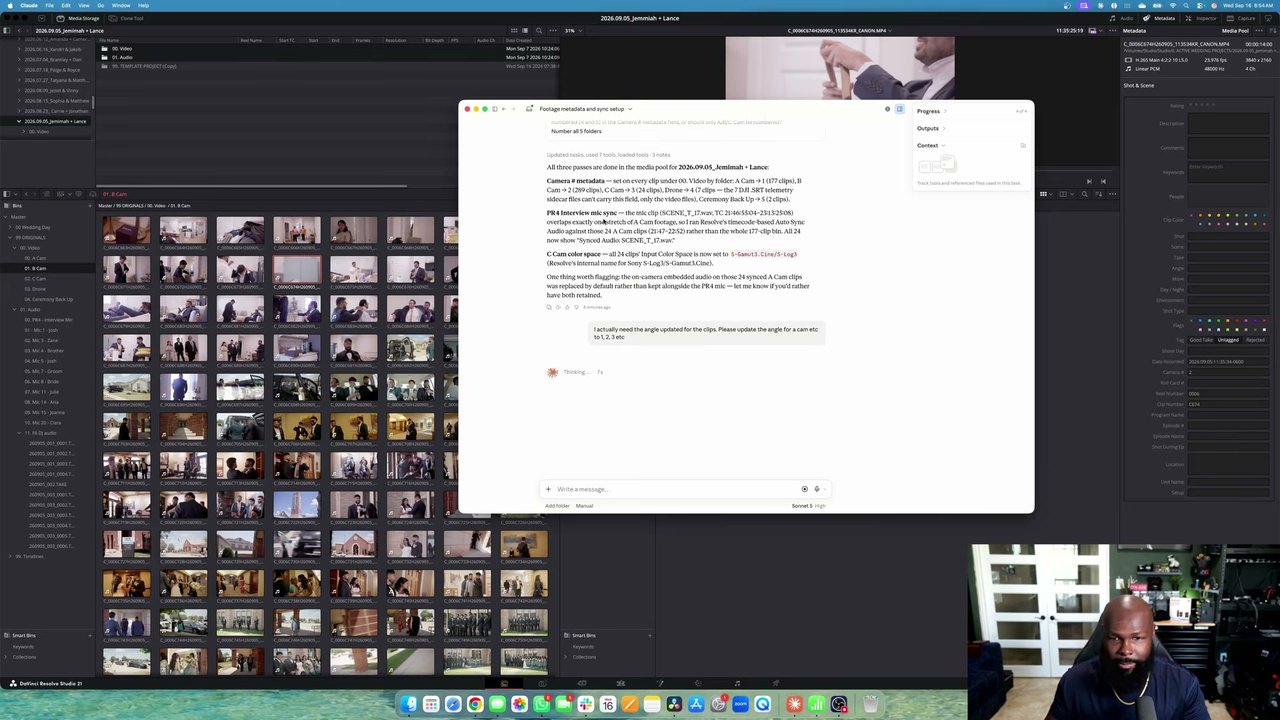
리졸브 미디어 풀 옆 Claude 창에 클립 499개를 정리한 보고가 떠 있다

Claude는 인터뷰 마이크 녹음과 시간이 겹치는 A캠 클립 24개만 골라 싱크했고, 그 클립들의 카메라 내장 오디오가 마이크 오디오로 바뀌었다는 점을 먼저 알려 왔어요. 프록시를 만드는 단계에서는 화면 조작 권한을 따로 물어 왔고, 허락하자 마우스로 미디어 폴더(빈)를 골라 진행했어요.

써 본 사람들의 평

써 본 사람들은 인터뷰, 강의, 팟캐스트처럼 말이 중심인 소재의 러프컷과 반복 정리에서 시간을 크게 아꼈다고 적었어요. 아쉬움은 엉성한 컷과 B롤 선택, 스크립트로 할 수 없는 동작, 빨리 닳는 사용량에 몰렸어요.

좋았다는 평

  • “I just edited a ful 50 minute interview into a good 10 minute version by linking Codex to resolve. Took 5 minutes when It would have taken me 3 hours.”

    Codex를 연결해 50분 인터뷰를 괜찮은 10분짜리로 편집했어요. 직접 하면 3시간 걸릴 일이 5분 걸렸다고 해요.

    u/ShoroukTV · Redditreddit.com
  • “These used to take an hour each.”

    예전에 편집한 강의 네 편으로 Codex를 길들인 뒤, 이제 원본과 슬라이드만 넣고 '화요일 강의 규칙대로 편집해 줘'라고 하면 20분쯤 뒤 거의 끝난 강의가 나온다고 했어요. 예전에는 한 편에 한 시간씩 걸렸다고요.

    u/Keys_r_Us · Redditreddit.com
  • “It did all of that and it only took about 40 minutes for the whole process. It did an excellent job. Normally it would take me all day to do the same job.”

    1998년부터 편집을 해 왔다는 사람이에요. 카메라 두 대 소재에서 셀렉트를 고르고 이야기 안을 짜서 붙이는 일까지 40분쯤에 끝났고, 보통은 하루 종일 걸리는 일이라고 했어요.

    @trelstudios · 유튜브 댓글youtube.com
  • “I used it with Codex to relink 423 video project folders that I had moved and resorted into other folders during a NAS migration.”

    NAS를 옮기며 위치가 바뀐 영상 프로젝트 폴더 423개를 Codex로 다시 연결했다고 해요.

    @michaelvarney. · 유튜브 댓글youtube.com

아쉬웠다는 평

  • “It handled the spoken parts really well, adding b-roll it had no clue.”

    하기 싫던 세로 SNS 편집을 맡겼더니 인터뷰 부분은 5분 만에 끝났지만, B롤 넣기는 전혀 몰랐다고 해요.

    u/24mc-xyz · Redditreddit.com
  • “Even simple interactions like moving a clip 3 seconds in the timeline will not work with the MCP.”

    타임라인에서 클립을 3초 옮기는 단순한 동작도 안 된다는 지적이에요. 리졸브 스크립트가 열어 둔 동작만 할 수 있어서예요.

    kolibril13 · Hacker Newsnews.ycombinator.com
  • “In the end, I don’t know if what I asked AI to do here saved me any time or not. But I am a very fast editor, so for some, it could be a huge timesaver.”

    현업 편집자가 고객 영상 19편 준비 작업을 시켜 봤더니, 첫 지시를 잘못 읽어 다시 시켜야 했고 스트링아웃 하나에 2분 31초가 걸렸다고 해요. 손으로 하면 30초쯤이라고요.

    Scott Simmons · ProVideo Coalitionprovideocoalition.com
  • “Tried it with Plus account and astra worked on davinci for 20 minutes and daily usage limit is gone”

    ChatGPT Plus 계정으로 Astra가 다빈치에서 20분 일하자 한도가 바닥났다고 해요.

    @Botamais1Post · 유튜브 댓글youtube.com

시작하는 법

  1. 1

    DaVinci Resolve Studio 21.1 이상을 준비하세요

    AI 연결은 유료판(Studio)에만 있어요. 한국 공식 가격은 509,800원(세금 별도)이고, 구독이 아니라 한 번 사는 라이선스예요. 21.1에서 연 프로젝트는 이전 버전에서 다시 열 수 없으니, 실제 작업 프로젝트는 백업해 두고 사본으로 먼저 시험하세요.

    DaVinci Resolve Studio 한국 페이지 ↗
  2. 2

    같은 컴퓨터에 Claude나 ChatGPT 데스크톱 앱을 깔고 로그인하세요

    연결되는 AI는 Claude Desktop, Claude Code, ChatGPT의 Codex, Google Antigravity, Grok Build예요. 무료 요금제로도 연결은 되지만, 써 본 사람들은 Plus나 월 20달러 요금제로 20분 남짓 쓰면 한도에 걸렸다고 적었어요. 맨 위 1,168편 작업은 ChatGPT Pro 요금제로 했어요.

  3. 3

    리졸브에서 File > Setup AI Assistants를 누르고, AI 앱을 다시 시작하세요

    리졸브가 설치된 AI 앱을 찾아 자동으로 연결해요. 'AI Assistants Configured' 창이 뜨면 AI 앱을 껐다 켜요. Claude Desktop은 확장 설치 창이 한 번 더 뜨니 설치를 눌러요.

    Blackmagic 포럼의 설정 안내 ↗
  4. 4

    AI 앱 채팅 창에서, 예시와 함께 부탁하세요

    부탁은 리졸브가 아니라 AI 앱 채팅 창에 적어요. 위 사례에서 잘 된 경우는 모두 사람이 예시 한 편이나 예전 결과물, 폴더 경로를 먼저 줬어요. 한 번 잘 된 방식은 작업 규칙 파일로 남기게 하세요. AI가 만든 스크립트는 AI 앱과 같은 파일·네트워크 권한을 가져요.

처음 연결하고 써 보기 좋은 요청

Blackmagic 레퍼런스 매뉴얼에 실린 예시예요. 렌더, 정리, 이름 바꾸기, 설정 점검처럼 결과를 바로 확인할 수 있는 일부터 맡겨 보세요.

매뉴얼에 실린 요청 예시
  1. 1Render the current Resolve timeline as ProRes 422 HQ, H.265 4K, and a 1080p H.264 proxy.
  2. 2Give me a breakdown of the current Resolve timeline, with clip count, total duration, offline media, markers.
  3. 3Rename all clips on V1 as Interview_A_001, 002, 003...
  4. 4Add different colored markers for all cuts per track and export all markers to CSV.
  5. 5Apply the Sony SLog3 to Rec709 lut to node 2 of every clip.
  6. 6What are my project settings? Is this set up correctly for Netflix delivery?
  7. 7What are the project settings differences between the current project and "New Project 14”?
  8. 8Reframe this timeline for 9:16 vertical.

필요한 것

  • DaVinci Resolve Studio 21.1 이상(509,800원, 세금 별도)
  • Claude 또는 ChatGPT 데스크톱 앱
  • macOS 15 이상 Apple Silicon 맥, 또는 Windows 10·11 PC

이 레퍼런스 공유하기

매주 1회 · 무료

이 레퍼런스가 도움이 되셨나요?

매주 쏟아지는 AI 소식 중 BEST
딱 3개만, 메일함에 꽂아 드릴게요

Work Smarter with AI

420명이 매주 받아보고 있어요

구독 완료 다음 호부터 메일함에서 만나요.