Loading...

動画編集AI · DaVinci Resolve AIアシスタント

DaVinci ResolveにAIをつないで寝たら、朝にはクライアントのショート動画1,168本の再編集が終わっていた

DaVinci Resolve Studio 21.1にClaudeやChatGPTをつなぐと、チャット欄で頼んだ編集を、AIがResolveの中で直接こなします。長い撮影素材からのリールの切り出し、動画1本の編集、数百のタイムラインで同じ作業を繰り返すことまで。実際の編集の仕事を任せた事例を集めました。

2026年10月6日·事例 4件

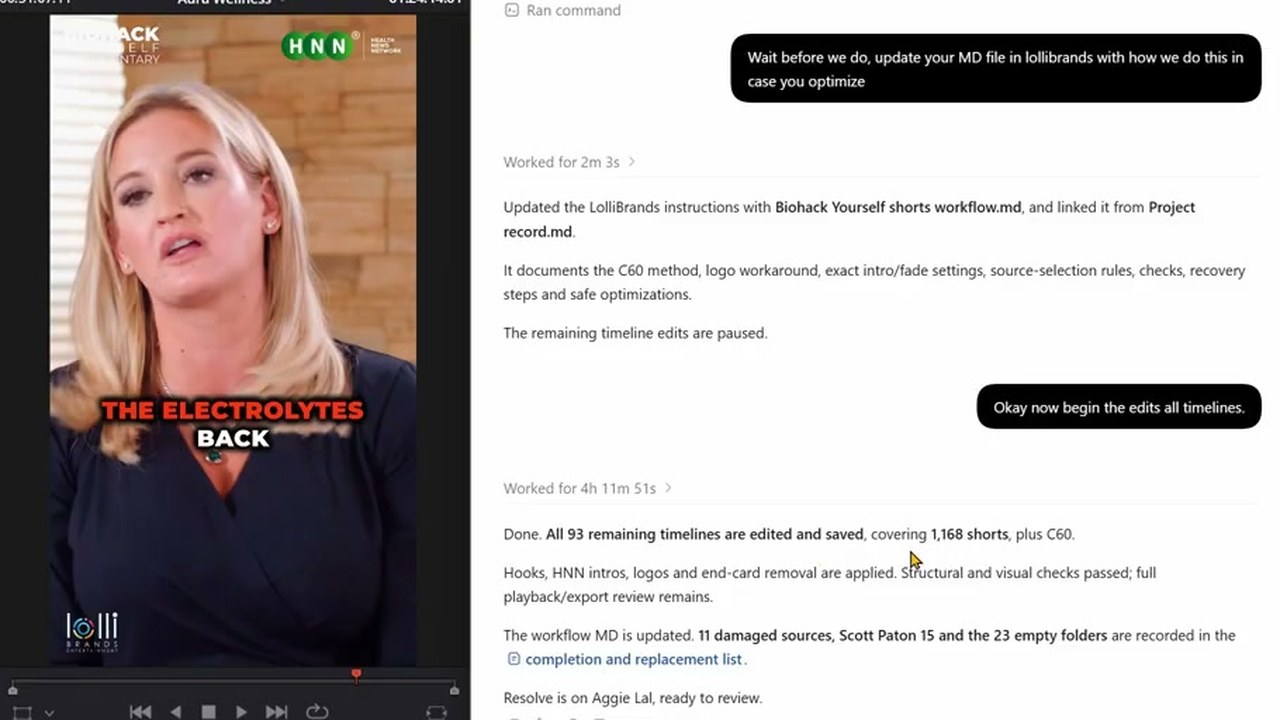
左のResolveのビューアに、HNNのロゴが載った縦型のショート動画があり、右のChatGPTのウィンドウに「Worked for 4h 11m 51s」と、ショート動画1,168本を編集して保存したという報告が表示されている
ショート動画の再編集を任せて眠り、翌朝に結果を確認する場面です。出典:The David Shutt YouTube

一番上の動画は、映像編集者のDavid Shutt氏が、クライアントの古いショート動画を再公開するために、フック、イントロ、ロゴを付け直す作業をChatGPTに任せて眠った夜の記録です。翌朝、アプリには"Worked for 4h 11m 51s(4時間11分51秒作業)"の表示とともに、ショート動画1,168本を編集して保存したという報告が残っていました。同氏は"it would have taken me a few days anyway(自分でやっていたら、どのみち数日はかかっていた)"と話しています。

9月8日にBlackmagic DesignがDaVinci Resolve 21.1にAIアシスタントとの連携を加えると、Redditの動画編集の掲示板には"So Claude can now edit videos and I’m having a bit of a panic attack(Claudeがもう動画を編集できるなんて、ちょっとパニックになっている)"という投稿が立ち、300件を超えるコメントがつきました。

この連携で作業するとき、AIはResolveの画面をクリックするのではなく、チャットで受けた依頼をResolveのスクリプトに変換して実行します。そのため、同じ作業を何百回も繰り返す仕事にとりわけ向いています。
Reference 01映像編集者 David Shutt · Resolve講座のYouTubeチャンネルを運営

見本を1本自分で直して見せると、AIが残りのショート動画1,168本に同じ編集を繰り返しました

David ShuttがChatGPTに書いた依頼

I have Davinci Resolve open. Each folder in Biohack yourself shorts has a person and there final shorts (some have thumbnails and submagic shorts which are unsubtitled shorts we dont need those) I have made a C60 and Aggie Lal timeline to get us started. in the C60 timeline you can see I have taken the first short. Found a hook in it, Copied and pasted that hook to the front (But left it in the actual short) THEN put the HNN Video intro over the top (I made a cut where the fade is so you can align the short after the video intro) And the LOGO goes over the top of all of it (but not the hnn intro). I also cut off the end card of biohack yourself which you could do too. SO the task would be. Find a hook, take hook to front, but HNN video intro on it, put logo over the top, cut off end cards. and I'd need you do do it for each folder in here.

依頼を文章だけで説明せず、最初のショート動画1本を自分で直したタイムラインを見本として示しました。続けて、まずC60のフォルダ1つで試してみようと伝えています。

全体を任せる前に送った依頼

Wait before we do, update your MD file in lollibrands with how we do this in case you optimize

C60での試しが終わったあとに送った依頼です。AIは作業手順をまとめたファイルを、クライアントのフォルダに残しました。

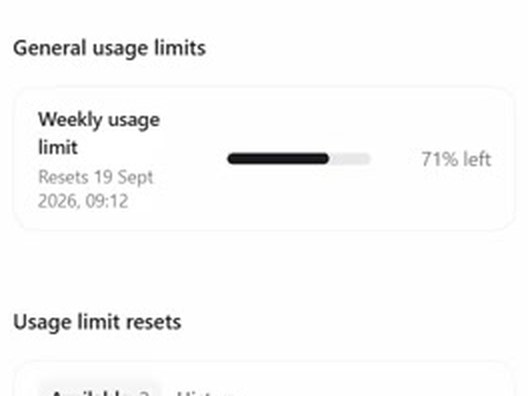
ChatGPTの設定画面にある週間使用量のバー。71% left
作業を始めた夜:週間使用量の残り71%
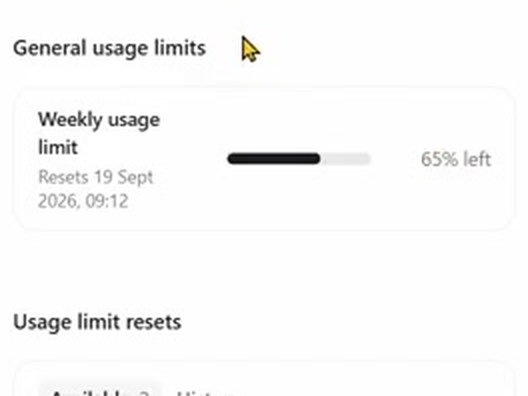
ChatGPTの設定画面にある週間使用量のバー。65% left
翌朝:残り65%

ChatGPT Proプラン(月200ポンド)で、週間使用量の6ポイントを使いました。ロゴ画像は、Resolveのスクリプトでは初期設定の5秒より長く伸ばせませんでした。AIが画面操作に切り替えようとするとDavid Shutt氏が止め、AIはロゴを透過背景の動画として作り直して同じ効果を出しました。元ファイルが壊れていた11本と空のフォルダ23個は、別にリストとして残しています。

Reference 02同じ編集者 David Shutt · クライアント:美容施術の教育者

施術の撮影素材4時間を任せると縦型リールが12本でき、うち1本がクライアントのチャンネルで公開されました

患者ごとに単色の画面で区切った施術の撮影素材と、以前に自分で作ったリールを見本として渡し、ChatGPT(GPT-6 Astra)にリールの切り出しを任せました。 そうして切り出したリールの1本が、9月23日にクライアントのチャンネルで公開されています。

David Shuttが書いた依頼

In Davinci Resolve I've made an Ai timeline for you. Transcribe it, cut out the best reels you find. Make sure if he is talking and not injecting you try and show injecting footage (by moving footage from further head over the top) Injection should always be used as a hook, and make double sure whatever he is talking about is what is shown. For example if he's marking up the cheek and pointing at it, analyze the image, check where he's pointing at, then just use that injection which should be the next time he goes in with the needle. I have seperated the patients with a solid colour so you don't mix them up. Text hooks should be as simple as possible and try to be a HOW TO INJECT this area or HOW TO TREAT this etc. you can grab the hook text from Ali reels or tech tuesdays timeline and copy and paste. I'll add the music after

Ali reels、tech tuesdaysは、以前に自分で作ったリールのタイムライン名です。自分の過去の作品が入ったタイムライン名に置き換えてください。

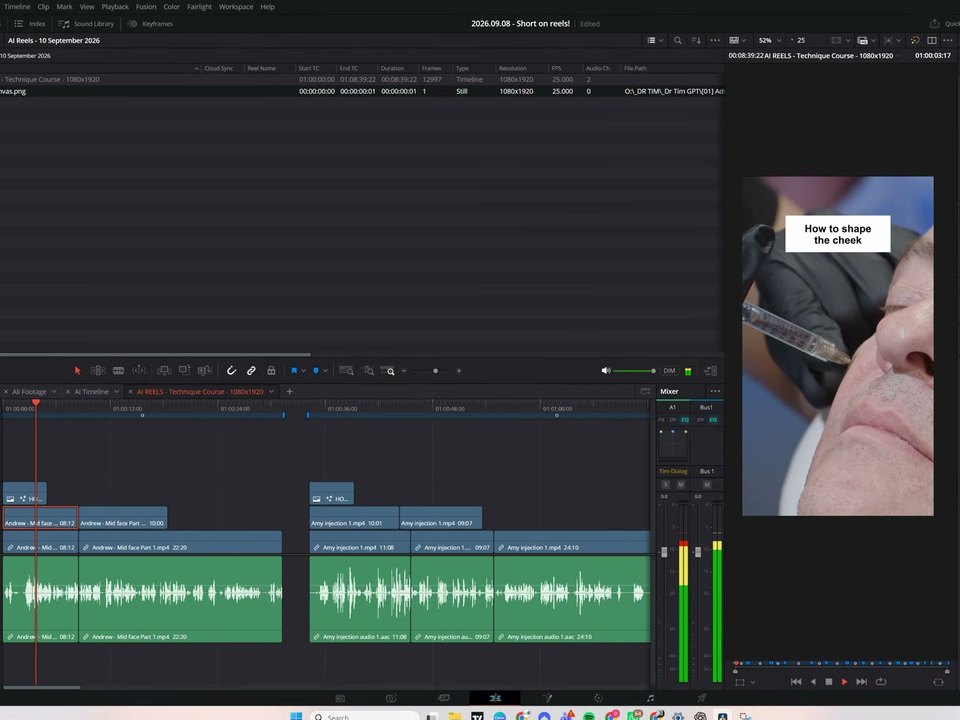
DaVinci Resolveの画面。AI REELSのタイムラインと、ビューアに映る注射の場面に重なる「How to shape the cheek」のタイトル
Resolveの中でAIが作ったリール01番
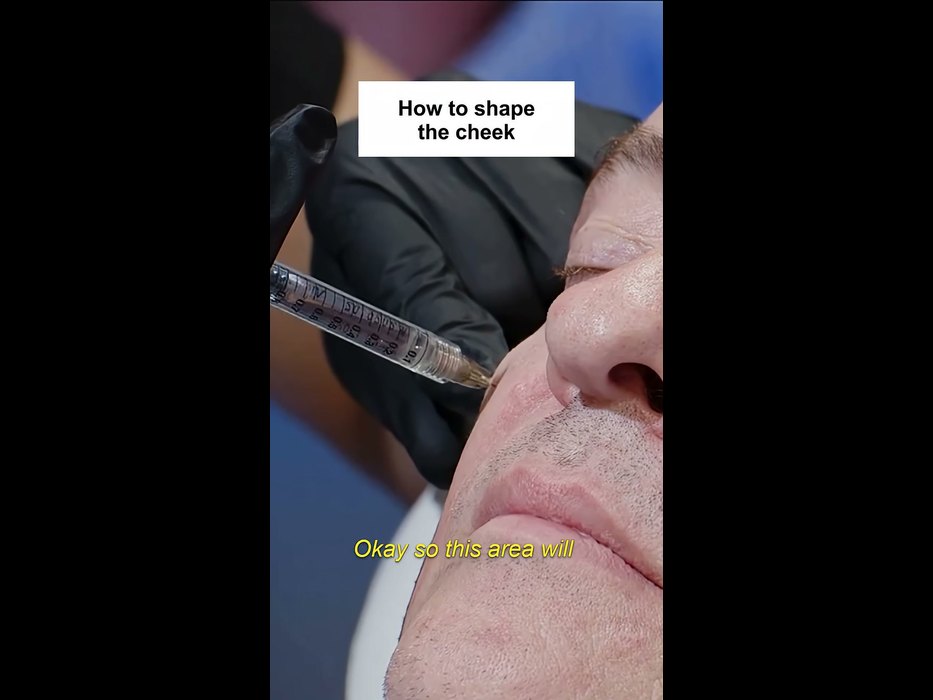
クライアントのチャンネルのショート動画の最初の場面。同じ注射の場面と「How to shape the cheek」のタイトル、黄色い字幕
9月23日にクライアントのチャンネルで公開されたショート動画

AIは12本を1本の縦型タイムラインにマーカーで区切って保存し、音楽と字幕は人の仕事として残しました。クライアントのチャンネルで公開されたショート動画は、AIの成果物と最初の場面、タイトル、最初のセリフが同じで、黄色い字幕が加えられています。

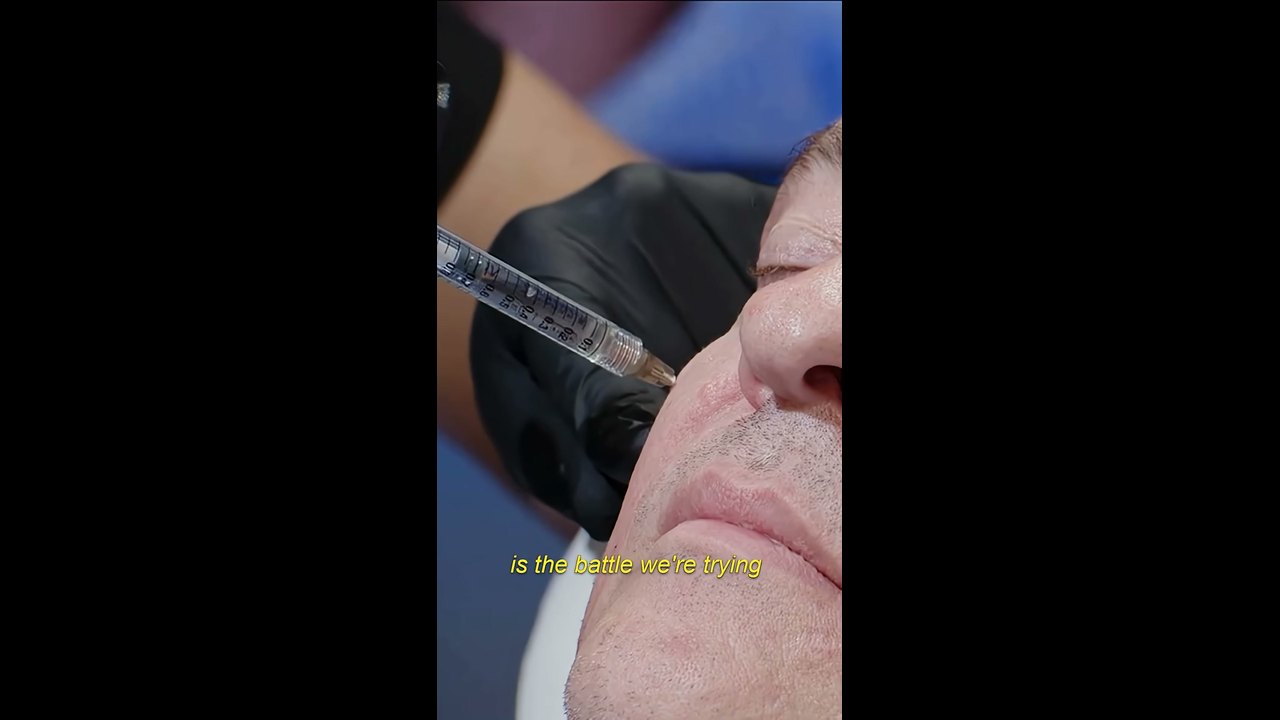
クライアントのチャンネルのショート動画の一場面。手袋をはめた手が注射器で頬に施術し、黄色い字幕が載っている

ただし最初の依頼のあと、David Shutt氏はさらに10回以上メッセージを送っています。針が画面の外に出てしまった場面は画像で指摘し、AIがタイムラインを消しては作り直すのを繰り返すと、"Why do you delete and rebuild everything? whats the purpose of that(なぜ全部消して作り直すの?何のために?)"と尋ねました。同氏は、リールの70%はそのまま使えて、30%は手直しが必要だと話しています。

Reference 03AI動画講座のYouTubeチャンネル AI Shot Studio · 登録者8.7万人

台本と素材フォルダの場所を伝えると、Claudeが4分のYouTube動画をResolveで最初から最後まで編集しました

ClaudeデスクトップアプリのCoworkモードにResolveをつなぎ、それまでに一緒に書いた台本と、スクリーンショット・ナレーション・ブランド素材・効果音のフォルダの場所を伝えました。Claudeはすぐには編集を始めず、5段階の計画と3つの質問を先に出してきました。作成者が動画に入れた時間表示によると、最初の版は41分でできあがりました。

AI Shot StudioがClaudeに書いた依頼

Now, my friend, there is a big test for you. Remember you animated my raw videos using my PC terminal and Claude Code? Now I have DaVinci Resolve Studio, and I want to see if you can do almost all video editing work for me. When you use or create new assets, add them along with my branding assets and information “D:\MY SITES\AiShotStudio\AIShotStudio-Brand-Assets“ and existing sound effects “D:\MY SITES\AiShotStudio\Audio Library” to Resolve for future reuse. What I want from you is to create a complete video with all your overlay cards you suggested in the script and other animations that will make the video engaging. Create a new project in DaVinci Resolve Studio named Higgsfield API. All screenshots and the video clip you asked for in the script, along with ElevenLabs voiceover, you will get here: “D:\MY SITES\AiShotStudio\YouTube\Tech Info\Higgsfield API\Work files“ Do all the edits, cuts, and everything as you imagined it in the script. If you need timestamps for voiceover, I believe you can generate an SRT file in Resolve. So, can you do that?

引用符の中のD:\から始まるパスを、自分のフォルダのパスに置き換えます。台本は、それより前に同じ会話でClaudeと一緒に書きました。

最初の版を見て送ったフィードバック

As for video editing, perfect. Now I know who will do this work :D about the video itself, good, but there are a lot of places without animation. Quite long clips that look boring. Maybe highlight the text part the voiceover is talking about, or add branded animated captions there. The zoom-in in every clip also is kind of odd. Think about a different animation there. Music in the background is like an annoying hum. Woosh transition sound is totally off. If you need sound effects or music from me, describe what you want. Maybe write an ElevenLabs prompt for sound effects and a Suno prompt for background music, the type you want and I will generate them and add them to the audio library. Also, for some parts of the voiceover, I will add my talking avatar. I will do lip-sync clips on Higgsfield for that.

「いまいち」とひとまとめにせず、退屈な区間、不自然なズーム、音楽、効果音を1つずつ指摘しました。2つ目の版には、表の強調、価格カード、アバターが入りました。

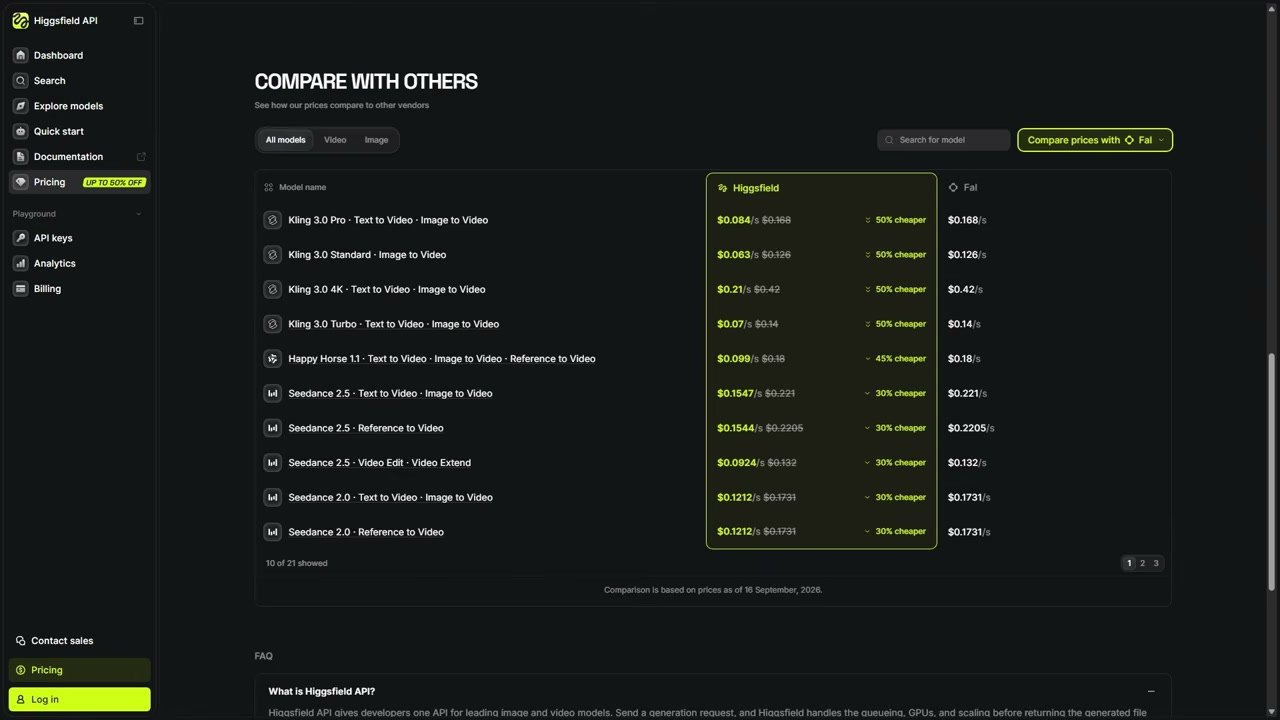
公開された動画の価格比較カード。Kling 3.0 Pro、Higgsfield API $0.084、FAL $0.168、50% CHEAPER

Claudeは自分の限界も書き残しています。"Resolve's API cannot write keyframes(ResolveのAPIではキーフレームを書き込めない)"ため、画面がゆっくり寄っていく動きはクリップにあらかじめ入れてレンダリングした、と。こうして作った動画が、9月18日にチャンネルで公開されました。

Reference 04結婚式の映像制作者 Justin Porter Media · 登録者9.1万人

Claudeが結婚式のクリップ499本のカメラ番号、音声の同期、色空間を、編集前に整えておきました

新しい結婚式のプロジェクトを開くたびに行う準備作業を、Claudeに任せました。次の工程であるマルチカム編集を担当する外部の編集者が、カメラ番号でクリップをまとめられるようにするための整理です。

Justin Porter Mediaが書いた依頼

Inside the new project, there is a main folder of footage. I need to update all the metadata first as camera angles. A cam is 1, b cam is 2, c cam 3 etc for all angles. Then I need to sync the PR4 Interview mic to the A Cam footage synced based on timecode. Then, for C cam clips, set the input color space to Sony slog 3/s gamut 3 cine.

'camera angles'と書いたため、Claudeは最初Camera #の欄を埋めてしまい、Angleの欄でやり直させました。埋める欄の名前を正確に書けば、やり直しは要りません。

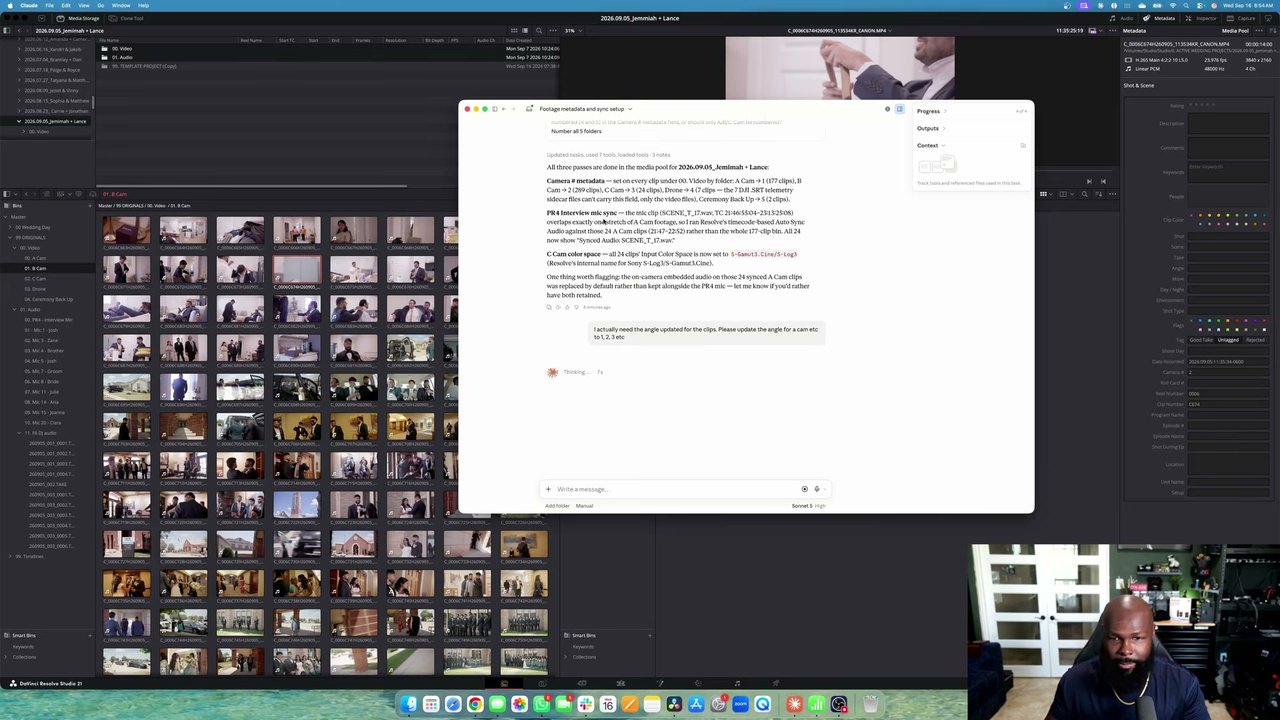
Resolveのメディアプールの横のClaudeのウィンドウに、クリップ499本を整理した報告が表示されている

Claudeは、インタビュー用マイクの録音と時間が重なるAカムのクリップ24本だけを選んで同期し、それらのクリップのカメラ内蔵音声がマイクの音声に置き換わったことを先に知らせてきました。プロキシを作る段階では画面操作の権限を別に求めてきて、許可するとマウスでメディアフォルダ(ビン)を選んで進めました。

使った人の声

使った人たちは、インタビュー、講義、ポッドキャストのように話が中心の素材のラフカットや、繰り返しの整理作業で大きく時間を節約できたと書いています。不満は、粗いカットとBロールの選び方、スクリプトでできない操作、すぐに減る使用量に集まりました。

よかったという声

  • “I just edited a ful 50 minute interview into a good 10 minute version by linking Codex to resolve. Took 5 minutes when It would have taken me 3 hours.”

    Codexをつないで、50分のインタビューを質のいい10分版に編集したそうです。自分でやれば3時間かかる作業が5分で済んだといいます。

    u/ShoroukTV · Redditreddit.com
  • “These used to take an hour each.”

    以前に編集した講義4本でCodexを仕込んだあとは、素材とスライドを入れて「火曜の講義のルールどおりに編集して」と頼むだけで、20分ほどでほぼ完成した講義ができるそうです。以前は1本に1時間ずつかかっていた、と書いています。

    u/Keys_r_Us · Redditreddit.com
  • “It did all of that and it only took about 40 minutes for the whole process. It did an excellent job. Normally it would take me all day to do the same job.”

    1998年から編集をしてきたという人です。カメラ2台分の素材からセレクトを選び、ストーリー案を組んでつなぐところまで40分ほどで終わり、普段なら丸一日かかる作業だそうです。

    @trelstudios · YouTubeコメントyoutube.com
  • “I used it with Codex to relink 423 video project folders that I had moved and resorted into other folders during a NAS migration.”

    NASの移行で場所が変わった動画プロジェクトのフォルダ423個を、Codexで再リンクしたそうです。

    @michaelvarney. · YouTubeコメントyoutube.com

物足りなかったという声

  • “It handled the spoken parts really well, adding b-roll it had no clue.”

    やりたくなかった縦型のSNS向け編集を任せたところ、インタビュー部分は5分で終わったものの、Bロールの入れ方はまったくわかっていなかったそうです。

    u/24mc-xyz · Redditreddit.com
  • “Even simple interactions like moving a clip 3 seconds in the timeline will not work with the MCP.”

    タイムライン上でクリップを3秒動かすような単純な操作すらできない、という指摘です。Resolveのスクリプトが開放している操作しかできないためです。

    kolibril13 · Hacker Newsnews.ycombinator.com
  • “In the end, I don’t know if what I asked AI to do here saved me any time or not. But I am a very fast editor, so for some, it could be a huge timesaver.”

    現役の編集者がクライアントの動画19本の準備作業を任せてみたところ、最初の指示を読み違えてやり直させる必要があり、ストリングアウト1本に2分31秒かかったそうです。手作業なら30秒ほどだといいます。

    Scott Simmons · ProVideo Coalitionprovideocoalition.com
  • “Tried it with Plus account and astra worked on davinci for 20 minutes and daily usage limit is gone”

    ChatGPT PlusのアカウントでAstraにDaVinciで20分作業させたら、上限を使い切ったそうです。

    @Botamais1Post · YouTubeコメントyoutube.com

始め方

  1. 1

    DaVinci Resolve Studio 21.1以降を用意します

    AI連携は有料版(Studio)だけの機能です。韓国での公式価格は509,800ウォン(税別)で、サブスクリプションではなく買い切りのライセンスです。21.1で開いたプロジェクトは以前のバージョンで開き直せないので、実際の作業プロジェクトはバックアップを取り、まずコピーで試してください。

    DaVinci Resolve Studioの製品ページ(韓国) ↗
  2. 2

    同じコンピューターにClaudeかChatGPTのデスクトップアプリを入れて、ログインします

    つなげるAIは、Claude Desktop、Claude Code、ChatGPTのCodex、Google Antigravity、Grok Buildです。無料プランでも接続はできますが、使った人たちは、Plusや月20ドルのプランで20分あまり使うと上限に達したと書いています。一番上の1,168本の作業は、ChatGPT Proプランで行いました。

  3. 3

    ResolveでFile > Setup AI Assistantsを押し、AIアプリを再起動します

    Resolveが、インストールされているAIアプリを見つけて自動でつなぎます。「AI Assistants Configured」ウィンドウが出たら、AIアプリを終了して起動し直します。Claude Desktopでは拡張機能のインストール画面がもう一度出るので、インストールを押します。

    Blackmagicフォーラムの設定案内 ↗
  4. 4

    AIアプリのチャット欄で、見本を添えて頼みます

    依頼はResolveではなく、AIアプリのチャット欄に書きます。上の事例でうまくいったケースはどれも、人が見本1本や過去の作品、フォルダの場所を先に渡していました。一度うまくいったやり方は、作業ルールのファイルとして残させましょう。AIが作るスクリプトは、AIアプリと同じファイル・ネットワークの権限を持ちます。

つないだ直後に試すのにちょうどいい依頼

Blackmagicのリファレンスマニュアルに載っている例です。レンダリング、整理、名前の変更、設定の確認のように、結果をすぐ確かめられる仕事から任せてみてください。

マニュアルに載っている依頼の例
  1. 1Render the current Resolve timeline as ProRes 422 HQ, H.265 4K, and a 1080p H.264 proxy.
  2. 2Give me a breakdown of the current Resolve timeline, with clip count, total duration, offline media, markers.
  3. 3Rename all clips on V1 as Interview_A_001, 002, 003...
  4. 4Add different colored markers for all cuts per track and export all markers to CSV.
  5. 5Apply the Sony SLog3 to Rec709 lut to node 2 of every clip.
  6. 6What are my project settings? Is this set up correctly for Netflix delivery?
  7. 7What are the project settings differences between the current project and "New Project 14”?
  8. 8Reframe this timeline for 9:16 vertical.

必要なもの

  • DaVinci Resolve Studio 21.1以降(韓国では509,800ウォン、税別)
  • ClaudeまたはChatGPTのデスクトップアプリ
  • macOS 15以降のApple Silicon搭載Mac、またはWindows 10・11のPC

このリファレンスを共有

このリファレンスは役に立ちましたか?

毎週厳選されたリファレンスをメールでお届けします