In October 2025, a door opened inside ChatGPT for "real apps" to walk through for the first time. One of the first partners through that door was Canva.
Ten months later, Canva's biggest rival walked through the same door — carrying 70+ tools with it, from Photoshop to Firefly.
So what actually changed?
On August 6, 2026, Adobe rebuilt its scattered ChatGPT integrations into a single plugin. Adobe Express, Photoshop, Firefly, Premiere, Acrobat, Lightroom, Illustrator, InDesign, Adobe Stock — all 70+ tools now live under one roof.
It started much smaller. In December 2025, only three apps were connected: Photoshop, Express, and Acrobat. Eight months later, those three became 70+.
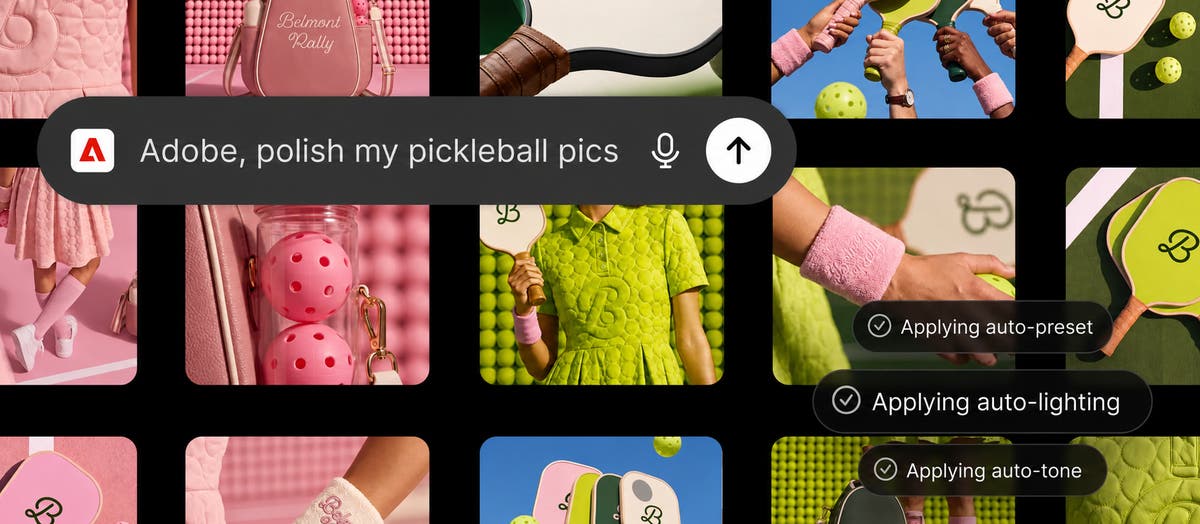
Using it is simple. Type "@Adobe" in a new chat, describe what you want, and the AI picks the right tool combination on its own. You can try it as a guest with no login, or sign into your Adobe account to unlock Firefly's generative features and your existing Creative Cloud files. The real point: if you need finer control, you can pick up the exact same work in the desktop app and keep going.
Canva opened the door — its biggest rival just walked in
Here's the interesting part: which platform this plugin is sitting on. OpenAI first unveiled the idea of "apps inside ChatGPT" at DevDay in October 2025 — and Canva was one of the launch partners. Canva effectively validated this ecosystem, built on the MCP (Model Context Protocol) standard, before anyone else did.
Ten months later, Canva's biggest competitor showed up in the same ecosystem with 70+ tools in tow. Industry analysis largely agrees this isn't aimed at professional photographers or editors — it's targeting less experienced, everyday users. The people who switched to Canva because Adobe felt "too complicated, too expensive" are exactly who Adobe is reaching for again, through a familiar front door: ChatGPT.
The actual use cases line up almost exactly with Canva's strongest territory. Upload a campaign photo, describe the style you want, and it gets applied consistently across every shot. Upload a long video and it gets recut for YouTube Shorts or Instagram Reels. Pick from thousands of templates, tweak the text and colors, and out comes an animated social post or a print-ready PDF.
| Old way (open each app) | ChatGPT @Adobe | |
|---|---|---|
| Getting started | Install apps, learn each one | One sentence in a chat |
| Switching tools | Manually jump Photoshop → Premiere | AI picks the combo for you |
| Draft speed | Depends heavily on your skill | One conversation, one draft |
| Fine-tuned finishing | Strong | Hand off to the desktop app |
But why now, and why go this hard?
Adobe isn't betting this big on ChatGPT for no reason. Start with the stock price. Adobe shares that peaked at $661 in 2021 had slid to $202 by mid-June 2026. That's nearly 70% gone in five years.
And Canva isn't the only threat. Analysts point to "vibe coding" tools like Codex and Claude Code, which let people build their own software instead of buying a license — a trend that's shaking the traditional software-licensing model itself. Adobe reportedly weighing a freemium model fits the same story. On top of that, leadership is in flux: CEO Shantanu Narayen is set to step down, and CFO Dan Durn left for Marvell in June 2026.
OpenAI's math here is just as clear. Vibhor Chhabra, who leads ChatGPT's ecosystem products, said he's excited to "expand our partnership with Adobe, bringing its creative and productivity capabilities directly into ChatGPT." With Slack and Gemini integrations reportedly coming later this month, Adobe's strategy looks settled: instead of getting people to open a separate app, meet them wherever they already are.
Try it right now
- Turn on the plugin in ChatGPT
Open a new chat and type "@Adobe" to bring up the menu, or search for Adobe in the plugin directory and add it. - Test it as a guest first
Basic editing works with no login at all. Upload one campaign photo and try something like "match this tone across all 5 images." - Log in for generative features
You'll need to sign into your Adobe account to use Firefly's generative tools or pull in your existing Creative Cloud files. - Push into video and PDFs
The more specific your ask — "cut this into a Shorts version," "turn this spreadsheet into a catalog PDF" — the more accurate the result. - Finish the fine details on desktop
For precise retouching or color grading, hand the same file straight off to Photoshop or Premiere and keep working.
Go deeper
Adobe for ChatGPT — official announcement Adobe's own blog post, with real use cases and screenshots. blog.adobe.com
Forbes — Adobe Debuts ChatGPT App A business-side look at Adobe's stock slide and leadership changes behind this move. forbes.com
PetaPixel — Adobe Is Coming for Canva The photography industry's read on why this is a direct shot at Canva. petapixel.com
9to5Mac — New Adobe plugin in ChatGPT The most detailed rundown of every tool included and how the workflow actually feels. 9to5mac.com
PromptHub — OpenAI DevDay 2025 Roundup Where the ChatGPT app ecosystem, the Apps SDK, and MCP all come from. prompthub.us