When performance is down and you can’t tell whether it’s just your business
Paid search conversions are down from last month. It’s hard to tell from internal trends alone whether campaign settings have gone off track, seasonality is at work, or similar businesses are slowing down too. You end up moving between Google Ads and Analytics reports to find a comparison baseline again.
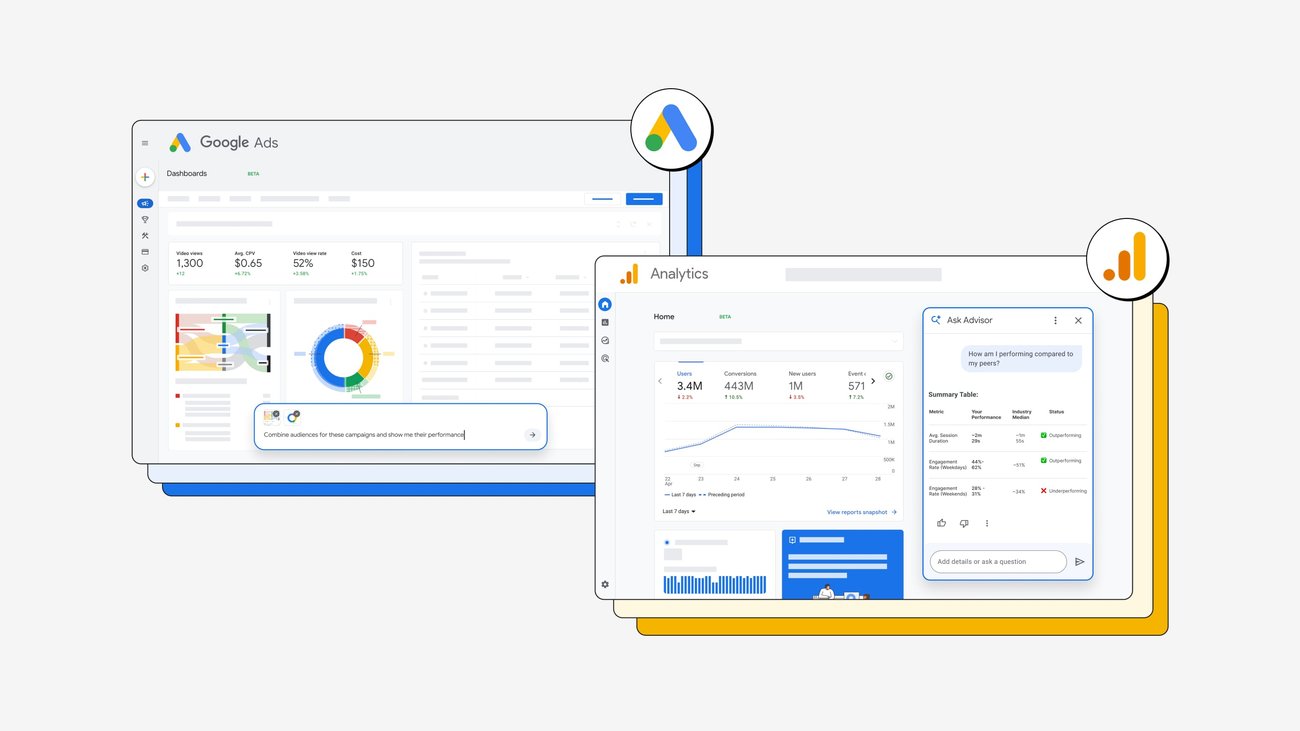
On August 10, 2026, Google announced that Analytics Ask Advisor had expanded to compare campaign performance with anonymized similar-business averages. It does not show an “industry-wide average” or the actual performance of a specific competitor.
There is one distinction to make here. Ask Advisor’s average comparison and the median and percentile benchmarking in existing GA4 reports have different officially confirmed scopes. You need to obtain the two results separately and record the comparison basis before using them as evidence for campaign changes.
View averages and percentiles through different paths
Existing GA4 report benchmarking displays your property’s trend line alongside the peer-group median and the 25th and 75th percentiles. You can change the peer group across 25 top-level industry classifications and the available subcategories.
For Analytics Ask Advisor, official announcements confirm only that it compares campaign performance with anonymized similar-business averages. Public materials do not confirm whether Ask Advisor uses the same peer groups or formulas as reports, or whether it returns the median and 25th–75th percentiles as-is.
Choose the path based on the answer you need
- To see where your metric falls within the peer-group distribution, check the median and 25th–75th percentiles in standard GA4 reports.
- To compare a specific campaign with similar-business averages, ask Analytics Ask Advisor with the time period and campaign scope.
- Do not combine the two into a single ranking or score until you have confirmed that their peer groups and calculation methods are the same.
Do not interpret absolute report metrics as simple averages of raw data from specific competitors, either. For example, the engaged sessions benchmark is estimated by multiplying the peer group’s engaged sessions per active user by your property’s number of active users. Active users is the exception, using the peer group’s actual number of active users.
Start with GA4 reports—no installation required
You do not need a separate program or API key. Sign in to Google Analytics with your Google account and select the GA4 property to analyze. To change data-sharing settings yourself, you need an Analytics account-level Editor role or higher.
- Check the data-sharing setting for report benchmarking.
In Admin > Account details, check whether Modeling contributions & business insights is enabled. If it is off, an account-level Editor or higher must save the change, or you can ask the account administrator. This setting is a requirement for existing report benchmarking; official materials do not confirm whether it is equally required for Ask Advisor average comparisons. - Open Acquisition overview.
Go to Reports > Lifecycle > Acquisition > Acquisition overview and look for a benchmarking badge or toggle on a supported metric card. - Confirm that the distribution appears.
If turning on the toggle shows your property trend line, the peer-group median, and the 25th–75th percentile range together, your first check was successful. - Check whether the comparison group fits your actual business.
In Benchmarking peer group, review the industry and subcategory, and switch if a classification more closely matches your customers and business model. - Record the period, channel, and metric in one sentence.
For example: “For the last 30 days, supported metric A for Paid Search is below the peer-group median and above the 25th percentile.” A and 30 days are illustrative placeholders, so replace them with your actual metric and analysis period.
Benchmarking data is available for periods after May 30, 2024 and is refreshed every 24 hours. Benchmarks may not appear if the date range is “today” or if you select a custom metric or unsupported metric.
Check your display language before opening Ask Advisor
If Analytics Ask Advisor is available for an eligible property, you can open its panel from the Ask Advisor icon in the upper right or from the Analytics search bar. The feature processes data only from the currently selected GA4 property, and the current user’s Analytics display language must be English.
- Set your Analytics display language to English.
Go to Admin > My Preferences > Languages, select English, and click Save changes. The language is a per-user personal setting, not a shared property setting. - Sign out and sign back in.
A display-language change may not apply immediately just by saving. Sign out of Google Analytics, sign back in, and check that the English interface appears. - Open Ask Advisor in the target property.
Select the GA4 property to analyze, then check the Ask Advisor icon in the upper right or the Analytics search bar. If the icon is still absent after changing the display language and signing back in, the property may not be eligible or the feature may not yet be available. - Ask with a time period and campaign scope.
As an illustrative example, you can enter “Compare paid search campaign performance over the last 30 days with similar businesses.” Replace Paid Search and 30 days with the actual channel, campaign, and period you want to investigate. - Confirm that a similar-business average comparison is returned.
You have succeeded if the performance of the specified campaign is explained in comparison with anonymized similar-business averages. If you need medians or percentiles, check the GA4 report from the earlier steps separately.
Writing the question in English alone is not enough
What you need to check is the current user’s Analytics display language, not the GA4 property language. Save English as the display language, sign out, and sign back in. If the feature still does not appear, the specific eligibility criteria and schedule for additional languages have not been published, so you may need to wait for availability on that property.
Analysis and approving changes are separate flows
Official materials do not confirm a single flow that automatically sends a gap found in Analytics to a Google Ads change screen. Analytics Ask Advisor analyzes the selected GA4 property, while Google Ads Ask Advisor supports performance investigation and optimization recommendations in a separate Ads account.
| Feature | Confirmed role | Availability and limitations |
|---|---|---|
| Analytics Ask Advisor | Analyzes the selected GA4 property and compares campaigns with anonymized similar-business averages | Available for eligible properties to users whose Analytics display language is set to English |
| GA4 report benchmarking | Shows peer-group median and 25th–75th percentiles | Requires data-sharing settings and data thresholds; some metrics are unsupported |
| Google Ads Dashboards | Creates visual reports and summaries from text prompts | Beta for English-language accounts at the time of the official announcement; Dashboards for Analytics is coming soon |
| Google Ads Ask Advisor | Performance investigation, optimization recommendations, and implementation of approved changes | Requires user approval; MCC accounts are currently unsupported |
Google Ads Ask Advisor can implement recommended changes that you approve. However, Google states that you are responsible for verifying a recommendation’s accuracy and relevance before approval. Before applying it, check that the analysis period, target campaign, and conversion measurement status match those used when asking the question.
Keep the first result as two separate lines
The goal of your first use is not to create one composite score. In the GA4 report, record where a supported metric sits relative to the peer-group median and 25th–75th percentiles; in Ask Advisor, record how the specified campaign differs from anonymized similar-business averages.
If the report does not appear, check the data-sharing setting, date range, supported metrics, and data thresholds. If Ask Advisor does not appear, verify that you saved your personal display language as English and signed back in, and that the feature is available for the property. Even after getting comparison results, reviewing and approving Analytics findings and Google Ads change recommendations separately is the currently confirmed usage scope.
If you want to dig deeper
Evolve your marketing with new AI tools explains the announced scope of Analytics Ask Advisor’s similar-business comparisons and the Google Ads Dashboards beta for English-language accounts. blog.google
Benchmarking is the official help article explaining GA4 report peer groups, medians and percentiles, calculation methods, and display limitations. support.google.com
Ask Advisor in Google Analytics (Beta) explains where to access it, its property-level processing scope, and current language requirements. support.google.com
Personal user settings explains the menu for changing your personal Analytics display language and the sign-in-again procedure. support.google.com


.png)
